





Beyond static experiences: Where AI is taking the next generation of websites
How to prepare your content, technology and team for digital experiences that respond to individual intent.
For 30 years, websites have been built around predefined pages, personas and journeys. Even with personalisation, people have to find and navigate the path that most closely matches their needs. The cognitive load for visitors is high.
AI is changing expectations. In this webinar, we explore how and how you can get your website ready.
Website ready for what comes next? Take our 10-step quiz →
Watch the Australia & New Zealand webinar
Transcript: Watch the webinar (ANZ)
Welcome, everyone.
Welcome to this Squiz webinar, Beyond static experiences. Today we're going to be looking at where AI is taking the next generation of websites.
I'm Lorna Hegarty. I'm director of marketing at Squiz, and I'll be your host today. Shortly we're going to throw to a pre-recorded session. The reason for this is so that we can bring in all the expertise from across our business to really bring you across this new topic.
We've got multiple insights from different parts of the business, and also multiple time zones, so it's really lovely that we can bring all those people together in one space. But please do stick around, because we're going to have a live Q&A at the end.
I'll be joined by my wonderful colleague Megan Andrews, who's our head of customer. She's going to be joining us for a live Q&A. So share all the questions you have throughout the session – pop them in the Q&A box just over there to the right, and we'll revisit them at the end of the session. All right.
Let's get started.
Welcome to this month's webinar. We're calling it Beyond fixed experiences: where AI is taking the next generation of websites. What we at Squiz have been thinking through a lot is just how long we've had these websites that are built around predefined pages and navigation and journeys.
They kind of leave people to find their own path, to figure out what's there. And a lot of work can be done to make those journeys great and very frictionless for people. But wouldn't it be great if we could preempt what they want and give them something dynamically that's really customized to them?
And if you've been around online and tech at all, the answer is probably AI, right?
But there could be a trap there.
There could be a trap there. Putting AI on top of a website without any thought as to how it interacts with the content that you have, and without thought towards how it's going to interact with the users that visit your site, isn't really so much of a strategy as it is – I don't know – maybe a small cry for help. But not to worry, we're here to help you think through some of these things. I'm joined by my colleagues Kat and Ricky, and we're going to talk through some of the shifts that we've been seeing at Squiz, as well as some of the tools that we've been building to assist you in adapting to this new era of usage on the web.
So I'm excited to have you both here. Hi, Kat. Hi, Ricky. How are y'all doing today?
Hey. Good. How are you?
I'm doing all right. We are a global webinar team today. We've got Ricky in New York City, and Kat's in Australia. I'm in the middle of the south of the US, and we've got some cool demos for everyone.
So I think what we want to do is get into it. Keep questions coming – you can toss them in the chat here. Someone will answer them during our chat today, but we'll also leave time at the end for you to talk with maybe not all three of us, but some of our colleagues will be jumping on to do the Q&A with you.
So first, I want to start with a question for you, Kat.
What is the change that you have noticed around how audiences expect content to serve them? And why is this fixed website model reaching its limits?
Yeah, that's a great question. We spend so much time talking to customers all around the world about this exact topic, because it's very front of mind for everybody. I think the thing that we're really noticing is the disintegration, if you like, of browsing as we know it.
In all of the eras of experience design up until now, a lot of the effort, a lot of the cognitive load, has been placed on the end user. So, for example, I'm busy shopping for a fridge right now. Back in the day, that would have meant I have to go to Google, I have to come up with the right kind of combination of keywords, get six pages of search results, open 25 different tabs, compare different models, and possibly make physical notes as well.
And then go to your website and understand your information architecture. How do I find things? Use your search to do a secondary search on your website. So there was a lot – pretty much all – of the work really placed on the user to figure out how to find the information that they needed.
We created a digital destination, and the user had to come to it and figure out how to use it. And I think what's really interesting now is that we are seeing a much lower tolerance from users for that kind of effort. They no longer want to have to do all of that work. They very much expect – and are being trained to expect by ChatGPT and the like – that we will present that information to them contextually and personalized, in response to a question that they've asked.
And so that's really what we're seeing in terms of changes in behavior.
We're calling this the Intelligence Era. I wonder if you could give a quick overview of that transition period that you've seen, from these fixed experiences into what we're dealing with today with more personalized, customized, dynamic, rich experiences.
Yeah, absolutely. You're right, we're calling it the Intelligence Era, and era is a big word. But what we're really trying to communicate there is that things are fundamentally different moving into this new era compared to how we've been doing things in the past. So we've roughly split the evolution of digital experiences into four eras. We started with the system era, which was the birth of computing.
Interfaces were very much built by developers for developers, so there was no graphical user interface. It was all command line. And so there was no real acknowledgment that there were people on the other side of the system who had to be able to use it.
From there we moved into the usability era. That's where we started thinking about: hey, there are people on the other side of this. They need to be able to interact with it. How about we give them some kind of graphical interface to use? How about we think about some basic concepts of usability?
And then from there we went into the era that we've been in for the past couple of decades probably, which is what we've called the experience era. That's really where we started getting a little bit more nuanced. So rather than just creating an interface for humans as a homogenous blob of people, we started thinking about: hey, people are different.
Some people have different needs, for example. So we developed concepts like accessibility. We want things to be easy and intuitive to use. So we started thinking about customer journeys and user research and all of those great things.
And now we are transitioning into the Intelligence Era. I think the defining shift that we're looking at there is going from designing for a group of people and making a bunch of assumptions about what those people need and want, to experiences being dynamically generated and created and crafted for one single person. So from designing for many to designing for me. And I think it's a really interesting shift, because it very much implies that we have to start thinking about things and doing things very differently moving forward.
And what comes to mind for everyone immediately is: well, we have all these AI tools now, right? It's all we've been able to talk about, all we've been able to see or read about for the last, what, two or three years, for any of us that do our work on the web at all.
Why is it that organizations can't just simply add AI to an existing website that they have? What are the considerations that need to go into deploying AI, picking the right application for AI, but then also the underlying infrastructure that's going to make some sort of AI-powered, intelligent front end useful and effective?
Yeah, great question. There are a couple of things to unpack there. I think the first is: why can't we just add AI? You totally can if you want to, if you have that kind of risk tolerance and you're willing to just go for it. But generally speaking, we don't recommend just adding AI. The reason for that is that for AI to get you really great results, there's a lot of foundational work that needs to happen first.
AI is looking at your content. That's its primary source of information. So if you haven't got your content up to date and accurate and well structured and all of those good things, chances are your AI is not going to give you particularly good results.
So that's the first thing. Because ultimately, if you're plopping AI onto your website, you want it to be giving accurate, reliable, helpful responses – not making things up and writing poems and doing other strange stuff. So it's really important that you are thinking about getting your content sorted out. And then I think the second thing there – and we're seeing this more and more – is that for AI to operate somewhat autonomously, you need to be thinking about the governance that it's operating within.
We had this really useful concept of AI as an intern in our trends report a couple of years ago. If you think about an intern, or even a junior employee, you're not going to send them out there to deliver work without guidelines, without training materials, without best practices, without oversight and a leader in the loop. AI is the same. You've really got to be thinking about the surrounding governance that it's operating within, so that you can feel like you have peace of mind that it's going to deliver good results.
I think there's something that's maybe not overtly said within that. For those that are on the web a lot, they've heard of all these technologies that allow you to connect the general models that you might be using to a lot of other software. And we're seeing that pop up a lot more across the CMS space. I think the key there is that governance piece. Sure, you can take any old model and hook it up to whatever you want. But if you don't have those governance guardrails, if you don't have that information and context for it to be able to go and work alongside the software, then you're kind of introducing a little bit more risk into that content process.
It's not necessarily that something bad's going to happen, but it opens it up a lot more to risky hallucination and risky moves within your content. It could break your entire content model if you're not careful about how that AI is being deployed within the infrastructure that you have.
Yep, absolutely. And we're starting to talk about this idea of your website moving from being a digital destination to being more of an experience engine – a system that is going to allow you to generate these experiences. And for that to happen, and for you to be able to have great experiences that you're generating, you've really got to get the basics right, the building blocks.
And I know that doesn't necessarily sound that sexy in the world of AI. But at the end of the day, it's the foundations and the building blocks that are going to create a really great system. So it's things like your content guidelines and governance.
It's things like your design system. Have you got a good, structured, consolidated design system, or do you have design proliferation all over the place? It's things like your actual underlying technology and platforms. Do you have a really well maintained, modern, integrated platform, or have you got a really fragile custom build with lots of really old integrations and things that are really high maintenance?
It's all of that best practice stuff that you've got to look at and sort out first, before you start thinking about just throwing AI over the top. And there are ways and means that you can gradually introduce AI and help you with those things, but it's really important to understand just what a critical role they play in this AI future.
When I think about all the pain that came into so many universities when they put a chatbot on their website five years ago – maybe three years ago, when we started to have the more generative AI approaches to it – and found out that their content isn't ready for this, they then had to rewrite a whole bunch of content and retrain it manually.
Yes.
And those are the things that cost time and cost real money and real effort for any organization that's trying to put that in place. I think it underscores that riskiness that comes into play when you don't understand how ready your website, your content, your design models – all of that schema and architecture that goes into it – actually are. When you don't understand where it's at, then you're risking having to spend a lot of time overcorrecting, or secondarily correcting something that should have worked in the first place, right?
You're absolutely right. Most of our customers have what I call a content problem, or a content monster sitting in the corner. They know. Especially education and government – they know that they've got a proliferation of content. Sometimes these sites are 50,000 or 60,000 pages. So they know there's a lot of content out there that they don't necessarily have great visibility of.
They've been putting it off for a long time. AI is creating an impetus that you actually need to solve these problems.
But to your point, it does take time. It is an investment of effort to get that content right. And I think what's interesting about chatbots of the past, versus where we're recommending people head now, is that they created another repository of content that you needed to manage. What we're really trying to get our customers to think about is: how do you create one authoritative source of truth, so that you can slay the content monster?
You can get everything sorted out, and it's all within that one place, and you've got visibility of it there. And you can serve it out to wherever you want it to go, rather than going, "Hey, I really need an AI chatbot, let me go and get some third-party thing where I've got to create another whole knowledge base" – because now you've just duplicated the content monster.
Now you've got another place that you need to be managing that content. So a lot of our customers are really thinking about how they consolidate, and how they identify the single source of truth for a particular kind of information, and protect that and maintain that.
And you get so many gains on the governance side of things when you start to think about that. A lot of the sectors that we work with – government, higher education, these content-dense organizations – have spent years trying to get a handle on the governance side of what they're doing with their websites, only to be set back a couple of steps by a lot of the so-called solutions out there. So to your point, that's what we're really trying to tackle: how do we help organizations get to a point where they have that one authoritative source of truth, simplify their governance structures, not create a bigger monster, not add to the pile of confusion?
And in the end, that helps their users – their website visitors, their customers, their clients, their constituents, whoever it is – find that content better in a number of different places. Ricky, I didn't mean to ignore you on this webinar recording, but you've been sitting over there, and I want to get your input on the technical side of these things, because you're using our tools every day and you're making recommendations for how they might be placed into the technical structures of the organizations that we talk to all the time.
Can we start at just what you know needs to technically be in place for some of these experiences to be reliable?
Yeah. Well, as Kat was saying, the content is really king when it comes to these technical implementations.
And the product should be able to enable that – being able to tell you where the gaps are in your content, and why something is coming back a certain way. If it's not showing the right content, or if there's a content gap or anything like that, our tools can help provide answers based on that, and so give you more informed ways of fixing those sorts of issues.
Awesome. I think we've got a little demo here, right? You're going to show us some of this stuff. Because we've already established how these fluid experiences need that trusted content, effective search, strong governance, all these different things.
I wonder if you could walk us through the Content Intelligence and Conversational Search tools that we have, especially some of the ideas that we've got coming up for these more dynamic experiences.
Yeah, sure. Okay. So this is our content health tool. This is the kind of tool that I was talking about that could help identify gaps.
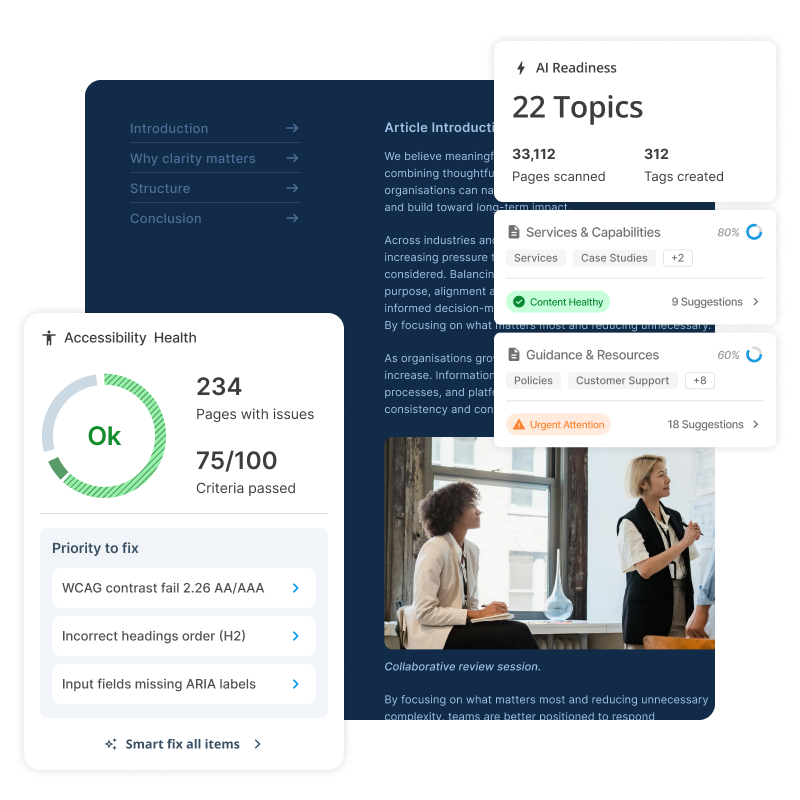
One of the big things about these tools is that it should be accessible as well. So accessibility is really important for AEO – answer engine optimization, or being found in AI answers. So wrapped up in this content health tool is an accessibility report. Clicking into this will show the sort of stuff that it comes back with.
It's a really nice, simple, easy-to-read report. It gives you a nice overview of your overall scoring of your accessibility, and an audit summary of how many resolved issues there have been since the last scan.
Importantly, with this tool, we've tried to make it so it prioritizes issues for you, so it doesn't overload you with accessibility issues. Other tools out there can show you tens of thousands of accessibility issues and can be really overwhelming.
So we sort them into quick wins here. You can also filter by fix type, because not all accessibility issues are specifically content. They could be code, so it requires a developer to go in and fix it.
Clicking into this, let's take a look at what kind of information comes back here. We do also attempt to group accessibility issues, again so it doesn't overwhelm you. So this is one overall accessibility issue, which is "ensure headings have discernible text". It tells you why it fails and the impact it has on users.
It also gives you what the actual implementation is. So what is the code that's generating this issue? And then it generates a fix here for you. This is where it uses AI to recommend fixes, both by reading the overall page and the classes and all that sort of stuff that's applied to it, and giving you the actual code that you can use to fix this accessibility issue.
It also tells you all the affected locations, and then all the grouping over here – so similar heading discernible text issues.
Going back out to the dashboard, we get detailed results here as well. So the total number of failed rules. And then finally, down here, all the different accessibility issues that are available to you. Again, here you can sort by categories. So different sorts of accessibility issues here, the kind of impact it has on users – so if it's critical, serious or moderate – and then also conformance level up to WCAG 2.2 AA.
The other reporting tool that we have here is our AI Readiness Auditor. This is a really great tool for understanding the gaps in your content where AI is concerned, because AI is already scanning all of your content and it's already reading it. If it finds conflicting information, it's going to give conflicting answers back to users if they're asking AI about your content.
When we scan your website, we organize it into topics. So here we've scanned the squiz.net website. We have content management, enterprise search, government digital services, all that sort of stuff.
The AI organizes all your web pages into specific topics, and then it asks you: do you want to start monitoring this topic? And that's when AI does a deep dive on all the content inside it. So when it reads all the content inside it, it asks itself: how many possible questions could someone ask about this content?
And then once it generates all of those questions, it attempts to answer all those questions based off the content that's available to it when it indexes your website. When it answers those questions, it rates itself. So it says: how well did I answer this question? And if it doesn't have a good answer, then it says, "I didn't answer this very well." So this is a little gap in the content – somewhere in the content has generated this bad answer. So, clicking into content management, let's take a look at the high-priority issue that's identified.
Here, again, we're attempting to prioritize the issues, because we don't want to overload you with issues; we try to prioritize the ones that are going to have the most impact if you fix them. So this one here is obviously a high-priority issue: correct the description of digital asset management to reflect centralized DAM functionality. Let's click into this. It gives me an overview of the issue: visitors may believe the digital asset management feature is about building integrations and connectors, when it actually provides a centralized library for managing approved assets across sites and campaigns.
So it's detailed the issue. It recognizes what the issue is. Obviously we're talking about DAM one way in one place and another way in another. So it's conflicting information, and we're basically generating a contradiction.
So here's the fix that it recommends for us. It's basically generating a sentence that we can use to improve the answer on the website, and it also tells us the pages where this is actually referenced. So this is where we actually go to change the content to make this answer not conflicting. So the next time AI scrapes that part of the site, it's going to have a more straightforward answer and be able to answer users' questions about what Squiz's DAM is much better.
Going back –
It sounds like I need to go fix that content on the website, Ricky.
Please don't, because it's a great demo.
Fair. All right.
So we can also ask questions directly to it. We can ask how it actually answers a question – a question that I had. I was wondering: how would AI answer a question when someone asks this specific thing about my website? So we can say, "describe the content management system".
Now this tool is going to look at all the content inside it and say: how would I answer this question based off all the web pages that are assigned to this topic? And here you get an idea. This is how AI is probably going to answer this question based off the content that has been indexed here. So it's a really great tool for seeing how your content can respond when someone asks a question like that.
I love how fast that response is too, Ricky.
I know.
It's very quick.
That was quick because – we all use AI a lot in a lot of different ways, and answers never come up that quick. That was super fast.
Yeah, it's really fast now, and it's great.
I should show you here too that it does show you all the issues that it's finding. So when it's pulling back all the sources or references that it used, we can see here that these are all the different answers that are generated and the issues that are being generated along with them. So we can go in here and figure out why this is an issue, which again is going to be really helpful for making our answers a lot better.
And there's just one last thing I want to show here: these are all the questions that it generates. Actually, I should show it here as well. There are only 51 pages in this specific topic – we have a really small website – but it's generated 4,500 questions. So you can see that AI is trying to guess all the different permutations of however anyone can ask a question about the content on the site. So for a larger website, which might contain 1,000 to 2,000 or 10,000 pages on a topic, it could generate tens of thousands of questions, and is really trying to cover all of its bases.
I'll take a pause there. What do you guys think?
Well, I'm a big fan, personally.
No, I think it's really great. One of the things that always really resonates, Ricky, with customers when we talk them through this is that prioritization – the biggest bang for your buck in terms of what you should be addressing next. Because a lot of them have other tools, and I've worked with other tools where, like you say, it will give me 10,000 issues. Everything's red. It's very overwhelming, and ends up just being put in the corner with the content monster, really, and just ignored.
Whereas I think this is a really great way of being able to build better content optimization practices into your everyday, into your BAU, because you can really just log in here once a week and address a couple of issues. And that way you're constantly, incrementally optimizing, which I think is really, really valuable.
Yeah, I'll echo that as well. That's been a real crowd pleaser with clients, because other auditing tools can be really overwhelming when you see thousands of issues, right? So the prioritization feature really helps them prioritize where to start. There's just one last thing that I wanted to show.
I thought I could give a little demo of the actual conversational search, working out in the wild, with a new feature we've just released, which is our rich content.
So this is just a demo instance I have that's hooked into our website again. That AI readiness report, I should also mention, actually becomes like an FAQ database for our Conversational Search. That means that we've pre-generated all the questions and answers, which means it's going to be really fast when it comes back with an answer here for me. And it also gives me certainty around how it was going to answer questions as well.
But we've tied it into this rich content experience, where you want AI to be able to answer questions based off your content with little input from you. You just want to know that your content is right, so it's going to answer right, which is great. But sometimes you want to add a little bit of additional content in there, when it picks up on things like trigger words.
So, for example, for a university client it might be admissions, like "how do I apply?". And you want to be able to display things like a form or maybe a call-to-action card. So this is where we come out with a new feature called our promo blocks. I'm going to ask a question here.
So: what is conversational search?
It's going to come back with an answer, a nice answer that comes straight from our AI. But importantly, it's hooked into keywords here. So it's recognized that I've asked about conversational search. And so what it's going to do is display this additional content here, which is actually inserted by our content management system.
So an editor has said: well, when someone talks about conversational search, I want to be able to add additional content to supplement the AI-generated answer. This is also built on top of our component service, which uses our inline page builder feature. So this means that we can actually put any sort of content into this response. It could be an embedded map, an embedded form, or just, like we have here, cards that display links that take me out to other areas.
So I really like this tool, because it has that automated response that we've come to love from AI, but gives you a greater level of control over what kind of content you want to display to that user when they've asked those questions.
Yeah, I think this is a real game changer. If we think back to what we were talking about earlier in terms of the Intelligence Era, and this idea that experiences are going to be generated around the user rather than us making assumptions about what they want to see, I feel like this is really that first quite big step into that world, where we are dramatically reducing the cognitive load, because they're not having to click around all over the place.
We are dramatically shortening the pathway from information to action as well, which I think is so critical, especially when you think about how browsing behaviors are changing generally. People are doing a lot more of that early-stage discovery inside their LLM of choice, inside ChatGPT or wherever it is that they spend their time. And when they're coming to your website, they're often a lot more task-focused and a lot more ready to just get the job done. This kind of interface is really great in terms of combining that browsing behavior with that search behavior, and being able to go: here's the exact information that you asked for, the exact form that you need to fill out, and off you go.
I think it's fantastic.
And just to be explicit about it: that Content Intelligence piece, where we did the full audit of all the content and generated that FAQ database, that powers this. So you don't have to retrain it. You don't have to go back and correct a whole bunch of content or spend a year on a massive content project. All you really have to do is maybe fix some of the contradictions that come up.
Yep.
And then put in place a content plan to revise and improve as you get that feedback loop of questions people are asking. Is it coming up with answers that are satisfying the question that they had? If not, create that new content.
Go back in, see what's coming up in Content Intelligence, see what's coming up in the conversations that people are having through this interface. And that means you have this constant optimization loop of a better experience every single time someone comes back onto the site and uses your conversational search. Ricky, thanks so much for the demo. That was awesome.
And to start to wrap this up, Kat, I wonder if you could give us a summary of how you're thinking through these things. So summarize what we've seen, where we're going, and our excitement for the future of web experiences.
Yeah, absolutely. Look, we are excited about the future of web experiences. I think there's a lot of narrative out there at the moment around "oh, websites are dead, you don't need a website".
That couldn't be further from the truth. You absolutely do need a website. It's just changing the role that it plays in your overall organization, and I think that is so exciting.
From a human perspective, you absolutely still need a website. Your website becomes a really important source of truth for AI, and it also becomes an even more important source of truth and source of information for you. As you said, there's this virtuous circle of feedback, where you're getting really great data from these AI interfaces. So, to summarize, as we said at the beginning, we're entering this new era.
We're very much in a transition phase into this new era as well.
We don't necessarily have all the answers. No one knows exactly what we're going to have to do. But what we do know is the criticality of getting the foundations right. And what we do know is that it's important to start embracing this new technology – but embracing it in a way that is controlled, that is structured, that is managing risk effectively. Having the kinds of tools that Ricky just demoed, your Content Intelligence, your Conversational Search, allows you to start embracing the power of AI, allows you to start addressing your foundations, getting your content right, and all of those good things, in a way that's going to provide you immediate value but is also going to lay really important foundations for the future that we're moving into.
All right. So thank you so much for joining us in this webinar. We hope you learned a lot. We would love to talk to you more about this.
If you're curious about how to self-assess where your organization is on this process, click the link that's in the chat or the QR code that's on the screen, and take our website readiness assessment. It's there to help you understand where you're at on this journey from fixed to fluid, and how ready you are to start putting these fluid experiences into place. And if you don't like the score, we want to talk to you about it. We want to find out what it is that seems to be in the way, and maybe we can offer some recommendations.
We're very happy to show you more in-depth demos of the products that we have, or talk to you about strategy. We are here to help. Thank you all for joining. Kat, thank you for being on.
Ricky, thank you for being on. It's been a great conversation. I feel lucky to have been able to be on this webinar speaking with you both. You're both super smart, and it's always a joy.
Thank you.
Thanks, Joel.
Fantastic stuff. Really exciting to see and hear all of that from our super smart colleagues. As a marketer myself, I'm very excited about the way things are heading. Just seeing those rich experiences assemble and come together is so satisfying.
And welcome to the stage, to the webinar party, Megan Andrews. Thank you so much for joining me. As I mentioned at the beginning, Megan's going to be joining us to go through the questions. We've had loads of questions, which is great, so we'll be working our way through as many as we can today.
Do you want to say hello, Megan, and welcome yourself to our attendees?
Yeah, thanks for having me, Lorna. I was loving that, and I noticed a great little comment about the Fender guitar in the background – Joel's always got a great background. But to your point, so exciting, from marketing all the way through to technical, just all the impact. Can't wait to answer some questions coming up.
Awesome. I'm actually going to be cheeky, and before we jump into the questions, to give people a little bit more time – if it's got the cogs going, keep those questions coming in. We would like to hear from you as well.
So we're going to launch a quick poll in a second. Just thinking about everything that we've covered today, we would like to hear from you: which area would make the biggest difference to your organization's ability to deliver reliable AI-powered website experiences? So the poll is up there.
Please do pop your responses in there, and once we've got a few more of those back, we will jump into the Q&A.
But keep popping your answers in, plus your questions – we'd love to hear them.
Oh, and we get a live update. Yeah. This is always really interesting to see where people are with their organizations.
There's a range, so don't be ashamed. If you don't feel like you're prepared, that's okay.
Yeah, absolutely. And it is nice to see those numbers coming in live. It's quite fun. Makes it like a race.
Yeah, exactly.
I love listening to Kat talking about slaying the content monster. I think that's such a good way of putting it. So relatable.
Yes, the visual on that. I actually wrote that down. I was like, this is something that will come up as a motto for me as well.
Yeah, exactly.
Getting close here.
What do you reckon, Megan? Is that a surprise, where we're landing at the moment?
You know, it makes sense to me.
Yeah. The real part here is, I think to your point, content is the foundation, but it's also understanding what your users are looking for now. How have things changed, and how do you need that to be reflected on your own site? We know large language models and AI are changing user behavior everywhere else off our sites, so this is really great. Search to better understand audience intent – I think that's a solid one we see a lot as well.
All right. We've got about ten minutes left. Thank you, everyone, for taking part in the poll, but let's jump into the Q&A. On the back of the discussion about content, I'm going to combine a couple of questions here, because I think there are a couple that we can answer in one go, and I really want to make sure we cover as much as we can.
The first question that we had in is very topical: we've got thousands of pages and a small team – how do we work out what to fix first? And then, as a nice follow-up, Megan, it would be good to hear: do we need to fix all of our content before we can turn conversational search on?
I think that's something we hear a lot, right? There's an intimidation around the amount of content that people have and being able to use AI tools like conversational search.
Yeah, great questions to combine, actually. And so many different organizations are in this similar space. You may have a large website – I was just working with a client this week who has 300,000 pages across their site, one of our higher education customers. And that's no joke, right? You've got a lot you need to figure out in terms of how you will even approach this.
One of the most important things to do is don't be scared to get started. You don't want to end up thinking about all of this for the next six to twelve months and never making any progress. A lot of these tools are designed so that you can take it bit by bit. You can point them at a certain part of your domain.
You can even exclude different areas of your site that you're not interested in. You just start small, or start where it's most important. So start with high-impact places, get an assessment and baseline of where you are.
And then, to your point, Lorna, there's no need to just flip on the switch for everything.
Similarly, if there's a strategy around what your priorities are – let's say you're really focused on increasing enrollments – let's go ahead and optimize content in that specific area and then turn on conversational search for that space.
Like any good marketing team would know: test and learn and improve, test and learn, improve. Keep deploying what you've learned and iterate on that process. I think that's the best recommendation.
Awesome. To that point, then: Ricky showed us a few of the tools that we have available to help our customers with this. One of the questions that we've had here is, can our content team use these tools themselves, or is it mainly something for developers? Again, I think that's a real concern, right, with new tools and teams having to get across things. What's your take on that one?
One of my favorite features in the tool is actually a filter you can put on, so you can understand – at least on the accessibility side – does a developer or technical user need to look at this, or is this something a content team could manage? So you have it right there in front of you. I would say the interface itself is extremely easy to navigate. I've been onboarding a lot of our customers in the US, and the content teams are elated.
It's not this overwhelming huge list. It's organized in a really thoughtful way. And you don't have to know all the details and the code behind the fixes on the site – it walks you through those if you need it.
But you can also use that filter and then bring in one of your technical counterparts and say, "Hey, let's tackle this together."
So that's really useful. I think the other piece, in terms of the AI readiness component, is that it's extremely intuitive. That interface is really easy for teams to use. So no matter who it is, you can pop in there, get an understanding of the assessment of your content, and those recommendations are fairly straightforward. If you need more information, or you have conflicting information across the site, these are really intuitive fixes that it's going to give you there in the queue.
Nice. And I think, particularly as a marketer myself, one of the things that I feel – and I know the team feels – is almost the fear of bringing in AI and knowing how to manage it and control it. One of the questions that we had there was: Kat had compared AI to an intern who needs guidelines – what sort of guardrails do you recommend organizations put in place?
I love this question, because this is when we always get to say: we still have our jobs. Keep a human in the loop. AI doesn't know everything yet. And I actually think it's important to understand there's some global discourse around what it may be capable of and where it could be deployed.
Tools like this are designed around only doing specific things. So you can have confidence that if you deploy this across your site, you've already ring-fenced the type of content it's allowed to access. It's not going to hallucinate. So you already have guardrails in place.
So there's that ease of understanding where your risk is as you begin.
And then, again, just shutting out the noise of that global conversation, and being aligned with your internal AI review board if you have one, or someone in one of the new positions we've seen rolling out – maybe a VP of AI. Have some of those conversations, bring them into your process. And I think you'll find that, especially with this tool, it's really focused on controlling what you can control.
It's really a lot about a content exercise. So there's not a whole lot you're asking the AI to do. You have great ways to test it. It's really just about facilitating that information flow on your site.
Amazing. You've answered a couple of questions there, I think, so that's really cool, because we can go through two. I wanted to pick up on one of the ones that was around what Ricky was showing for the more rich experience that we're now bringing out into market, which, again, I just find so exciting. It's a real reflection of the way things are moving, and something that we kind of expect to see very soon – but it's going to come out of nowhere like everything else in AI has done. So the question was: these cards that Ricky's showing alongside the answer – can we choose what shows up there, like a form or a link or a next step?
Yes, I love that. If you can remember back to what he showed on the screen, essentially you've got a conversation, a dialogue box, and then around that you can feed in these dynamic content pieces, right?
So I love this. Think of it as like a dynamic sticky note, or putting something up on the board, or think of content posters when you're at a coffee shop – where things that are relevant to the conversation can be fed in, and that's all configured on the back end. So what I really like about this piece, having managed content before in lots of different buckets, is that you don't have to do that. Once you plug in Content Intelligence and you've optimized your content, you hook in all the topics and conversation points that you would want to flow around certain areas.
And then you direct just really simple prompts for those little card placements around the conversation, and they can be really simple CTAs. So on the back end, you can say: anything about admissions, go ahead and bring in this call to action, go straight to the application page.
Or anything about getting a new bin for collection days – whatever your organization is managing, government, higher ed – you can configure that really easily on the back end, much like you would with your normal CMS and personalizing for different audiences. So I love it. It seamlessly feels dynamic, but the content and the configuration behind it are really easy to manage. So I think it is, to Kat's point and to the whole conversation really, entering a new era where that user experience is going to feel really personal very easily.
Yeah. Building for me. I can't wait to have my own website built just for me.
And going back a little bit – we've got a few more minutes – I just want to dig into some more questions around monitoring and improving content. Someone asked here: can we see whether answers are improving over time?
You can, and actually it'll continue to learn. What's nice is you can set an audit schedule for your content. Let's say you're heading into a content-focused time, and you're focused on one area of the site really specifically.
So you're like, "Hey, every week, why don't we do a quick audit on this and make sure that the questions are being answered the way we hope?" So come up with your top twenty or fifty questions, load them in, and you can see how it's improving. Then make changes on the site, and see if that content's actually really helpful and getting better information through.
There's a very live, interactive Q&A type of ability on that back end.
So what's nice is that once you get answers to a great spot, they're banked there. That becomes the large language model's own FAQ. So if users on the front end are asking something about that topic, you can rest assured that they're going to get surfaced that answer you've already seen on the back end, which is correct and accurate.
Amazing. I reckon we've got time for one more, so I'm going to squeeze it in. If someone asks something our content doesn't cover, what does conversational search do?
Oh, you can tell it what to say. That's the best part. If it doesn't know, it's not going to make something up. You can set a default response that says, "Appreciate your question. If you have specific questions about this topic, you can go here." And you can point them to a different place, but direct that large language model not to come up with something.
Amazing. Very good at the quickfire. Well done. I've covered off pretty much all the questions, I think.
There were a couple, I'm sorry, that I did skip over. So if I've skipped over yours, please rest assured we will be answering all of the questions in a written follow-up. You will get answers to all of these in writing in our follow-up comms.
Also, make sure that you head over and do your own self-assessment, and give us a shout if you'd like us to talk through that and what it means for you and your website, and how you can improve things to really meet the expectations of this new Intelligence Era that we're entering. Thank you so much to our presenters of the webinar session, and thank you so much, Megan, for being here to answer all the live questions.
Sure. Great to be here, Lorna, and thanks.
Thank you, everyone.
Video: Watch the webinar (ANZ). Captions and transcript available on playback.
Poll Results
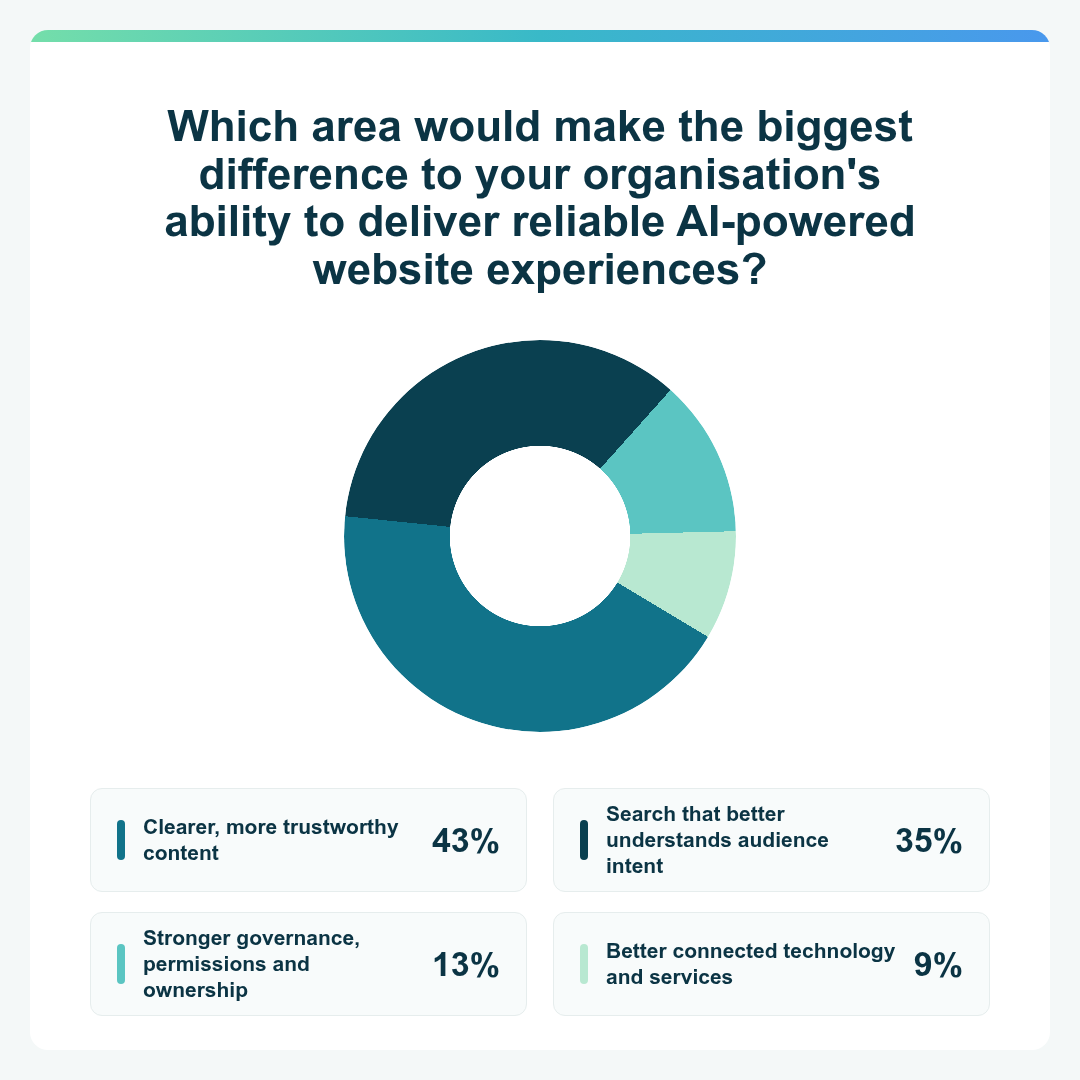
- Clearer, more trustworthy content – 43%
- Search that better understands audience intent – 35%
- Stronger governance, permissions and ownership – 13%
- Better connected technology and services – 9%
Watch the Europe webinar
Transcript: Watch the webinar (UK)
Welcome to this month's webinar. We're calling it Beyond fixed experiences: where AI is taking the next generation of websites. What we at Squiz have been thinking through a lot is just how long we've had these websites that are built around predefined pages and navigation and journeys.
They kind of leave people to find their own path, to figure out what's there. And a lot of work can be done to make those journeys great and very frictionless for people. But wouldn't it be great if we could preempt what they want and give them something dynamically that's really customized to them?
And if you've been around online and tech at all, the answer is probably AI, right?
But there could be a trap there.
There could be a trap there. Putting AI on top of a website without any thought as to how it interacts with the content that you have, and without thought towards how it's going to interact with the users that visit your site, isn't really so much of a strategy as it is – I don't know – maybe a small cry for help. But not to worry, we're here to help you think through some of these things. I'm joined by my colleagues Kat and Ricky, and we're going to talk through some of the shifts that we've been seeing at Squiz, as well as some of the tools that we've been building to assist you in adapting to this new era of usage on the web.
So I'm excited to have you both here. Hi, Kat. Hi, Ricky. How are y'all doing today?
Hey. Good. How are you?
I'm doing all right. We are a global webinar team today. We've got Ricky in New York City, and Kat's in Australia. I'm in the middle of the south of the US, and we've got some cool demos for everyone.
So I think what we want to do is get into it. Keep questions coming – you can toss them in the chat here. Someone will answer them during our chat today, but we'll also leave time at the end for you to talk with maybe not all three of us, but some of our colleagues will be jumping on to do the Q&A with you.
So first, I want to start with a question for you, Kat.
What is the change that you have noticed around how audiences expect content to serve them? And why is this fixed website model reaching its limits?
Yeah, that's a great question. We spend so much time talking to customers all around the world about this exact topic, because it's very front of mind for everybody. I think the thing that we're really noticing is the disintegration, if you like, of browsing as we know it.
In all of the eras of experience design up until now, a lot of the effort, a lot of the cognitive load, has been placed on the end user. So, for example, I'm busy shopping for a fridge right now. Back in the day, that would have meant I have to go to Google, I have to come up with the right kind of combination of keywords, get six pages of search results, open 25 different tabs, compare different models, and possibly make physical notes as well.
And then go to your website and understand your information architecture. How do I find things? Use your search to do a secondary search on your website. So there was a lot – pretty much all – of the work really placed on the user to figure out how to find the information that they needed.
We created a digital destination, and the user had to come to it and figure out how to use it. And I think what's really interesting now is that we are seeing a much lower tolerance from users for that kind of effort. They no longer want to have to do all of that work. They very much expect – and are being trained to expect by ChatGPT and the like – that we will present that information to them contextually and personalized, in response to a question that they've asked.
And so that's really what we're seeing in terms of changes in behavior.
We're calling this the Intelligence Era. I wonder if you could give a quick overview of that transition period that you've seen, from these fixed experiences into what we're dealing with today with more personalized, customized, dynamic, rich experiences.
Yeah, absolutely. You're right, we're calling it the Intelligence Era, and era is a big word. But what we're really trying to communicate there is that things are fundamentally different moving into this new era compared to how we've been doing things in the past. So we've roughly split the evolution of digital experiences into four eras. We started with the system era, which was the birth of computing.
Interfaces were very much built by developers for developers, so there was no graphical user interface. It was all command line. And so there was no real acknowledgment that there were people on the other side of the system who had to be able to use it.
From there we moved into the usability era. That's where we started thinking about: hey, there are people on the other side of this. They need to be able to interact with it. How about we give them some kind of graphical interface to use? How about we think about some basic concepts of usability?
And then from there we went into the era that we've been in for the past couple of decades probably, which is what we've called the experience era. That's really where we started getting a little bit more nuanced. So rather than just creating an interface for humans as a homogenous blob of people, we started thinking about: hey, people are different.
Some people have different needs, for example. So we developed concepts like accessibility. We want things to be easy and intuitive to use. So we started thinking about customer journeys and user research and all of those great things.
And now we are transitioning into the Intelligence Era. I think the defining shift that we're looking at there is going from designing for a group of people and making a bunch of assumptions about what those people need and want, to experiences being dynamically generated and created and crafted for one single person. So from designing for many to designing for me. And I think it's a really interesting shift, because it very much implies that we have to start thinking about things and doing things very differently moving forward.
And what comes to mind for everyone immediately is: well, we have all these AI tools now, right? It's all we've been able to talk about, all we've been able to see or read about for the last, what, two or three years, for any of us that do our work on the web at all.
Why is it that organizations can't just simply add AI to an existing website that they have? What are the considerations that need to go into deploying AI, picking the right application for AI, but then also the underlying infrastructure that's going to make some sort of AI-powered, intelligent front end useful and effective?
Yeah, great question. There are a couple of things to unpack there. I think the first is: why can't we just add AI? You totally can if you want to, if you have that kind of risk tolerance and you're willing to just go for it. But generally speaking, we don't recommend just adding AI. The reason for that is that for AI to get you really great results, there's a lot of foundational work that needs to happen first.
AI is looking at your content. That's its primary source of information. So if you haven't got your content up to date and accurate and well structured and all of those good things, chances are your AI is not going to give you particularly good results.
So that's the first thing. Because ultimately, if you're plopping AI onto your website, you want it to be giving accurate, reliable, helpful responses – not making things up and writing poems and doing other strange stuff. So it's really important that you are thinking about getting your content sorted out. And then I think the second thing there – and we're seeing this more and more – is that for AI to operate somewhat autonomously, you need to be thinking about the governance that it's operating within.
We had this really useful concept of AI as an intern in our trends report a couple of years ago. If you think about an intern, or even a junior employee, you're not going to send them out there to deliver work without guidelines, without training materials, without best practices, without oversight and a leader in the loop. AI is the same. You've really got to be thinking about the surrounding governance that it's operating within, so that you can feel like you have peace of mind that it's going to deliver good results.
I think there's something that's maybe not overtly said within that. For those that are on the web a lot, they've heard of all these technologies that allow you to connect the general models that you might be using to a lot of other software. And we're seeing that pop up a lot more across the CMS space. I think the key there is that governance piece. Sure, you can take any old model and hook it up to whatever you want. But if you don't have those governance guardrails, if you don't have that information and context for it to be able to go and work alongside the software, then you're kind of introducing a little bit more risk into that content process.
It's not necessarily that something bad's going to happen, but it opens it up a lot more to risky hallucination and risky moves within your content. It could break your entire content model if you're not careful about how that AI is being deployed within the infrastructure that you have.
Yep, absolutely. And we're starting to talk about this idea of your website moving from being a digital destination to being more of an experience engine – a system that is going to allow you to generate these experiences. And for that to happen, and for you to be able to have great experiences that you're generating, you've really got to get the basics right, the building blocks.
And I know that doesn't necessarily sound that sexy in the world of AI. But at the end of the day, it's the foundations and the building blocks that are going to create a really great system. So it's things like your content guidelines and governance.
It's things like your design system. Have you got a good, structured, consolidated design system, or do you have design proliferation all over the place? It's things like your actual underlying technology and platforms. Do you have a really well maintained, modern, integrated platform, or have you got a really fragile custom build with lots of really old integrations and things that are really high maintenance?
It's all of that best practice stuff that you've got to look at and sort out first, before you start thinking about just throwing AI over the top. And there are ways and means that you can gradually introduce AI and help you with those things, but it's really important to understand just what a critical role they play in this AI future.
When I think about all the pain that came into so many universities when they put a chatbot on their website five years ago – maybe three years ago, when we started to have the more generative AI approaches to it – and found out that their content isn't ready for this, they then had to rewrite a whole bunch of content and retrain it manually.
Yes.
And those are the things that cost time and cost real money and real effort for any organization that's trying to put that in place. I think it underscores that riskiness that comes into play when you don't understand how ready your website, your content, your design models – all of that schema and architecture that goes into it – actually are. When you don't understand where it's at, then you're risking having to spend a lot of time overcorrecting, or secondarily correcting something that should have worked in the first place, right?
You're absolutely right. Most of our customers have what I call a content problem, or a content monster sitting in the corner. They know. Especially higher education and government – they know that they've got a proliferation of content. Sometimes these sites are 50,000 or 60,000 pages. So they know there's a lot of content out there that they don't necessarily have great visibility of.
They've been putting it off for a long time. AI is creating an impetus that you actually need to solve these problems.
But to your point, it does take time. It is an investment of effort to get that content right. And I think what's interesting about chatbots of the past, versus where we're recommending people head now, is that they created another repository of content that you needed to manage. What we're really trying to get our customers to think about is: how do you create one authoritative source of truth, so that you can slay the content monster?
You can get everything sorted out, and it's all within that one place, and you've got visibility of it there. And you can serve it out to wherever you want it to go, rather than going, "Hey, I really need an AI chatbot, let me go and get some third-party thing where I've got to create another whole knowledge base" – because now you've just duplicated the content monster.
Now you've got another place that you need to be managing that content. So a lot of our customers are really thinking about how they consolidate, and how they identify the single source of truth for a particular kind of information, and protect that and maintain that.
And you get so many gains on the governance side of things when you start to think about that. A lot of the sectors that we work with – government, higher education, these content-dense organizations – have spent years trying to get a handle on the governance side of what they're doing with their websites, only to be set back a couple of steps by a lot of the so-called solutions out there. So to your point, that's what we're really trying to tackle: how do we help organizations get to a point where they have that one authoritative source of truth, simplify their governance structures, not create a bigger monster, not add to the pile of confusion?
And in the end, that helps their users – their website visitors, their customers, their clients, their constituents, whoever it is – find that content better in a number of different places. Ricky, I didn't mean to ignore you on this webinar recording, but you've been sitting over there, and I want to get your input on the technical side of these things, because you're using our tools every day and you're making recommendations for how they might be placed into the technical structures of the organizations that we talk to all the time.
Can we start at just what you know needs to technically be in place for some of these experiences to be reliable?
Yeah. Well, as Kat was saying, the content is really king when it comes to these technical implementations.
And the product should be able to enable that – being able to tell you where the gaps are in your content, and why something is coming back a certain way. If it's not showing the right content, or if there's a content gap or anything like that, our tools can help provide answers based on that, and so give you more informed ways of fixing those sorts of issues.
Awesome. I think we've got a little demo here, right? You're going to show us some of this stuff. Because we've already established how these fluid experiences need that trusted content, effective search, strong governance, all these different things.
I wonder if you could walk us through the Content Intelligence and Conversational Search tools that we have, especially some of the ideas that we've got coming up for these more dynamic experiences.
Yeah, sure. Okay. So this is our content health tool. This is the kind of tool that I was talking about that could help identify gaps.
One of the big things about these tools is that it should be accessible as well. So accessibility is really important for AEO – answer engine optimization, or being found in AI answers. So wrapped up in this content health tool is an accessibility report. Clicking into this will show the sort of stuff that it comes back with.
It's a really nice, simple, easy-to-read report. It gives you a nice overview of your overall scoring of your accessibility, and an audit summary of how many resolved issues there have been since the last scan.
Importantly, with this tool, we've tried to make it so it prioritizes issues for you, so it doesn't overload you with accessibility issues. Other tools out there can show you tens of thousands of accessibility issues and can be really overwhelming.
So we sort them into quick wins here. You can also filter by fix type, because not all accessibility issues are specifically content. They could be code, so it requires a developer to go in and fix it.
Clicking into this, let's take a look at what kind of information comes back here. We do also attempt to group accessibility issues, again so it doesn't overwhelm you. So this is one overall accessibility issue, which is "ensure headings have discernible text". It tells you why it fails and the impact it has on users.
It also gives you what the actual implementation is. So what is the code that's generating this issue? And then it generates a fix here for you. This is where it uses AI to recommend fixes, both by reading the overall page and the classes and all that sort of stuff that's applied to it, and giving you the actual code that you can use to fix this accessibility issue.
It also tells you all the affected locations, and then all the grouping over here – so similar heading discernible text issues.
Going back out to the dashboard, we get detailed results here as well. So the total number of failed rules. And then finally, down here, all the different accessibility issues that are available to you. Again, here you can sort by categories. So different sorts of accessibility issues here, the kind of impact it has on users – so if it's critical, serious or moderate – and then also conformance level up to WCAG 2.2 AA.
The other reporting tool that we have here is our AI Readiness Auditor. This is a really great tool for understanding the gaps in your content where AI is concerned, because AI is already scanning all of your content and it's already reading it. If it finds conflicting information, it's going to give conflicting answers back to users if they're asking AI about your content.
When we scan your website, we organize it into topics. So here we've scanned the squiz.net website. We have content management, enterprise search, government digital services, all that sort of stuff.
The AI organizes all your web pages into specific topics, and then it asks you: do you want to start monitoring this topic? And that's when AI does a deep dive on all the content inside it. So when it reads all the content inside it, it asks itself: how many possible questions could someone ask about this content?
And then once it generates all of those questions, it attempts to answer all those questions based off the content that's available to it when it indexes your website. When it answers those questions, it rates itself. So it says: how well did I answer this question? And if it doesn't have a good answer, then it says, "I didn't answer this very well." So this is a little gap in the content – somewhere in the content has generated this bad answer. So, clicking into content management, let's take a look at the high-priority issue that's identified.
Here, again, we're attempting to prioritize the issues, because we don't want to overload you with issues; we try to prioritize the ones that are going to have the most impact if you fix them. So this one here is obviously a high-priority issue: correct the description of digital asset management to reflect centralized DAM functionality. Let's click into this. It gives me an overview of the issue: visitors may believe the digital asset management feature is about building integrations and connectors, when it actually provides a centralized library for managing approved assets across sites and campaigns.
So it's detailed the issue. It recognizes what the issue is. Obviously we're talking about DAM one way in one place and another way in another. So it's conflicting information, and we're basically generating a contradiction.
So here's the fix that it recommends for us. It's basically generating a sentence that we can use to improve the answer on the website, and it also tells us the pages where this is actually referenced. So this is where we actually go to change the content to make this answer not conflicting. So the next time AI scrapes that part of the site, it's going to have a more straightforward answer and be able to answer users' questions about what Squiz's DAM is much better.
Going back –
It sounds like I need to go fix that content on the website, Ricky.
Please don't, because it's a great demo.
Fair. All right.
So we can also ask questions directly to it. We can ask how it actually answers a question – a question that I had. I was wondering: how would AI answer a question when someone asks this specific thing about my website? So we can say, "describe the content management system".
Now this tool is going to look at all the content inside it and say: how would I answer this question based off all the web pages that are assigned to this topic? And here you get an idea. This is how AI is probably going to answer this question based off the content that has been indexed here. So it's a really great tool for seeing how your content can respond when someone asks a question like that.
I love how fast that response is too, Ricky.
It was quick.
It was quick because – we all use AI a lot in a lot of different ways, and answers never come up that quick. That was super fast.
Yeah, it's really fast now, and it's great.
I should show you here too that it does show you all the issues that it's finding. So when it's pulling back all the sources or references that it used, we can see here that these are all the different answers that are generated and the issues that are being generated along with them. So we can go in here and figure out why this is an issue, which again is going to be really helpful for making our answers a lot better.
And there's just one last thing I want to show here: these are all the questions that it generates. Actually, I should show it here as well. There are only 51 pages in this specific topic – we have a really small website – but it's generated 4,500 questions. So you can see that AI is trying to guess all the different permutations of however anyone can ask a question about the content on the site. So for a larger website, which might contain 1,000 to 2,000 or 10,000 pages on a topic, it could generate tens of thousands of questions, and is really trying to cover all of its bases.
I'll take a pause there. What do you guys think?
Well, I'm a big fan, personally.
No, I think it's really great. One of the things that always really resonates, Ricky, with customers when we talk them through this is that prioritization – the biggest bang for your buck in terms of what you should be addressing next. Because a lot of them have other tools, and I've worked with other tools where, like you say, it will give me 10,000 issues. Everything's red. It's very overwhelming, and ends up just being put in the corner with the content monster, really, and just ignored.
Whereas I think this is a really great way of being able to build better content optimization practices into your everyday, into your BAU, because you can really just log in here once a week and address a couple of issues. And that way you're constantly, incrementally optimizing, which I think is really, really valuable.
Yeah, I'll echo that as well. That's been a real crowd pleaser with clients, because other auditing tools can be really overwhelming when you see thousands of issues, right? So the prioritization feature really helps them prioritize where to go, where to start. There's just one last thing that I wanted to show.
I thought I could give a little demo of the actual conversational search, working out in the wild, with a new feature we've just released, which is our rich content.
So this is just a demo instance I have that's hooked into our website again. That AI readiness report, I should also mention, actually becomes like an FAQ database for our Conversational Search. That means that we've pre-generated all the questions and answers, which means it's going to be really fast when it comes back with an answer here for me. And it also gives me certainty around how it was going to answer questions as well.
But we've tied it into this rich content experience, where you want AI to be able to answer questions based off your content with little input from you. You just want to know that your content is right, so it's going to answer right, which is great. But sometimes you want to add a little bit of additional content in there, when it picks up on things like trigger words.
So, for example, for a university client it might be admissions, like "how do I apply?". And you want to be able to display things like a form or maybe a call-to-action card. So this is where we come out with a new feature called our promo blocks. I'm going to ask a question here.
So: what is conversational search?
It's going to come back with an answer, a nice answer that comes straight from our AI. But importantly, it's hooked into keywords here. So it's recognized that I've asked about conversational search. And so what it's going to do is display this additional content here, which is actually inserted by our content management system.
So an editor has said: well, when someone talks about conversational search, I want to be able to add additional content to supplement the AI-generated answer. This is also built on top of our component service, which uses our inline page builder feature. So this means that we can actually put any sort of content into this response. It could be an embedded map, an embedded form, or just, like we have here, cards that display links that take me out to other areas.
So I really like this tool, because it has that automated response that we've come to love from AI, but gives you a greater level of control over what kind of content you want to display to that user when they've asked those questions.
Yeah, I think this is a real game changer. If we think back to what we were talking about earlier in terms of the Intelligence Era, and this idea that experiences are going to be generated around the user rather than us making assumptions about what they want to see, I feel like this is really that first quite big step into that world, where we are dramatically reducing the cognitive load, because they're not having to click around all over the place.
We are dramatically shortening the pathway from information to action as well, which I think is so critical, especially when you think about how browsing behaviors are changing generally. People are doing a lot more of that early-stage discovery inside their LLM of choice, inside ChatGPT or wherever it is that they spend their time. And when they're coming to your website, they're often a lot more task-focused and a lot more ready to just get the job done. This kind of interface is really great in terms of combining that browsing behavior with that search behavior, and being able to go: here's the exact information that you asked for, the exact form that you need to fill out, and off you go.
I think it's fantastic.
And just to be explicit about it: that Content Intelligence piece, where we did the full audit of all the content and generated that FAQ database, that powers this. So you don't have to retrain it. You don't have to go back and correct a whole bunch of content or spend a year on a massive content project. All you really have to do is maybe fix some of the contradictions that come up.
Yep.
And then put in place a content plan to revise and improve as you get that feedback loop of questions people are asking. Is it coming up with answers that are satisfying the question that they had? If not, create that new content.
Go back in, see what's coming up in Content Intelligence, see what's coming up in the conversations that people are having through this interface. And that means you have this constant optimization loop of a better experience every single time someone comes back onto the site and uses your conversational search. Ricky, thanks so much for the demo. That was awesome.
And to start to wrap this up, Kat, I wonder if you could give us a summary of how you're thinking through these things. So summarize what we've seen, where we're going, and our excitement for the future of web experiences.
Yeah, absolutely. Look, we are excited about the future of web experiences. I think there's a lot of narrative out there at the moment around "oh, websites are dead, you don't need a website".
That couldn't be further from the truth. You absolutely do need a website. It's just changing the role that it plays in your overall organization, and I think that is so exciting.
From a human perspective, you absolutely still need a website. Your website becomes a really important source of truth for AI, and it also becomes an even more important source of truth and source of information for you. As you said, there's this virtuous circle of feedback, where you're getting really great data from these AI interfaces. So, to summarize, as we said at the beginning, we're entering this new era.
We're very much in a transition phase into this new era as well.
We don't necessarily have all the answers. No one knows exactly what we're going to have to do. But what we do know is the criticality of getting the foundations right. And what we do know is that it's important to start embracing this new technology – but embracing it in a way that is controlled, that is structured, that is managing risk effectively. Having the kinds of tools that Ricky just demoed, your Content Intelligence, your Conversational Search, allows you to start embracing the power of AI, allows you to start addressing your foundations, getting your content right, and all of those good things, in a way that's going to provide you immediate value but is also going to lay really important foundations for the future that we're moving into.
All right. So thank you so much for joining us in this webinar. We hope you learned a lot. We would love to talk to you more about this.
If you're curious about how to self-assess where your organization is on this process, click the link that's in the chat or the QR code that's on the screen, and take our website readiness assessment. It's there to help you understand where you're at on this journey from fixed to fluid, and how ready you are to start putting these fluid experiences into place. And if you don't like the score, we want to talk to you about it. We want to find out what it is that seems to be in the way, and maybe we can offer some recommendations.
We're very happy to show you more in-depth demos of the products that we have, or talk to you about strategy. We are here to help. Thank you all for joining. Kat, thank you for being on.
Ricky, thank you for being on. It's been a great conversation. I feel lucky to have been able to be on this webinar speaking with you both. You're both super smart, and it's always a joy.
Thank you.
Thanks, Joel.
All righty. Well, hi everybody, thank you very much for joining us. I hope you enjoyed the webinar with Joel and Kat and Ricky.
It's now over to myself and Jamie – we've kind of been lurking in the background all the while. I'll do a quick introduction. My name is Toby, I'm one of the digital strategy directors here at Squiz, joined by the wonderful Jamie, who is our head of customer.
Our role really is to answer some questions. There are some really good ones that I can see have been submitted as we've gone through. Jamie and I are going to be doing a bit of Q&A and picking out some of the best ones. They're all good ones, but we won't get to all of them, and we would of course follow up. Before we get into that, though, I'm just going to hand over to Jamie very quickly, as I believe we have a little poll to kick things off. So Jamie, I'll pass over to you.
Yeah, that's exactly it. Before we move into answering some questions, we really want to hear from you. So, thinking about everything we've covered today, we're keen to hear which of these areas would make the biggest difference to your organisation's ability to deliver reliable AI-powered website experiences. If you can just take a couple of seconds, have a quick look.
So, whether it's clearer, more trustworthy content, search that better understands audience intent, better connected tech and services, or stronger governance, permissions and ownership. Thinking about what we've heard, we're really keen to hear where people are at in terms of having those reliable foundations in place and getting that source of truth in a good spot. Based on what we're hearing from customers, and what you're thinking, Toby – if you were a betting man, what do you reckon will come out on top?
Yeah, it's a good question. My money would probably be on the first one, so clearer, more trustworthy content. Maybe not even trustworthy per se, but clear, good, accurate content. We work with a lot of customers who have a lot of content, and it's no wonder that it's difficult to stay on top of that. If we're talking about literally hundreds of thousands of pages of content in some cases, it's understandable how we have conflicting information in several places. And where we've got devolved teams that are responsible for different areas of the website as well, it's not always super easy to stay joined up. So CI then becomes a really good tool to be able to assess all of that. But I suspect, in the dealings that I have with customers, that to me is often the biggest, hardest thing to stay on top of.
All right, no worries. Well, thank you everyone for that feedback. I think we're having a bit of technical difficulty getting the results up, but let's just jump straight in and ask some questions, because as Toby said, there are some really good ones in there. Maybe I'll jump in and pick one out for you, Toby.
Here's a really good one that I can see in the chat. Somebody's asked: how does conversational search know it's giving people the right answer?
Yeah, really interesting question. It's probably worth saying that conversational search doesn't inherently know that it's giving the right answer, but when it's combined with Content Intelligence, as Ricky and Kat pointed out, it's very hard to get it wrong.
And that's assuming, of course, that your content is in good shape, which is what CI is there to do. So CI, or Content Intelligence, is there to provide the content governance, so that conversational search is generating answers based on that pre-approved and pre-validated content that Ricky talked about. So, in short, to reiterate what the guys talked about: CI scans your content, it generates thousands and thousands of questions, it then uses your content to create Q&A pairings based on that, and where it can't confidently answer a question, it will flag the reason why. Conversational search then integrates with that. It uses that bank of pre-validated answers, which means that if your content is in good shape, you're very unlikely to get an answer that you're not happy with. So hopefully that answers the question.
Yeah, nice. Do you want to do one more?
Yeah, find one more. I've got a couple for you, Jamie, but if you want to fire one more over, I'm happy to keep going.
All right, here's another good one. Does conversational search only use our own website content, or can it pull from other sources too?
Yeah, another really good question. So generally speaking, conversational search will only answer from content that you've approved and brought in from the monitored scope. You choose what you want it to focus on. It will not search the open internet or use general information to fill in gaps.
So it's up to you, within that scope. If you wanted to include other sources, as long as they're publicly accessible, there's nothing to stop you scanning them with Content Intelligence, having it create all of those lovely Q&A pairings, and then connecting that with conversational search to allow it to provide answers around that. It's entirely up to you. But if you've got it set up to only scan your website, for example, and you've then gone in and selected the topics within your website that you want to connect to conversational search, it will only ever pull content from those places.
It will not go anywhere outside of that, so you can have complete confidence that it's not going to pull in a random Reddit thread from five years ago.
Yeah, all very locked down in that sense, which is obviously super important.
Yeah, I've got a couple of questions coming your way, Jamie, if you're happy with that. Let's have a little look. I like this one – I think it was the first question that came in, actually. We have got thousands of pages and a small team, something we hear a lot. How do we work out what to fix first?
Yeah, so as you say, that is an extremely common problem. Most of our customers – I think this got mentioned by our colleagues – are in government or higher education, so they've got those really content-heavy sites. Most people today have got a really lean team, so everyone's trying to do more with less. So we absolutely get it.
But the very first thing to say is: don't try and fix the whole site at once. You don't need to get to perfect first. You really need to just start with a manageable topic or a user journey, something that's going to provide return on investment for your organization and improve the experience for your users. So, again, as in some of the demos that we were shown, a common question that comes through to your call centre, or a key call to action like the admissions example that was shown, or open day sign-up – something that you want to drive, that's going to improve that experience for users.
And then Content Intelligence, as you saw in the demo, crawls that wider estate. It will group your content into topics, generate those likely questions, and then rank the issues by impact. So what that's doing is giving your team straight away that prioritized backlog that we saw, so you've not got a flat list of thousands of findings that you've got to try and figure out. And the sensible path in terms of order is: it will start looking at contradictory information that could produce wrong answers for you, then repeated templates or structural problems that might be affecting pages, then high-value pages and important tasks, deadlines and services, and then any gaps or unclear answers to questions that people are actually asking.
And then it measures all of those results. And then you can just be moving through from one topic to the next. I think Kat mentioned this as part of the process too: once you get that up and running, that prioritization can just become an ongoing part of your BAU.
Yeah, love that. I'd say it's one of the most useful things that we see our customers using, that prioritization tool.
It can often be a bit overwhelming, can't it, to see what you need to do. But the ability to look at what's going to have the biggest impact is such a powerful thing.
Another question for you, Jamie. I like this one as well because, again, we hear it a lot. Can our content team use the tools themselves, or is it mainly something aimed at developers?
Yeah, another good question. Again, I think a lot of people think, "Oh, AI – we need to lead with our dev team, we need to log a job for that, that's going to be above my head."
But the whole idea with the Content Intelligence tool and with conversational search is that they're made to be easy to use, and specifically to make your content team's life easier. In exactly the same way that we were talking about this idea of the AI era and removing cognitive load for the user, having tools like this in place removes that cognitive load for your team of having to maintain and manage the content – and, as I was talking about before, trying to figure out where to start and what to do next. So again, in the demo, we saw Ricky run through Content Intelligence, how it scanned the site, and how it immediately highlighted those quick wins and pointed the content team to the most important fixes.
And they don't have to sit there interpreting reams of data. So it absolutely is made to enable your content teams. But it's probably important to point out as well that developers do still absolutely have a role here. So there are technical issues like HTML structure, semantic markup and templates. There are potentially more complex accessibility fixes, things like that, that may come up as part of it, that you might then want to bring your development team along for. But absolutely, the product's intended to make it easy for your content team to get started and get things in good shape, and for this to become just part of your day to day.
Love that. Do you want another one, Jamie, or do you want to send one my way?
Sure, give me one more, and then I'll fire one down to you.
You're on a roll. Yeah, that's awesome.
Another good one here. If someone asks something that our content doesn't cover, what does conversational search do? Great question.
Yeah, good question. Conversational search is very specifically designed not to guess. Again, based on the types of organisations that we generally work with and the customers that we've got – obviously no one wants to be the customer that turns a chatbot on and then sees hallucinations. Nobody wants that, but we work with a lot of highly regulated organisations where this would be hugely damaging.
So our conversational search is specifically designed not to guess. We've got guardrails around it to ensure that it won't search the web to try and fill the gaps. So if we did find ourselves in a situation where the approved content couldn't support a reliable answer, we would have a configured fallback in place. So it would explain that it couldn't answer from the available content.
It would guide the user, probably to a traditional search route, potentially suggest a related question or an approved topic, or if necessary direct the user to a support route or a different next step. And that behaviour is obviously much preferable to it producing a plausible-sounding answer with no evidence, as we're all used to seeing in various third-party LLMs. So we'd work with you as part of that process to make sure you've defined fallback language and an escalation path. It's quite important as well, as part of the process, that we'd monitor any unanswered questions, because they're useful signs of genuine content gaps.
Love it, great answer. There are a couple more in there, Jamie. I don't know if you want to maybe pick a couple and fire them my way.
Yeah, should we grab one more? I'm conscious of time, but: Ricky showed some cards appearing alongside the answer. Can we choose what shows up there, like a form or a link to the next step?
Yeah, another really good question, and this is something that's very front of mind for us at the moment. We're referring to it as our rich experiences, and really it's that next level beyond getting good AI answers. It's going, okay, getting a good answer is great and really important, but if we can then augment that with content or components that are relevant and that drive the user to do something – so in a higher education context it might be "book an open day", for a council it might be "find out when my bin day is", whatever it might be – that becomes an altogether more powerful experience.
And to answer the question, can you choose? Yes, absolutely you can. So we go through a process, and we refer to them as promo pages. A promo page can include a set of components or bits of content, calls to action, forms, whatever you want.
We essentially create those in the back end, and again, they're really simple to create. They're designed for content editors to create rather than needing to know how to code. And then they're linked to whatever the intent of the question is. So when somebody asks a question related to a certain thing, we therefore show the correct promo page that has the relevant components on it.
What's interesting is that you can go as deep or as shallow as you like there. What we often encourage customers to do is start simple, maybe have two or three promo pages focused around key things you're trying to do. But the more you create, the more flexibility and granularity you can get. So you can start dealing with very niche questions that have a very niche intent, and you can deliver a promo page that has very niche next steps, or a form to something specific.
So the ability to do really interesting things is pretty infinite, and the tool is getting better and better all the time at inferring that intent. Phase two for rich experiences is for a lot of that to happen dynamically. So in future, people won't even necessarily need to create those promos manually. The tool will be able to look at what the question is from the user, infer the intent, and then go, "Yep, I need these specific components, I'll assemble them together." And then the experience gets even better. So it's really exciting. This tool is moving very, very quickly and there are loads of interesting things always going on. It feels like you wake up every day and the product's got something new for us, which is super exciting.
So yeah, that's what the future looks like, and we're really excited to start rolling it out.
Yeah, nice. I've had a little look, and unless I'm missing anything – there are quite a few more questions, but I think we're fairly tight on time.
Unless there are any others you want to quickly jump into, maybe we wrap there. And then we've got a few other questions that we can follow up with people on.
Perfect. Well, thanks everybody for your time and for hopping in today. It's been great, and thank you for all the great questions as well.
Yeah.
Lovely to see you all.
It's been great.
Video: Watch the webinar (UK). Captions and transcript available on playback.
.
Watch the US & Canada webinar
Transcript: Watch the webinar (US)
1
00:00:29.540 --> 00:00:41.889
Megan Andrews: Hello, everyone! Welcome to our webinar today. I'm Megan Andrews, Director of Client Partnerships here at Squiz, and I'm joined by my colleague, Fran Zablocki, our Client Strategy Director.
2
00:00:41.890 --> 00:00:56.739
Megan Andrews: And today, we're gonna have some exciting content for you. Everything in this webinar is about being found by AI. So, really good tips to keep your content healthy, and just keep up with the pace of all the change we see today with AI.
3
00:00:56.920 --> 00:01:00.280
Megan Andrews: So, couple housekeeping items before we jump in.
4
00:01:00.510 --> 00:01:10.600
Megan Andrews: First of all, feel free to scan this QR code. You can access a one-month trial of Squiz Content Intelligence. So, get a little insight into your content, get a little head start.
5
00:01:10.600 --> 00:01:24.429
Megan Andrews: The other thing is, we will be recording this, so if you have to leave halfway through, or you want to share this out with colleagues after, you can do that. We will send out a link to the recording, and also any follow-up questions that we weren't able to get to today. So…
6
00:01:24.480 --> 00:01:28.180
Megan Andrews: Let's get into it, Fran. Exciting stuff today.
7
00:01:28.640 --> 00:01:35.409
Megan Andrews: Really quick introduction. If you're not familiar with Squiz, you probably are, but we're a digital experience company.
8
00:01:35.500 --> 00:01:49.989
Megan Andrews: So, if you're operating on any sort of scale with your organization, you're probably using lots of different tools across your tech stack, and the great part is Squiz has all these different types of tools to help you manage your digital experience across your site.
9
00:01:50.020 --> 00:01:57.220
Megan Andrews: You can find out more on our website, but certainly we'll talk a little bit more about one of those tools today.
10
00:01:58.630 --> 00:02:18.289
Megan Andrews: So, get out your pens, or your typewriters, and get learning today. We're gonna have four different areas that we really address. One is just, why does good content practice break down? If you're on a content team, you know this can happen, it's okay, it happens to the best of us. But we'll look at some of the reasons for that.
11
00:02:18.430 --> 00:02:24.349
Megan Andrews: And if you've joined our webinar series, the last one we gave was about these four AI discovery signals. So…
12
00:02:24.500 --> 00:02:32.029
Megan Andrews: Again, new information, a new era. We'll revisit those and talk through how that impacts your content and its discoverability.
13
00:02:32.140 --> 00:02:51.750
Megan Andrews: We will also look at how to use those signals in… in practice. What does that mean for how you're looking at your content, optimizing it, and keeping up to date with that content on your site? And then the fourth area is just how Squiz Content Intelligence as a tool can help you do this, and, you know, optimize and monitor that content.
14
00:02:51.750 --> 00:03:03.540
Megan Andrews: not just once, but at scale and repeatedly, right? So that's the part that's pretty hard, is content can be in great shape for a moment in time, but how do you continuously monitor it at scale?
15
00:03:05.710 --> 00:03:22.979
Megan Andrews: So, in theory, yeah, I think about this sometimes, Fran, where it's like these beautiful moments where maybe your team has done this website redesign, and you're so excited about it, you're like, ugh, our site's down to a thousand pages, and we know each one of those pages is thoughtful and curated and good to go.
16
00:03:23.040 --> 00:03:31.800
Megan Andrews: And for, I don't know, 6 months, maybe even a year, you feel pretty good about that, right? But over time, things start to happen.
17
00:03:31.830 --> 00:03:43.399
Megan Andrews: And, it's really hard to, over time, keep up with things, but also with just new best practices and things we're learning with this changing environment of large language models. So…
18
00:03:43.450 --> 00:03:54.810
Megan Andrews: Things we're used to, right, on content teams. You've got those beautiful pages, and then, oh, there's a whole new campaign! So we've got to build out this little, little sub-area of the site, new content, new requests there from different teams.
19
00:03:54.810 --> 00:04:04.409
Megan Andrews: The aging pages, look, most of us aren't in brand new companies or organizations. We've been around for a minute. Sometimes things have been, published for a decade or more.
20
00:04:04.410 --> 00:04:11.309
Megan Andrews: And it kind of stacks over time, too. You can imagine, different deadlines that come up across year to year.
21
00:04:11.310 --> 00:04:22.149
Megan Andrews: Maybe you have an orientation page that was… August 19th was an orientation day last year, but it's gonna be August 20th this year. Do both those pages still exist? Do they have conflicting content?
22
00:04:22.230 --> 00:04:26.429
Megan Andrews: And maybe your team has gotten really good at auditing.
23
00:04:26.630 --> 00:04:36.519
Megan Andrews: Once. And then, did you do it again? How stale was that audit after time? Did you have a good way to keep up with your auditing process?
24
00:04:36.740 --> 00:04:55.610
Megan Andrews: And I think all of us understand that, you know, the firehose of requests that can come your way, and just trying to understand, you know, where do we need to prioritize our time and our team's time to keep up with content. So, these are a lot of the common pitfalls, right, Fran? And I'm sure you've seen some of these across time as well.
25
00:04:55.610 --> 00:05:12.809
Fran Zablocki: Yeah, absolutely. You're reminding me of another thing that feels very similar, and that is gardening. Getting your whole garden nice and weeded and cleaned feels terrific, but it's always gonna need it again in, like, a week or two. So, good constant maintenance is key.
26
00:05:13.610 --> 00:05:24.940
Megan Andrews: It's true, and you want to… you know, like, finding the times, too, at scale where you need to bring other people in, recruit your daughter to come in and help you out on some of those days.
27
00:05:25.800 --> 00:05:26.880
Megan Andrews: Am I right?
28
00:05:28.310 --> 00:05:44.899
Megan Andrews: So, yeah, I think the other thing, too, is that, there… in a world of SEO, where we've been, there are ways around, content that's not great on your site. When I think about the impact of large language models and AI,
29
00:05:45.000 --> 00:05:49.969
Megan Andrews: Really, it's putting… casting a magnifying glass across every page on your site.
30
00:05:50.010 --> 00:06:02.329
Megan Andrews: And what I visualize is that moment in 2022, or whenever all these models were going out across the entire internet. They were indexing every single part of the internet.
31
00:06:02.330 --> 00:06:15.280
Megan Andrews: And so, if you had pages that existed and were published on the web, those were ingested by a large language model. Now, they're not constantly doing that all the time, but some are, and in different ways, and so…
32
00:06:15.320 --> 00:06:21.719
Megan Andrews: The real question is, when any of these new platforms, TrachiPT, Gemini, we're all using these.
33
00:06:21.870 --> 00:06:30.980
Megan Andrews: When users go to these sites and they ask a question, there's a lot of different paths in terms of what's gonna come back and be surfaced in that response.
34
00:06:31.120 --> 00:06:40.030
Megan Andrews: Now, some of these, models are relying on indexed information, or some combination of indexing and then going out and looking in real time.
35
00:06:40.330 --> 00:06:56.429
Megan Andrews: But what is true is that regardless of what's, being asked, once those models go out, if they can't find consistent, current, structured, clear information on a site, whether they did it, you know, 2 years ago, or they're doing it in real time.
36
00:06:56.530 --> 00:07:02.930
Megan Andrews: it's gonna skip over, that actual content. It's just not gonna pick it up, not gonna surface it in the response.
37
00:07:03.280 --> 00:07:16.979
Megan Andrews: So, if there's this stale, duplicate, again, things we talked about, conflicting information, it's outdated, you know, it's just a bypass. It's gonna go find some other source that's more relevant and better organized.
38
00:07:17.100 --> 00:07:28.529
Megan Andrews: So, while you might think you can get away with some things, those audience questions, they're gonna rely on good content underlying it, to give a clear, specific response.
39
00:07:31.490 --> 00:07:40.299
Megan Andrews: So, we'll engage with you all, because I am very curious. Which of these do you see most often in your own content?
40
00:07:41.010 --> 00:07:46.360
Megan Andrews: So we've got… is it out-of-date information? Duplicate or conflicting pages?
41
00:07:46.510 --> 00:07:49.080
Megan Andrews: Gaps nobody spots until user asks.
42
00:07:49.320 --> 00:07:55.410
Megan Andrews: Or too many requests and no clear priorities. Fran, I'm curious, what do you think we're gonna see here?
43
00:07:55.830 --> 00:08:20.789
Fran Zablocki: I suspect a little bit of everything. I imagine that everyone probably experiences a little bit of this on some level, but the one that comes up in conversation most is that last one, too many requests and no clear priorities. I feel like that's less of a content thing and more of a governance thing. A lot of times, the folks managing content on the website just have so many people asking them to make changes all the time, and it's hard to predict when that's coming in, so it's definitely been top of mind for people.
44
00:08:20.790 --> 00:08:22.770
Fran Zablocki: I've had lots of conversations on that point.
45
00:08:23.310 --> 00:08:32.590
Megan Andrews: Yeah, great point. And I've seen some duplicate pages, too, like, a good way to understand what's duplicated and what's going on there.
46
00:08:32.830 --> 00:08:36.189
Megan Andrews: Let's see, do we have the results? We do. Okay.
47
00:08:37.299 --> 00:08:53.300
Megan Andrews: Gaps, nobody spots until a user asks, about 40% of you. That's really interesting. Yep, how do we get insight into what's happening on those platforms? And you're right, that too many requests, no clear priorities, and out-of-date information, both at about 30%, so…
48
00:08:53.600 --> 00:08:59.750
Megan Andrews: Interesting. Well, you are all in line with each other, just common challenges right now.
49
00:09:02.830 --> 00:09:09.430
Fran Zablocki: Right, so what are some of the specifics on these discovery signals that
50
00:09:09.600 --> 00:09:22.190
Fran Zablocki: will tip you off that AI might struggle with, right? So, if you attended our previous webinar, we went in a deep dive on structure, metadata, authority, and freshness as the four AI discovery signals.
51
00:09:22.360 --> 00:09:37.129
Fran Zablocki: And there's some scenarios in which, AI is just gonna have a hard time, right? So, if you don't have clearly structured information, and this is best practice that has gone back a while, right? If you don't have structured headings, structured content,
52
00:09:37.170 --> 00:09:55.370
Fran Zablocki: if you don't necessarily have a single topic with subtopics in an organized way, AI is going to struggle with that, just like SEO struggled with that in the past, and just like human beings struggle to read, right? If it's not, you know, if it's not scannable, if it's not obviously organized, AI is also going to struggle with it.
53
00:09:55.370 --> 00:09:58.939
Fran Zablocki: On the metadata side, we need to make sure that
54
00:09:58.940 --> 00:10:08.899
Fran Zablocki: AI can understand what the page is about. And this also overlaps a little bit with traditional SEO, because we're looking at things like page title and URL path and
55
00:10:08.900 --> 00:10:13.630
Fran Zablocki: in particular, the meta description. I know in my experience that
56
00:10:13.630 --> 00:10:32.660
Fran Zablocki: One of the most common gaps is that either there's no meta description for the page, or there's a default meta description that's being used across tons and tons of different pages, and in both of those cases, that's gonna kind of erode AI's trust as to exactly what this page is about, and also that this page is unique and has, you know, a particular purpose.
57
00:10:32.670 --> 00:10:34.930
Fran Zablocki: On the authority side.
58
00:10:35.010 --> 00:10:45.300
Fran Zablocki: This is actually authority of what is on the page, not necessarily your brand authority or equity that you've established, there.
59
00:10:45.730 --> 00:10:51.070
Fran Zablocki: This is… Really making sure… that…
60
00:10:51.090 --> 00:10:59.429
Fran Zablocki: has a dedicated page. Probably the closest equivalent in the SEO world would be, like, having a canonical page, right? This is the one page that…
61
00:10:59.430 --> 00:11:24.389
Fran Zablocki: is the source of truth on this particular topic. And where authority can start to erode, and where AI may struggle, is if you have multiple pages that either have identical content around that exact topic, or really, really similar content. And this happens easily over time, right? People want to put as much information to be helpful as possible, but over time, several different units or departments replicate each other, and then have slight variations. And that may not be something that a human would pick up.
62
00:11:24.390 --> 00:11:35.230
Fran Zablocki: on, because it's spread out across the site, but AI will pick up on it right away, and it will erode that trust. It will think to itself, I'm not really sure which of these three versions to believe, and so I'm just not going to include you in the results.
63
00:11:35.510 --> 00:11:45.579
Fran Zablocki: And then the last one, on the freshness side, is pretty self-evident, right? Like, we want to make sure… this is really what we're focused on today, is, like, making sure that we're checking to be sure our…
64
00:11:45.680 --> 00:12:00.269
Fran Zablocki: content is up-to-date and hasn't been, you know, hanging out for 10 years, like Megan mentioned, or to make sure that we don't have multiple versions of the same thing with multiple dates. This is a really common issue as…
65
00:12:00.420 --> 00:12:18.240
Fran Zablocki: websites grow. You have annual or maybe semi-annual reports that go out, or information that goes out, whether if it's in higher education, you have courses that are being updated every semester, or whether it's financial aid information that has tables associated with it that get updated every year.
66
00:12:18.240 --> 00:12:33.109
Fran Zablocki: if you don't clear out the old versions of those, they're gonna end up competing with the new versions, and they're gonna confuse the AI answer, and in a lot of cases, erode that trust as well. So, that's, you know, some really typical scenarios in which
67
00:12:33.110 --> 00:12:40.979
Fran Zablocki: These discovery signals, if we're not doing a good job with upkeep, can start to, make it hard to show up in those results.
68
00:12:42.550 --> 00:12:46.879
Fran Zablocki: Alright, so, what's our solution here? It is a simple four-step.
69
00:12:46.900 --> 00:12:53.389
Fran Zablocki: process, a content health loop for AI discovery. Fairly straightforward. The first step is to plan.
70
00:12:53.390 --> 00:13:18.329
Fran Zablocki: It's always good to have a plan at the beginning. The second step is to publish, and that includes making any changes, that's new pages or edits to existing pages. The third step is to monitor and make sure that we're keeping track of how those changes and new pages are performing, and then once we see how they are performing, the fourth step is to improve and iterate and rinse and repeat, right? This is an ongoing cycle, and it's something that can be applied either in the micro.
71
00:13:18.350 --> 00:13:35.019
Fran Zablocki: for an individual page, or in the macro for an entire site. But as we'll talk about a little bit more, when you start to scale this up for a site that has hundreds or maybe thousands of pages, that's when it gets really, really labor-intensive and really, really difficult. I'm sure that's no surprise to any of you. I mean, I think that…
72
00:13:35.200 --> 00:13:42.529
Fran Zablocki: In my experience working with content for large institutions over 15 to 20 years now, I think
73
00:13:42.730 --> 00:13:48.549
Fran Zablocki: The reality is, and this is to make everybody… Feel a little bit better.
74
00:13:48.650 --> 00:14:03.650
Fran Zablocki: The reality is that most institutions don't even get to 100% of their content because they just don't have the time to get to 100% of their content. So not only is the tool that we're going to talk about today going to allow you to
75
00:14:03.800 --> 00:14:13.489
Fran Zablocki: save time on the pages you are looking at, it's actually going to make it possible to get coverage across the entire website, in some cases for the first time, or at least, you know, much more
76
00:14:13.490 --> 00:14:23.830
Fran Zablocki: readily than, you know, like, a major, major content effort would be, to do it manually. So, that's the content health loop. Let's drill down a little bit into the different steps.
77
00:14:23.830 --> 00:14:27.850
Fran Zablocki: On the first step plan, it's always good to have a plan.
78
00:14:27.850 --> 00:14:50.850
Fran Zablocki: it's always good to know where you are before you point to where you need to go, and so the first thing to do here is to just get that audit and get that assessment. And you can see we've taken some screenshots of our content intelligence tool to the right. That's what content intelligence does a really good job of. It gives you that macro view of overall site health and readiness from the AI side, but it also drills down into specific topics and pages.
79
00:14:50.850 --> 00:14:56.910
Fran Zablocki: In terms of where they're at and what kinds of improvements that they have. So… Planning really makes sure
80
00:14:57.000 --> 00:15:11.369
Fran Zablocki: you just know what you have, and what it contains, and you can start to identify things, even at the planning stage, that are going to be easy fixes, like really old content, or duplicate content, or things that are missing, things like, you know, the correct meta description, like I mentioned earlier.
81
00:15:12.030 --> 00:15:21.010
Fran Zablocki: The next step is publish, and this is really where AI discovery signals can be strengthened, right? This is where the change is actually taking place.
82
00:15:21.010 --> 00:15:27.630
Fran Zablocki: I talked a little bit about each of those discovery signals and what, you know, can erode AI trust.
83
00:15:27.630 --> 00:15:42.580
Fran Zablocki: But this is where you're addressing things like structure and metadata and authority and freshness, and we're trying to make those answers easy to find and understand and trust. So this is really you getting into the page, into the CMS, and making the changes.
84
00:15:43.040 --> 00:15:47.620
Fran Zablocki: The next step is to monitor, and this is…
85
00:15:47.700 --> 00:16:00.619
Fran Zablocki: The thing that easily falls through the cracks, if it's something that we have to do manually, and why something like content intelligence is so valuable, because even after you've published, it's going to be taking a regular look at everything that changes.
86
00:16:00.620 --> 00:16:08.160
Fran Zablocki: And it's going to be re-ranking things to show you how much they've improved, both on the overall site level and on the page level.
87
00:16:09.080 --> 00:16:26.560
Fran Zablocki: I like to divide up the monitoring plan into prioritization of pages, right? So, like, you don't necessarily have to monitor 100% of your pages every week or two, but you probably want to monitor your really, really important pages.
88
00:16:26.560 --> 00:16:44.540
Fran Zablocki: every couple weeks or every month, and you want to get to everything at least once a year, and I'd even recommend, like, every 6 months. We've… there's been some studies out that have shown that, like, after 6 months, AI's signals for freshness really start to erode, so it's looking for things that have been published within the last 6 months. So,
89
00:16:44.610 --> 00:16:56.660
Fran Zablocki: Anyway, it's possible to actually look at certain pages more frequently. You might look at the most important ones 3 or 4 times, before you look at some of the least important ones once. Now.
90
00:16:56.660 --> 00:17:09.360
Fran Zablocki: how do you know which ones are most important and least important? One way is to take a look at your overall traffic, and analytics can help that. But I would take that traffic, and I would cross-reference it with what you know to be your core
91
00:17:09.359 --> 00:17:32.089
Fran Zablocki: customer journeys, or student journeys, depending on your industry. So, you know, let's take higher education, for example. A prospective student is going to need some really top-line information in order to enroll. They're probably going to need to look at all the admissions content, your academic program content, maybe your campus visit content. So start with all the different pages that belong on that path.
92
00:17:32.090 --> 00:17:46.469
Fran Zablocki: And make those a priority. And then make those pages that are getting a lot of traffic a priority, and, you know, when you cross-reference both, it's high traffic, and within that critical path, it should be the first group that you take care of, and so on down the line.
93
00:17:46.820 --> 00:17:52.900
Fran Zablocki: Alright, next step is… to improve. And so, once we know what has…
94
00:17:53.480 --> 00:18:04.409
Fran Zablocki: A gap, we want to make sure to decide what we need to do with that, and some common scenarios that you might run into here, and considerations for those scenarios.
95
00:18:05.860 --> 00:18:15.399
Fran Zablocki: R. Finding, an important question does not have gate, because it's going to say, here's… here are the questions that, you know, people are asking.
96
00:18:15.500 --> 00:18:24.460
Fran Zablocki: here's the questions that I, as an AI tool, am asking, that I'm getting, you know, I'm getting answers that aren't quite good enough.
97
00:18:24.460 --> 00:18:44.280
Fran Zablocki: 2, and so that will point out which pages need to create a focused answer, whether it just doesn't exist at all, and you might need a new section on a page, or a completely new page, or whether it's just that the content of the page just needs an update. Perhaps it's to change the H2 title
98
00:18:44.280 --> 00:18:54.610
Fran Zablocki: to the form of a question, and tailor that next paragraph that's after that H2 to more directly answer the question. That's kind of a practical step there.
99
00:18:54.610 --> 00:19:09.850
Megan Andrews: One thing I'd like to point out here and remind people of, too, because you make such a good point that generally as humans, right, we don't necessarily think in terms of… unless we're content people. Like, oh, that H2 could be different, or we could ask it, you know, phrase that a different way.
100
00:19:10.090 --> 00:19:21.929
Megan Andrews: this is… this tool is driven by a large language model giving an evaluation, so it's actually really helpful. We don't always, as humans, think in those terms. We might look at a page, visually assess it, right?
101
00:19:22.070 --> 00:19:24.639
Megan Andrews: And as a content team, think, we're good.
102
00:19:24.920 --> 00:19:39.099
Megan Andrews: But this is something we might miss, right? Where it's like, actually, the structure of this page, underlying this page needs to be addressed. I think that's helpful to keep in mind as you think about these things. There's two ways to design things, humans and bots, right?
103
00:19:40.070 --> 00:19:52.030
Fran Zablocki: Yeah, definitely. And they don't have to be at odds with each other, you just have to make sure that you're doing the right thing for both sides. And there's a lot of overlap, but there are some particulars around AI that, yeah, humans would not necessarily notice.
104
00:19:52.040 --> 00:20:00.229
Fran Zablocki: So, next scenario is several pages competing or contradicting. Kind of talked about this with, you know, source, ultimate source of truth.
105
00:20:00.230 --> 00:20:23.529
Fran Zablocki: what's the practical solution to that? Consolidating into one source of truth. That could be really explicit, like, you're just gonna make this page the only thing that has this content on it, but more than likely, you're gonna take one of the pages, make it the source of truth, and then look at the other pages that had repetitious content, and change that content to a reference to the source of truth page, right? So instead of trying to go into all the detail on that page.
106
00:20:23.530 --> 00:20:28.159
Fran Zablocki: You just want to create a crosslink to that page that mentions that particular topic.
107
00:20:28.260 --> 00:20:43.809
Fran Zablocki: And the last one is just content that's stale or expired or critical, and this is just that gardening analogy where we just need to make sure we're clearing out the old stuff, and we don't have old dates and figures and financials sitting around that are causing things to get
108
00:20:44.090 --> 00:20:58.940
Fran Zablocki: messed up in the, in the results. I typically take a rubric for this, that if anything is over a year old and has really low traffic, it is a prime candidate to retire.
109
00:20:58.970 --> 00:21:16.740
Fran Zablocki: there's gonna be exceptions. There's usually some really old pages that just have legs, because they're an article that somebody wrote that gets traffic annually, perennially, and, you know, you want to make sure to keep that. But use your analytics, use your, you know, age of page.
110
00:21:16.740 --> 00:21:27.960
Fran Zablocki: Use traffic to determine what can be retired, because tightening up the pages themselves and making sure that you don't have bloat is going to help with overall results.
111
00:21:28.550 --> 00:21:31.819
Fran Zablocki: Alright, so those are the four steps. Sorry, go ahead, Megan.
112
00:21:31.820 --> 00:21:45.429
Megan Andrews: You know, one of my favorite examples, we had talked about this a little earlier, was, I think… here's a practical question for you. So let's, many of you may know, like, Steve Jobs gave a very famous commencement speech, and…
113
00:21:45.550 --> 00:21:57.409
Megan Andrews: It was super popular, it's popular across YouTube, all these different places. It happened to be at Stanford University, and Stanford hosts a page that has that, commencement speech recording on it.
114
00:21:57.550 --> 00:21:59.999
Megan Andrews: and trans, transcribes it. So…
115
00:22:00.030 --> 00:22:03.929
Megan Andrews: It's a very popular page that people visit a lot. That…
116
00:22:03.950 --> 00:22:20.609
Megan Andrews: That speech was given in 2006, right? So, that's 20 years ago now. What do you do with that type of page? To your point, there are these types of pages, really popular articles, things like that. How do those sit with the freshness perspective? What do you do about those?
117
00:22:21.570 --> 00:22:32.100
Fran Zablocki: That's a really, really good question, because you can't really change the original publishing date, right? Like, you want to keep that, so it's got the historically accurate time.
118
00:22:32.100 --> 00:22:52.419
Fran Zablocki: But I could see actually creating some additional promotional content that is fresh and has newer dates to it to call attention to that… that page, right? And, like, referencing that page from a couple of different places. Or maybe, you know, create a new news article that is revisiting, you know, Steve Jobs
119
00:22:52.600 --> 00:23:07.419
Fran Zablocki: speech from 20 years ago in the light, you know, in today's context, or today's light, and then, you know, that kind of, like, surfaces it in a more modern context. If it's something that is, you know, an evergreen page and not a news article.
120
00:23:07.420 --> 00:23:19.659
Fran Zablocki: then just changing the content on the page and changing the dates will… that'll be it. But yeah, it's kind of a balance between, like, maintaining the historical record, but also, like, calling attention to it with some new, fresh content.
121
00:23:20.330 --> 00:23:21.040
Megan Andrews: Nice.
122
00:23:22.780 --> 00:23:28.220
Fran Zablocki: Alright, so, here's the honesty question. When did you last audit your content?
123
00:23:29.810 --> 00:23:30.339
Megan Andrews: Oh, boy.
124
00:23:30.340 --> 00:23:45.839
Fran Zablocki: be afraid to answer never, because that is actually a fairly common answer, right? Like, maybe you just haven't been able to get around to it, and that is exactly why we have tools like Content Intelligence to help you be able to get, you know, get through that thing that you just haven't had time to do.
125
00:23:46.740 --> 00:23:53.420
Megan Andrews: I like the never or not that I know of. You could claim… I mean, I'm not aware of an audit.
126
00:23:54.410 --> 00:24:05.449
Megan Andrews: But this is great. I will be curious, again, be honest in this, it's really good to understand what people are, are actually experiencing. And we do have a question, too, that I'd like to get to, Fran after this, related to…
127
00:24:05.620 --> 00:24:16.080
Megan Andrews: to content summaries. You know, there are lots of different ways and tools. There's everything from spreadsheets to something like content intelligence, but here we go.
128
00:24:16.440 --> 00:24:28.040
Megan Andrews: Oh, 20%, never, not that I know of. Totally fine. Most people sitting right around either in the last 3 months or 6 to 12 months, so that's pretty good. 30% each. Good job, everyone.
129
00:24:28.040 --> 00:24:30.330
Fran Zablocki: Pretty even split across everybody.
130
00:24:30.330 --> 00:24:31.060
Megan Andrews: Yeah.
131
00:24:31.300 --> 00:24:32.110
Fran Zablocki: Good work.
132
00:24:33.020 --> 00:24:47.809
Megan Andrews: Now, one question that came in that I think could be great to address here, and it's more a comment, but we could riff on this for a moment. We are a two-year community college, our SEO tool customer success manager mentioned AI overviews.
133
00:24:47.810 --> 00:24:54.679
Megan Andrews: And ways to get found in them. One of the ways is to have good quality content. So, AI-generated content is usually vague.
134
00:24:54.960 --> 00:25:00.709
Megan Andrews: And so this is a question around, or comment around AI-generated content.
135
00:25:00.940 --> 00:25:09.990
Megan Andrews: So, guess that's something to call out here. We're not necessarily saying, use this tool to generate content, right? It's very different from that.
136
00:25:10.650 --> 00:25:17.230
Fran Zablocki: Yes, yeah, I think… Using AI to generate content is only…
137
00:25:17.530 --> 00:25:26.319
Fran Zablocki: useful as a very first draft, and I think a lot of other people kind of share that, sentiment. Like, for example, the content intelligence tool is going to suggest
138
00:25:26.460 --> 00:25:30.219
Fran Zablocki: What you might… how you might want to position new content, but…
139
00:25:30.600 --> 00:25:50.299
Fran Zablocki: ultimately, you're the editor, right? Like, you're the one who needs to make sure that you agree with that statement, and that, you know, that's something that you want to publish, but I wouldn't be our recommendation to necessarily flood your site with AI-generated content. In fact, in a lot of cases, even the company… I was just reading an article yesterday, actually, that the companies…
140
00:25:50.300 --> 00:25:52.570
Fran Zablocki: Who are providing.
141
00:25:52.580 --> 00:26:05.670
Fran Zablocki: easily created AI content are now starting to realize just, how much has been flooding their platforms, right? Like, LinkedIn just put in a button that said, like, please report AI slop.
142
00:26:05.860 --> 00:26:29.740
Fran Zablocki: And so, I think it's really important for it to be human-created content. Maybe AI-assisted, but human-created, ultimately, in the end. And yeah, so we're, you know, like, our system is going to identify where things need to be improved. It is using AI to help you do that, but the actual content generation should definitely have, as they say, like, a human in the loop, and the human is the last step.
143
00:26:31.080 --> 00:26:31.740
Megan Andrews: Yep.
144
00:26:35.550 --> 00:26:39.320
Fran Zablocki: Alright, so, we know it's a lot of work.
145
00:26:39.450 --> 00:26:54.889
Fran Zablocki: We know it sometimes takes too much work to do, and we don't get to all of it, and that's why we created Content Intelligence. So, good practice at scale. We just want to be able to do all of these good practices that you've probably been doing manually, and create a tool
146
00:26:54.890 --> 00:27:05.500
Fran Zablocki: that can do this at scale across the entire site, and then maintain it across the site, so you just feel like you're on top of it, at all times, and not falling behind. And so…
147
00:27:05.500 --> 00:27:11.329
Fran Zablocki: On one page, very easy to do. On 10,000 pages, not so much. So…
148
00:27:11.520 --> 00:27:14.969
Fran Zablocki: Some of the other challenges, it's not just volume, it's also just…
149
00:27:15.380 --> 00:27:32.819
Fran Zablocki: how many people you have working on content, and where they're located, and how much you communicate. If you're in a larger institution that's decentralized, you might have 100, 200 different people managing content on the website. Coordination amongst them can be tricky. People will have different levels of
150
00:27:33.000 --> 00:27:56.480
Fran Zablocki: familiarity with all of these topics and content management in general, and so the level of quality and consistency, maybe with your branding and your voice and tone, might be, you know, there might be some gaps there. That's how we end up with multiple pages answering the same question. It's also how we end up with, you know, review dates and owners that are all over the place and that get really hard to track and centralize.
151
00:27:56.490 --> 00:28:01.080
Fran Zablocki: Publishing models may allow certain people to publish, but they might be…
152
00:28:01.130 --> 00:28:10.450
Fran Zablocki: are kind of breaking their rules or not practices. So overall, changes happen faster than manual audits can keep up, and once you actually have the audit.
153
00:28:10.700 --> 00:28:25.359
Fran Zablocki: in place, it's very difficult to take, you know, a thousand recommendations and decide which of those thousand to start with without some kind of prioritization list, and that's another key component of content intelligence that we'll… we'll show you shortly.
154
00:28:27.520 --> 00:28:29.450
Megan Andrews: Let's show them. How about that?
155
00:28:31.100 --> 00:28:41.520
Megan Andrews: We'll do a little video for you. Now, just a heads up, the video moves quickly, so our voices will as well, but you'll get a good idea of what exactly content intelligence looks like.
156
00:28:42.020 --> 00:28:50.110
Megan Andrews: So, if you were to log into your SquizDXP and go into the Content Health area, this is the backend, this is what you'd see currently.
157
00:28:50.180 --> 00:29:08.439
Megan Andrews: And this tool actually is split, right, into accessibility and AI readiness. So, it's really top of mind for everyone right now. Turns out good accessibility is critical to AI readiness and visibility. So, that's why we've paired them together. We'll take a look at the accessibility piece first.
158
00:29:08.690 --> 00:29:17.189
Megan Andrews: At the top, you're gonna get your score, your kind of roll-up summaries of everything that's going on across your domain, or the site that you've plugged in here.
159
00:29:17.190 --> 00:29:33.770
Megan Andrews: And then, I love this piece. Is it a content fix? Is it a code fix? Do I need a developer or a content editor? Really easy way to filter those quick wins, depending on who's in there. And then just snapshot of some different patterns and things it's seeing across your site.
160
00:29:33.960 --> 00:29:44.119
Megan Andrews: And of course, that big old scary long list, but don't worry, you can filter it by just focusing on what is the most critical thing we need to do, or most serious update.
161
00:29:44.120 --> 00:29:56.860
Megan Andrews: or violation here on the site. And clicking into those, it gives you all the context you could want, probably more than you would ever need, but you will deeply understand what exactly is going on, the impact it has.
162
00:29:56.860 --> 00:30:06.399
Megan Andrews: And it shows you, side by side, what's on your site right now, and what is that recommended fix that would, alleviate this issue and resolve it for you. So…
163
00:30:06.720 --> 00:30:10.700
Megan Andrews: That's a really helpful way to go through the accessibility side of your site.
164
00:30:10.860 --> 00:30:13.000
Megan Andrews: And Fran, how about AI?
165
00:30:13.380 --> 00:30:32.849
Fran Zablocki: Right? Alright, so accessibility is for humans, and the AI readiness is for the bots, is, like, what we like to say. Same kind of overview, right, giving you an overall health rating, then breaking it down into the individual topics and showing you how well you're performing. Now, this is showing…
166
00:30:34.050 --> 00:30:41.979
Fran Zablocki: Squiz.net is our website, so, priority issues, but we do have some remaining, and even without the high priority issues.
167
00:30:42.090 --> 00:31:06.820
Fran Zablocki: identified with an AI-ready section, there's plenty of detail contained within, right? So in this conversational AI search topic, there's 31 pages that are included in that topic, and we have 4 low-priority issues that we need to deal with. Each one of those is detailed in that list there, and you can drill down and see exactly what it is that's the issue. This next part, where it says 2,771 questions, is where it is emulating and showing exactly how that fan-out quiz
168
00:31:06.820 --> 00:31:08.439
Fran Zablocki: It's working, and so…
169
00:31:08.440 --> 00:31:20.320
Fran Zablocki: you can look through every individual question and see how it's being answered. It's really quite impressive. Now we're looking at an individual issue detail and some suggested revisions, so…
170
00:31:20.330 --> 00:31:40.229
Fran Zablocki: to that question earlier, it's just suggesting what you should include, and, you know, really, you should take that and edit it and publish it as you like. And it's also showing all the different pages that are referenced for this issue, and then if you, if you want, there's a link out to the specific page of your website to just make it easy to look at.
171
00:31:40.230 --> 00:31:42.580
Fran Zablocki: Now, we're looking at the Squiz
172
00:31:42.660 --> 00:31:58.189
Fran Zablocki: conversational search interface installed on our site. Feel free to go to Squiz.net and try it out for yourself. It's the best way to kind of get used to it. But this is the newest version of our search that incorporates this type of AI
173
00:31:58.210 --> 00:32:17.009
Fran Zablocki: conversational search functionality that we've gotten used to with things like ChatGPT right into the experience and flow of your website, right? So, it's got your answer in there, it's showing the different sources, it's also a place to do follow-up questions so that you can create a conversational record there.
174
00:32:17.050 --> 00:32:37.439
Fran Zablocki: And it's still paired with the traditional search results as well. So, it's very rich, kind of giving you the best of both worlds. You get that conversational AI response, but you also have that faceted search set that, you know, we've all been used to over the years, and between those two things, you're really getting a rich set of information for the questions that you're asking.
175
00:32:39.020 --> 00:32:41.020
Fran Zablocki: Okay, let's see where we go next here.
176
00:32:41.240 --> 00:32:42.729
Megan Andrews: Nice. Wow. Thank goodness.
177
00:32:42.730 --> 00:32:43.820
Fran Zablocki: Okay, here we go.
178
00:32:43.820 --> 00:32:45.250
Megan Andrews: I think that's it.
179
00:32:45.290 --> 00:33:01.100
Megan Andrews: No, we did it, and it's… you know, it's a lot of… it's a lot to take in. I think, probably a lot of this is just understanding how to equip your team, right? There… there's a manual approach that's gonna really be painful, and so…
180
00:33:01.100 --> 00:33:13.050
Megan Andrews: We're just talking through one possible solution and tool here. If you do decide you're excited and want to try Content Intelligence for a month, scan that QR code again. It will give you access to that,
181
00:33:13.080 --> 00:33:16.639
Megan Andrews: not only the AI search visibility, but that accessibility auditor.
182
00:33:16.720 --> 00:33:22.730
Megan Andrews: And give you those prioritization of fixes. And it works with whatever stack you're using, it will work.
183
00:33:22.900 --> 00:33:37.169
Megan Andrews: So that's the great piece. It is super easy to do, no matter where, where your content lives at this point. We do have a question that came in, will this video be shared afterwards? Yes, it will. So if you're registered for
184
00:33:37.170 --> 00:33:59.749
Megan Andrews: the webinar, that, email address you put on file, we're gonna go ahead and blast out everything that we did here today, including the recording. So, a look back. Key takeaways. What in the world did we talk about today? Really big point is just that AI, the AI world, it's really putting magnifying glass on your content, and that includes your content health issues or problems.
185
00:33:59.750 --> 00:34:10.539
Megan Andrews: Again, those signals that you really need to be aware of, because AI depends on them. It's strong structure, metadata, authority, and freshness. So hopefully we talk through some different good examples for you there.
186
00:34:10.639 --> 00:34:29.679
Megan Andrews: And then, a repeatable way to keep those signals strong, they could be great for a moment in time, and then over time, we've seen, right, different examples of how that could, decline. And Squiz Content Intelligence helps you do that, not just as a snapshot, but really at scale over time.
187
00:34:30.980 --> 00:34:36.230
Megan Andrews: So we'll see if we have any more questions. I saw a couple more come in in the chat.
188
00:34:36.380 --> 00:34:45.490
Megan Andrews: And let's see, here's one. Does having a page not indexed affect AI's ability to crawl that page? Fran, what are your thoughts there?
189
00:34:48.449 --> 00:34:49.210
Megan Andrews: Oh.
190
00:34:49.219 --> 00:34:58.259
Fran Zablocki: Sorry, I'm muted. I've been trying to find that article, which we're going to share momentarily. It was a New York Times article, so, so we'll follow up on that.
191
00:34:58.389 --> 00:35:06.999
Fran Zablocki: if you have something listed as noindex, it's not going to get picked up. So that is actually something that came up in our previous webinar as, like, the very first
192
00:35:07.229 --> 00:35:23.749
Fran Zablocki: gate post for being picked up by AI search results, and that is that if you've basically, you know, closed it off, as noindex, or if it's something that's behind a login, right? So if it's on an intranet or portal, it's just not gonna… not gonna show up. It's not gonna be able to get access to that.
193
00:35:24.560 --> 00:35:34.369
Megan Andrews: I had a great example of this, actually. We were putting the AI tool across one of our early higher education sites, a big university, and we were covering the topic of campus life.
194
00:35:34.370 --> 00:35:44.800
Megan Andrews: And we're trying to figure out all the URLs that were involved in that specific topic, and we thought we had them all. And pretty much towards the end of our auditing process, it was a little bit more manual a year ago.
195
00:35:44.800 --> 00:35:56.669
Megan Andrews: One of their content editor said, hey, wait, there's this whole page, it is an FAQ just about campus life and everything we'd been trying to look at, but it wasn't indexed anywhere. There was no breadcrumbs to get to it, it was just…
196
00:35:56.810 --> 00:36:10.960
Megan Andrews: floating out there in the ether. So we… you know, sometimes these processes, right, reveal where you do have these gaps. Hopefully just… you can speed up that time to where you know where the gaps are. I think that's the point of having a good tool.
197
00:36:12.260 --> 00:36:13.310
Megan Andrews: Alright.
198
00:36:14.000 --> 00:36:21.840
Megan Andrews: Do we have any other questions that came in? Let's see… The Q&A here.
199
00:36:22.010 --> 00:36:24.349
Megan Andrews: We'll do one more, I think we've got time.
200
00:36:24.810 --> 00:36:25.890
Megan Andrews: like that.
201
00:36:26.470 --> 00:36:29.520
Megan Andrews: So this came in earlier, Anne,
202
00:36:31.250 --> 00:36:39.270
Megan Andrews: How often should we review our most important content? Like, what's the… what's the pace at which we should be thinking about these audits and reviews, Fran?
203
00:36:41.640 --> 00:36:55.130
Fran Zablocki: Well, like I mentioned before, it really depends on how high priority the pages are, right? I think the range should be that the most important pages are potentially even every week, right? If you're running a newsroom, or you're running,
204
00:36:55.380 --> 00:37:11.729
Fran Zablocki: an events calendar, or you're in the midst of a really intensive period, like, if you're, for example, in higher education, you know, you're entering the fall, and, like, orientation is hitting, and people are signing up for classes, and there's just a ton of activity and a ton of people looking for, information.
205
00:37:11.950 --> 00:37:29.999
Fran Zablocki: It could be daily, but just for short periods of time, and just for really, really important pages. But that's not practical for most scenarios, and so that would be, like, a small subset of pages. So, maybe daily for that kind of scenario. Most likely every month for really important pages, you know, in normal times.
206
00:37:30.020 --> 00:37:49.599
Fran Zablocki: every quarter, maybe, for that secondary tier of priority. And then, I'm recommending every 6 months for the… for all pages on the site, and that is mainly because, you know, that freshness is such a huge key for it getting picked up by AI. You can do all… you can check all the other boxes and have all the great… the best information.
207
00:37:49.600 --> 00:38:00.009
Fran Zablocki: But if AI looks at two equally weighted pages, and one of them is, you know, a year or a year and a half old, and one of them is within, like, 3 months or 5 months of being published.
208
00:38:00.010 --> 00:38:08.460
Fran Zablocki: It's likely to pick the one that's more current, so it is important to be able to take a look at everything, at least within 6 months, a year at the very most.
209
00:38:09.540 --> 00:38:17.710
Megan Andrews: Nice, love that. Another one just came in, not sure if it was covered earlier, did you cover the importance of an FAQ schema markup in the context of AEO?
210
00:38:17.880 --> 00:38:22.929
Megan Andrews: what new words we're all working with here, AEO included?
211
00:38:23.290 --> 00:38:26.829
Megan Andrews: One quick thought I've had on this is that, I had one…
212
00:38:26.970 --> 00:38:42.800
Megan Andrews: client we were working with who was like, well, what if we just do all of our FAQs, they aren't visual for, you know, like, on the front-end display, it's just schema markup where, you know, large language models can learn what they need to learn and go on their way. So what's your thought on that, Fran?
213
00:38:43.300 --> 00:38:51.839
Fran Zablocki: Yeah, so schema markup is something interesting, and my… I mean, my simple way of understanding it in my own brain is…
214
00:38:52.030 --> 00:39:06.000
Fran Zablocki: what you provide in markup, in code, in schema, should reflect, not, like, near-identically, but it should reflect what is visible on the front end, in the design, and in the content that's being
215
00:39:06.000 --> 00:39:20.050
Fran Zablocki: read by human beings, right? So if you have a page that has a couple questions and answers, like maybe you're using an accordion component to do that, or maybe just the page itself has H2s that are in the form of questions with paragraphs that follow.
216
00:39:20.390 --> 00:39:29.149
Fran Zablocki: you can make the argument that you'd want to include the FAQ schema at least inline on that page. But what I have seen is kind of…
217
00:39:29.150 --> 00:39:41.659
Fran Zablocki: an overcorrection because of how many articles and SEO firms have been talking about how schema is really important, and it's sort of like the old days where people were, like, just putting keywords everywhere.
218
00:39:41.660 --> 00:39:50.359
Fran Zablocki: some of the recommendations of, like, let's just add all the schema and every single page and load it up, and that's overkill. And actually, Google has said that,
219
00:39:50.460 --> 00:40:02.369
Fran Zablocki: not that it's gonna penalize you necessarily, but it's definitely not helping your cause if you're just stuffing too much schema in there. So, you know, my practical approach would just be take a look at the page that you have right now.
220
00:40:02.370 --> 00:40:06.100
Fran Zablocki: If it looks good, if it's doing what it needs to do for humans who are on it.
221
00:40:06.100 --> 00:40:27.240
Fran Zablocki: ask yourself which schema makes sense to include, because in a lot of cases, there's some pretty low-hanging fruit, right? You might have that FAQ schema, or maybe for higher ed, if it's an academic program page, there is an academic program schema that should be included on every academic program page. If you have events, there's an event schema, and so on and so forth. So there's a layer of kind of like, okay, let's just match up the schema
222
00:40:27.240 --> 00:40:45.370
Fran Zablocki: to the things that we already have, and I would take that as step one, and then, you know, I think you can start to think about adding additional schema as a second pass. And if you've done something like Content Intelligence Review, and you've added more content to answer those questions, and things are being ranked as healthy.
223
00:40:45.590 --> 00:40:52.889
Fran Zablocki: that's the point at which you would want to go back in and say, okay, are there… is there any more tweaks we can make on the schema side?
224
00:40:52.890 --> 00:41:05.999
Fran Zablocki: So, it's kind of a layered approach, and I wouldn't necessarily just jump in and be like, oh my gosh, we have to add, you know, we have to add all the schema to all the pages just to try to move the needle, because it's one… it's only one signal out of many, many, and you can kind of actually overdo it.
225
00:41:06.370 --> 00:41:09.959
Megan Andrews: Yep. Yep. It's a good thing you keep in mind,
226
00:41:10.140 --> 00:41:19.600
Megan Andrews: And I think these best practices will continue to evolve, so it's good to experiment, to your point. Try some different things, make sure, measure them, see if they're working.
227
00:41:19.770 --> 00:41:28.990
Megan Andrews: One last question that came in, and then we'll wrap this up. How long does it typically take AI to drop search results for content that isn't easily accessible or outdated?
228
00:41:29.290 --> 00:41:33.519
Megan Andrews: I guess one interpretation of that may be also is, you know, what…
229
00:41:33.790 --> 00:41:40.759
Megan Andrews: Is, is, are these large language models just gonna completely ignore things that are not accessible or outdated?
230
00:41:42.700 --> 00:41:45.340
Megan Andrews: I think probably a lot of them would, yep.
231
00:41:45.340 --> 00:42:08.379
Fran Zablocki: I think so. I think, actually, there's a lot of parallels between how a screen reader interprets the content on the site and how AI crawls the site. And again, so this is a big overlap, and another reason why accessibility is such a core piece of this and getting that right. And I know a lot of you have already been doing a really good job with accessibility and really staying on top of it, and in that respect, you've already done a lot of the work you need to to be
232
00:42:08.380 --> 00:42:12.149
Fran Zablocki: To be on top of it, but if you do have accessibility issues.
233
00:42:12.150 --> 00:42:16.449
Fran Zablocki: you're kind of… you kind of have now a compound problem, right? Like, not only are you…
234
00:42:16.450 --> 00:42:39.070
Fran Zablocki: not accessible for screen readers, but AI is going to end up not being able to navigate as well, because a lot of the same structures and signals are being used by that. So, it's part of the reason why AI… sorry, why accessibility is one half of our review, and AI readiness is the other half, because you really have to have both of those buttoned up, in order to get the best results.
235
00:42:40.910 --> 00:42:48.800
Megan Andrews: Definitely. Well, if there are any other questions that you all come up with, we'll make sure we, answer them in our summary email to everybody, but
236
00:42:48.800 --> 00:43:01.730
Megan Andrews: Thanks for joining us! It's a lot of information to take in, and you know, even just having these conversations, starting to get the vocabulary and framework for this, and use this with your team, sometimes that's helpful. Watch it together, talk about these things.
237
00:43:01.730 --> 00:43:17.790
Megan Andrews: And get that, common language and understanding going with your team. But we do often have these webinars, they're very frequent. I think monthly we've got them, so keep an eye out for the next one. And we'll keep diving into these different topics, but thanks for joining us, and we'll see you next time, everyone.
238
00:43:17.790 --> 00:43:19.389
Fran Zablocki: Good to spend time with you, thanks.
Video: Watch the webinar (US). Captions and transcript available on playback.
Poll Results
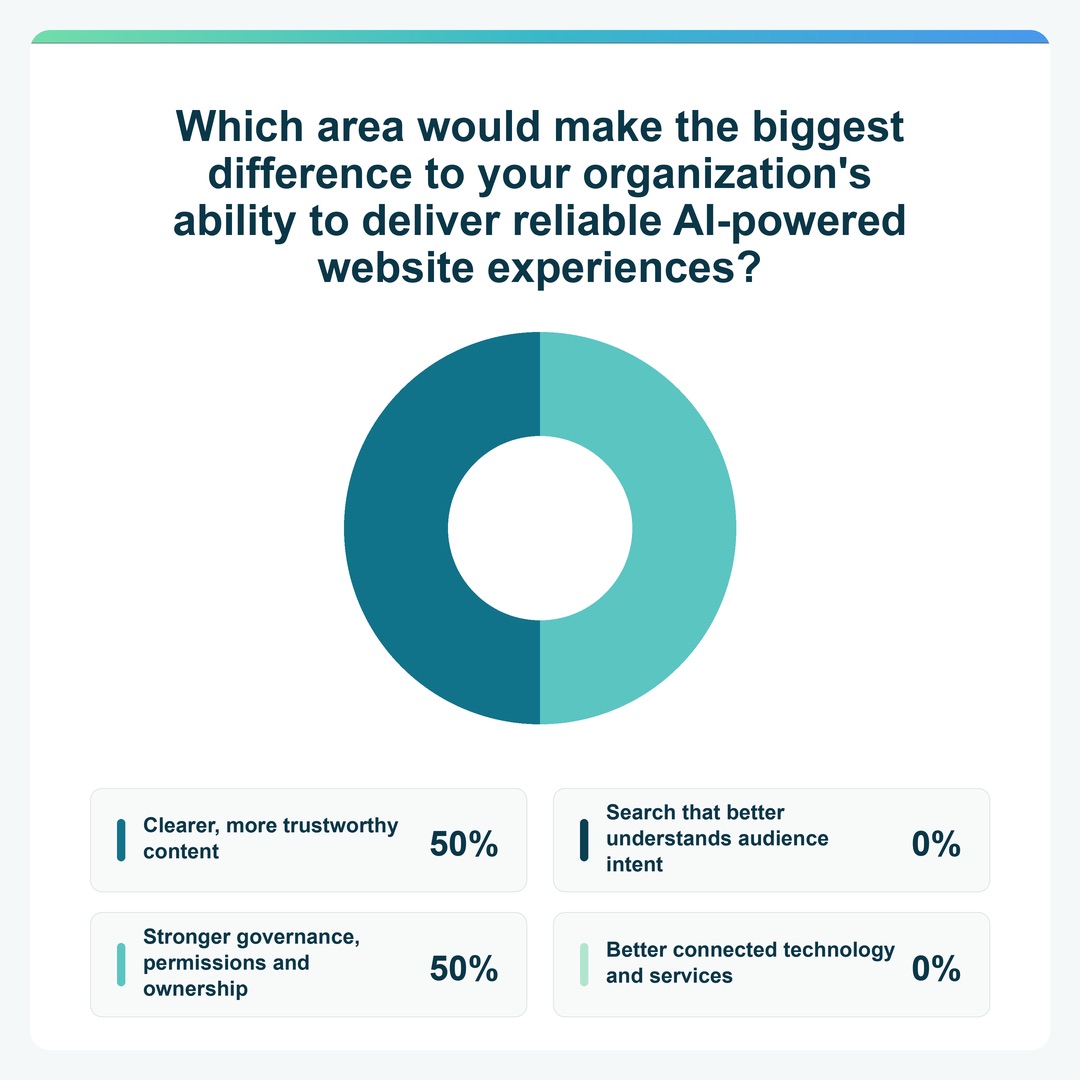
- Clearer, more trustworthy content – 50%
- Search that better understands audience intent – 0%
- Stronger governance, permissions and ownership – 50%
- Better connected technology and services – 0%
Webinar Q&A
When you manage thousands of pages with a small team, the key is to focus your effort where it will have the greatest impact. Start with the topics or sections most closely tied to your organization’s priorities, such as enrollments, applications or a high-value service.
Content Intelligence gives you a baseline, groups related pages into topics and prioritizes issues by impact. Instead of working through a flat backlog across the entire website, your team gets a focused list of the improvements that matter most.
From there, build a regular improvement cycle. Address the highest-impact issues, run another audit to measure progress, then expand to the next priority. This allows a small team to improve a large content estate in deliberate, manageable stages.
Content teams can use these tools themselves. The interface and recommendations are designed for content and marketing teams, with clear guidance on what to fix and where.
In the Accessibility Auditor, you can filter findings by role to see a focused list of content fixes and a separate list of code fixes for the development team. Each team can concentrate on the work relevant to them without sorting through the full set of findings.
The AI Readiness Auditor focuses on content. It highlights information that is missing, unclear or contradictory, then provides prioritized guidance on what to improve and where.
No. Content Intelligence will generate a large set of likely audience questions and the answers your current content supports from the first audit. You do not need to resolve every finding or perfect every page before launching Conversational Search.
Start by identifying the questions that matter most to your audience and organization. Review the answers Content Intelligence generates for those priority questions, then focus your improvements wherever the answers are not yet accurate or useful.
You are ready to launch when your content answers those priority questions well. After launch, recurring audits keep the question and answer foundation aligned with your published content, while real audience questions help you identify where to improve or expand coverage next.
Conversational Search answers from the content that has been approved and indexed for that search experience, not from the open web or the model's general knowledge. It is designed not to guess, and it shows the sources behind an answer.
When Content Intelligence audits your content, it generates the questions people are likely to ask about each topic, answers them from your content and rates how well each question was answered. Those reviewed questions and answers become the FAQ database behind Conversational Search. That means you can check the answers on the back end before your audience ever sees them. It also helps Conversational Search respond quickly.
The quality of an answer still depends on the quality of the source content. If your content is outdated, incomplete or contradictory, the answer can reflect that, which is why auditing, testing and monitoring matter.
Yes. Those are promo blocks, and editors control them.
You set the topics or trigger words that should bring in extra content – for example, anything about admissions or about bin collection days – and choose what appears alongside the AI-generated answer. Because promo blocks are built on our component service and inline page builder, that content can be a call-to-action card, a link to the next step, an embedded form or an embedded map.
The result feels dynamic to the user, but the configuration is managed much like personalised content in your CMS. It shortens the path from information to action: the answer to the question, plus the exact form or link needed to complete the task.
Keep a human in the loop, and be clear about what the AI is allowed to do.
The first guardrail is scope. These tools are designed to do specific things using only the content you have approved and indexed, so the range of what the AI can say is limited before you begin. That makes your risk much easier to understand than with a general-purpose model connected to everything.
The second is the strength of your foundations: content guidelines and governance, a consolidated design system, and a well-maintained platform. AI works from your content, so accurate, current, well-structured content is the most effective guardrail you have.
The third is process. Agree your approach with your internal AI review board or whoever owns AI in your organisation, define a regular testing routine, and keep review and approval with named people. Test the answers, decide what the fallback response should be when content does not cover a question, and treat gaps as a prompt to improve the content.
You can do either. Content Intelligence, our content health solution, scans a site in much the same way as a search engine. You can point it at your whole domain or a specific section, then exclude any areas you do not want to include.
When it scans, it organises your pages into topics – for example content management, enterprise search or government digital services. You then choose which topics to monitor, and only those topics get the deeper analysis. This is how large estates stay manageable: scan broadly for a picture of where you stand, then focus monitoring and remediation on the sections that matter most.
Conversational Search answers from the content indexed for that particular search experience. For most organizations, that is their own website content. Answers are not generated from the open web or from sources you have not approved.
Because it runs on Funnelback Search, the index can cover more than one source where that content can be crawled or fed in, and editors can add supporting content alongside an answer through promo blocks. The scope is a configuration decision rather than a fixed limit, so it is worth confirming which sources you want included as part of setup. This goes a little beyond what we covered on the day, so we are happy to talk through the options for your environment.
Yes. Both tools work on the content you point them at, rather than being tied to a single site.
Content Intelligence can scan more than one domain or subdomain, so you can assess your main site and your onboarding site together or separately, depending on how you want to prioritise and report.
For Conversational Search, the index behind a search experience can cover multiple sources as long as that content can be crawled. You can run one experience across both sites or keep them separate. For example, you might use a public experience on the main site and a more focused one for customers going through onboarding. Separate experiences can work better when the audiences have different needs and questions.
Two things worth confirming at setup: which sites and sections are in scope, and whether any of that content sits behind a login, because that affects how it can be indexed.
Yes. You can set an audit schedule for your content – weekly, for example, while you are actively working on a section – and compare results between scans.
A practical method is to agree your top twenty to fifty real audience questions, load them in, review how well each one is answered now, make the content changes, then re-test after the next scan to see how the answers improve.
The accessibility reporting works the same way, showing your score and how many issues have been resolved since the last scan. Alongside that, monitor the questions people are actually asking through Conversational Search, so your improvements follow real demand rather than assumptions.
It will not invent an answer. If the indexed content does not support a response, Conversational Search is designed not to make something up.
You control what it says instead. You can set a default response – for example, acknowledging the question and pointing the person to a contact page, a service team or a relevant section of the site – so the experience still gives them a useful next step.
Those unanswered questions are also valuable. They show you exactly where your content has gaps, which feeds straight back into your content plan and gives you an evidence-based list of what to write next.
You can think of it like a layer underneath your existing content. It’s a variation of the content on your site formatted as questions and answers. You don’t have to keep track of this set of content or edit it directly. Content Intelligence makes sure it’s always up-to-date with your current marketing content so that Conversational Search can provide the best answers and personalized results possible.