





How to become an expert in AI search platforms
In this webinar
Your audience isn't searching the way they used to. They're asking AI search platforms like ChatGPT and Perplexity. And when they do, one question becomes dozens. AI search platforms silently generate a series of follow-up questions behind the scenes, and if your content doesn't already answer them, you're invisible.
In this webinar, you'll get a clear checklist of what to look for on your pages, plus a practical path to reduce the risk of your organization becoming invisible as AI models evolve.
Video: Watch the webinar. Captions and transcript available on playback.
Watch the webinar
Press play to watch the webinar on demand.
Transcript: Watch the webinar
Poll results
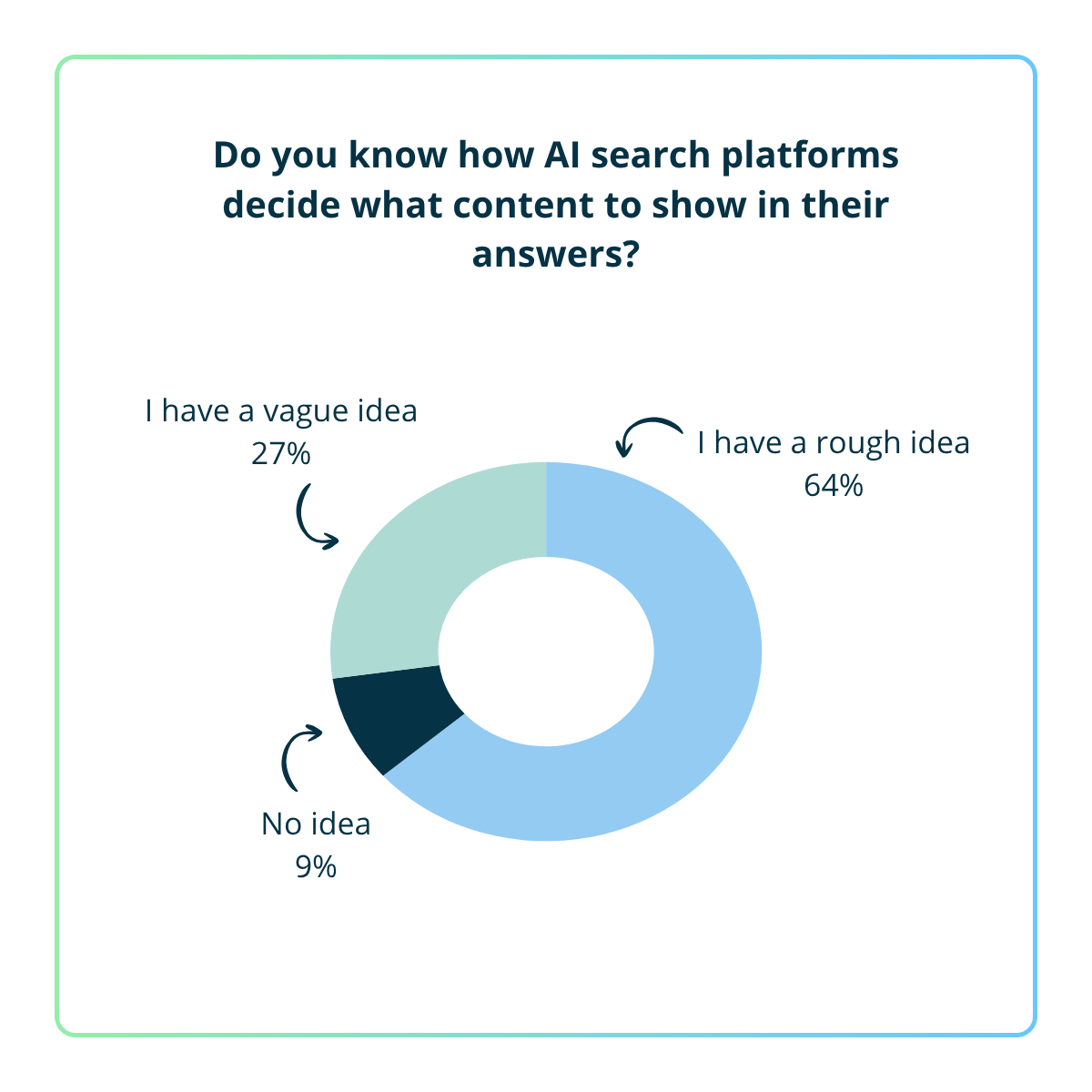
Yes, I understand it well - 0%
I have a rough idea – 64%
I have a vague idea – 27%
No idea – 9%
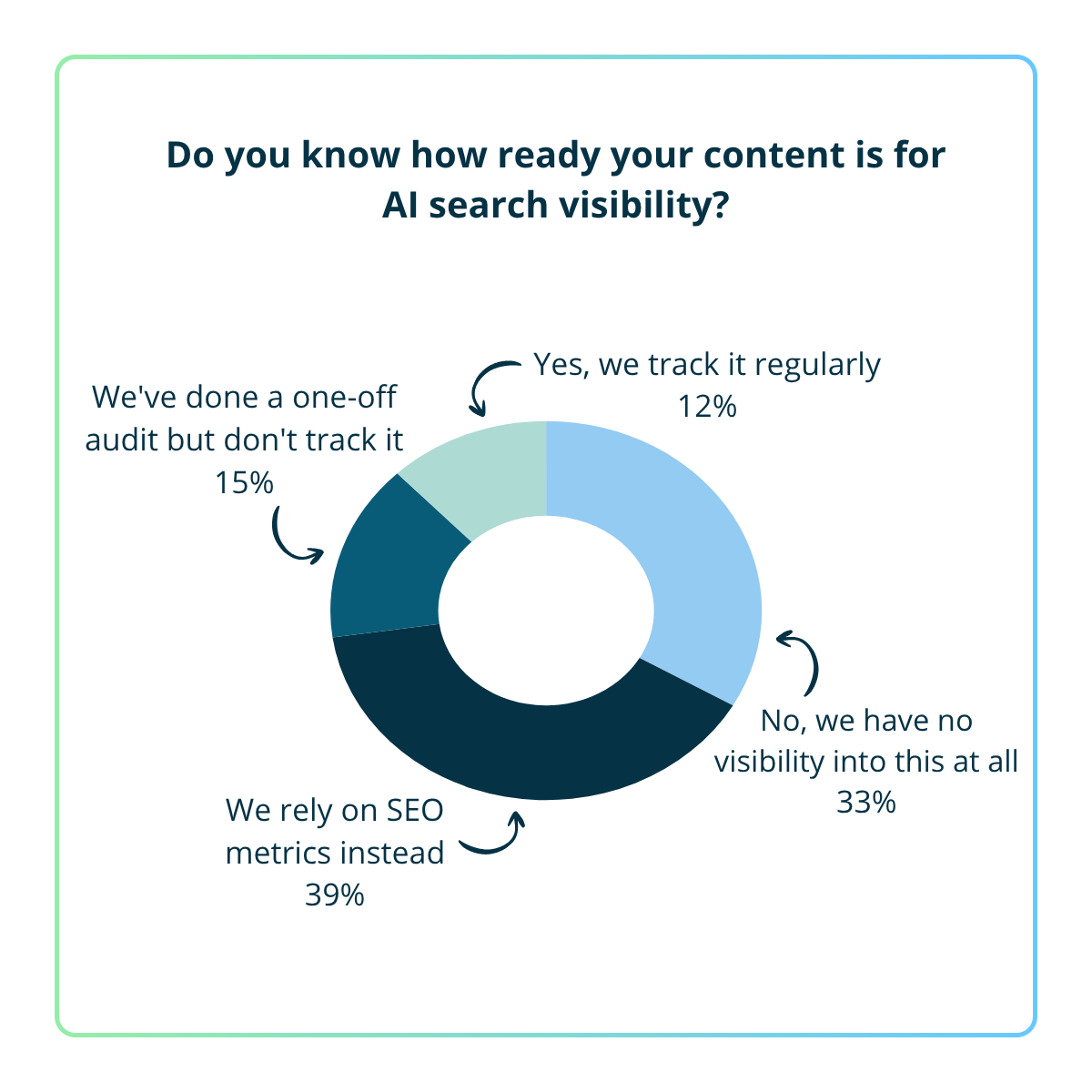
We track it regularly - 12%
We've done a one-off audit but don't track it - 15%
We rely on SEO metrics instead - 39%
No, we have no visibility into this at all - 33%
AI visibility report
Is your content invisible in AI search platforms?
Get a free AI visibility report of your content. See where you stand today and get clear recommendations on next steps.
Webinar Q&A
Content and structure
Abbreviations can hurt your AI search visibility if they're not explained. AI language models learn from text, so if your content only uses an abbreviation without spelling it out, the model may not connect it to the underlying concept a user is asking about. For example, if a user asks about "content management systems" and your site only ever uses "CMS", the AI may not surface your content in response.
The fix is straightforward: spell out abbreviations on first use (e.g. "content management system (CMS)"), or include both forms naturally in your content. This helps AI models understand what your content is about and match it to relevant queries.
This is a common tension between usability and AI visibility. AI models generally read each page in isolation – they don't follow button links the way a user would, so they may not understand that your pages form a sequence.
A few things can help:
- On each page, briefly restate the context (e.g. "This is step 3 of a 5-step guide to...") so the page makes sense on its own
- Use consistent naming and linking (e.g. "Next: Step 4 – [title]") to signal the relationship between pages
- Consider a hub or index page that links to and summarises all steps – this helps AI understand the full picture even if it only reads one entry point
- If the structure can be consolidated into a single long page with anchor links, that's often the easiest win for AI visibility without sacrificing the step-by-step experience
It's worth considering, yes. Images – including infographics – are invisible to AI unless they have descriptive alt text or an accompanying text equivalent on the page. If you can represent the same information in structured HTML (for example, a table, a numbered list, or a coded diagram), that content becomes directly readable by AI models.
If the visual outcome is the same and the HTML version is maintainable, it's generally the better option for both AI visibility and accessibility. Where a visual format is necessary – for example, a complex branded graphic – include a full text equivalent on the page. Not just alt text, but a written description or table that captures the same information.
Both can work, but FAQ sections embedded within relevant content pages are often more effective for AI search visibility.
AI search platforms retrieve and evaluate content in short chunks. A well-written Q&A pair – a clear question followed by a concise answer – maps naturally to this model. Embedding those Q&A pairs within a relevant content page provides stronger topical context and helps reinforce that page as a coherent, authoritative source on the subject. If you do use Q&A pairs, applying FAQPage schema markup reinforces the structure for both traditional and AI search platforms.
In contrast, standalone FAQ pages often group unrelated questions together, which can dilute those signals.
That said, standalone FAQ pages still have a role. They work well for:
- genuinely cross-cutting questions that don't belong to a single page (e.g. contact details, processes, policies)
- tightly themed question sets targeting a specific intent
Linking between FAQ content and core pages can further strengthen context and discoverability in both cases.
Ultimately, the quality of the Q&A matters more than where it sits. Write questions in the language your audience actually uses, keep each answer focused on a single concept, and be specific – vague Q&As don't help users or AI search platforms.
AI search platforms are more likely to retrieve and cite content that's clearly structured around questions and direct answers. But that's not the same as saying you need formal FAQ pages.
The Q&A format helps because AI is increasingly matching specific questions to specific answers. But the traditional "dump every question onto one page" FAQ isn't what makes that work, and it can be actively unhelpful. Poor FAQ pages are usually a content quality problem, not a format problem — if the questions are shallow, repetitive, or written to game search, they won't help humans or AI.
A few things to keep in mind:
- Topic depth beats topic breadth. A focused page that thoroughly covers one topic will outperform a single page listing 30 loosely related questions. One primary topic per page, answered properly. FAQ pages that sprawl across unrelated topics dilute the signal for both readers and AI.
- The Q&A structure is what matters, not the FAQ label. AI search breaks a user's question into many sub-questions behind the scenes and looks for content that directly answers each one. A heading written as the question your audience would actually ask, followed by a passage that fully answers it, does the same job as a formal FAQ block — and is often the better choice when an FAQ page would feel forced.
- You don't have to abandon content design best practice. Use real FAQ pages for genuinely common, narrow, transactional questions (entry requirements, fees, deadlines, opening hours). For everything else, weave the Q&A pattern into the page itself through clear question-style headings and direct answers underneath.
- Know how hidden content patterns behave. Accordions, tabs, and other "click to reveal" elements are usually fine for AI search, as long as the content sits in the page's HTML at load and is just visually collapsed. The problem is when content is only injected after a click, hover, or other JavaScript event. Many major AI crawlers (Perplexity, ChatGPT, Google's AI systems) don't execute JavaScript, so anything loaded in dynamically may be invisible to them. Screen readers generally work against the rendered DOM and can read this content; AI crawlers often can't. To check, view the page source rather than the rendered DOM.
- Consistent terminology and natural variation aren't in conflict. Use the same name for the same thing — your course title, your product name, the terms your organisation has decided on — every time it appears. That builds a coherent signal across your site. Within the surrounding content, it's fine to reflect the different ways your audience naturally phrases things. The rule: be consistent on identity, flexible on phrasing.
In practice: think less about "should we build an FAQ page" and more about "are the questions our audience asks clearly answered somewhere on our site, in language they'd recognise, with the answer right next to the question." That's the pattern AI is rewarding.
A short, indexable landing page is the stronger choice. Dropdown navigation isn't crawlable as content — it's read as link structure. A short page with a clear question-style heading, a direct answer, and a link to the form gives both humans and AI something to read, cite, and follow.
AI search platforms find and cite content like a careful researcher: they need a clear path in, a direct answer, and consistent signals across your site.
Focus on:
- Homepages and key landing pages are hubs, not answer pages. Use descriptive headings and links to signpost topics; deeper pages should provide the full answers.
- Clean, semantic structure. Correct heading hierarchy (H1 → H2 → H3), semantic HTML, descriptive link text, and ARIA labels; crawlers read the code, not the design.
- One topic per page (for answer pages). Keep topic, question, and answer tightly aligned so AI can extract and cite accurately.
- Use Q&A patterns within pages. Question-style headings with direct answers, rather than sprawling, catch-all FAQ pages.
- Avoid true duplication and inconsistency. Multiple menu links are fine; duplicated or conflicting content across URLs dilutes rankings and confuses models.
- Prefer HTML over PDFs for important content. PDFs are crawlable but usually weaker and less accessible; keep key info in structured pages and offer PDFs as supplements.
- PDF forms are weakest. Rebuild high-value ones as web forms; if a PDF must remain, add clear HTML instructions on the hosting page.
- Apply this pre-publish too. Audit staging or pre-prod and fix structure before launch.
Structure is the difference between AI finding the right door immediately and wandering a building with no signs.
For general AI search visibility, you don't need to. Large language models understand the relationship between words like "dorm" and "residence hall" – they're trained on enough natural language to know these concepts travel together in a higher education context. The model won't fail to surface your content just because it uses different terminology.
The bigger priority is consistency. If you use "residence hall" on most pages but "residential community" or "program house" on others, that inconsistency is more likely to cause confusion – for both AI models and humans – than the gap between your terminology and a student's search term.
If you use an on-site conversational search tool, that's where synonym handling becomes more useful. You can configure it directly – for example, telling it to interpret "dorm" as "residence hall" – to make sure users are directed toward your institution's own language.
Having both is fine, and it's often the right approach. The key is that the specific, factual content needs to be present and clearly written. A brand voice and aspirational language have their place – they draw people in and reinforce your institution's identity. But they need to sit alongside content that actually answers questions, not replace it.
AI models can extract a clear, direct answer from a page even when it's surrounded by brand copy. The risk only arises if the marketing language is all there is – if someone has to infer the answer rather than read it plainly. As long as a complete answer exists on the page, the presence of splashy language alongside it won't dilute it.
Better still: the more you can make your specific content sound distinctively yours – accurate and on-brand at the same time – the more it reinforces your authority on the topics only your institution owns.
General
Yes – the recording and Q&A will be shared after the webinar. Keep an eye out for a follow-up email with the link.
Yes, it's true. Both Wikipedia and Reddit contributed significantly to the training data for most major AI models, and AI search platforms do retrieve from them at query time when they're ranking highly for relevant queries.
You can't control those platforms directly – you don't own them, and attempting to edit Wikipedia on your own organisation's behalf isn't advisable.
The most effective response is to make your own content the authoritative source. If Wikipedia or Reddit is showing up as the go-to answer for questions your institution should own, that's a signal your content isn't answering those questions as clearly or completely as it could. Fix the content on your site so it becomes a compelling alternative to those sources. This is the same dynamic as organic SEO – authority comes from having better, more specific, more trustworthy content than whatever else is out there.
Video and media
AI models can't watch video – they can only read text. So if your video content isn't accompanied by text, it's effectively invisible to AI search.
Here's what you can do:
- Add accurate transcripts to your videos and publish them on the same page as body text
- Write a clear summary of what the video covers
- Use descriptive titles and metadata
Subtitles help with accessibility, but on their own they may not be read by AI in the same way as page body text. A transcript that's part of the page content is the most reliable approach.
It depends on whether the image is meaningful or purely decorative.
If a stock image is just visual decoration and adds no information to the page, it should be marked as decorative (using an empty alt attribute: alt="") rather than given descriptive alt text. This tells both screen readers and AI that the image doesn't carry content.
If a stock image is being used to illustrate a concept, support a point, or convey information, then yes – alt text matters. Describe what the image shows and why it's relevant. Vague alt text like "photo of a person" won't help either accessibility or AI visibility.
The key question is: does this image add meaning? If yes, describe it. If no, mark it as decorative.
Either approach can work, as long as the transcript is in HTML and reachable by AI crawlers. AI search platforms don't watch videos or process audio, so the major crawlers rely on the text version. If the transcript isn't there or isn't readable, the content effectively doesn't exist as far as AI is concerned.
The simplest, strongest option is to put the transcript directly on the same page as the video — either visible underneath, or in an expandable section that's still present in the page source. That keeps the topic, video, and text together, and AI sees one cohesive page with clear context.
Separate transcript pages can also work, but they have to be indexable. AI search platforms find content by running Google or Bing searches behind the scenes and pulling from the top results — so if a transcript lives on its own page, that page needs to be crawlable and indexable. A "hidden" page (set to noindex, behind a login, or unlinked from the rest of the site) won't help your AI visibility, even if you link to it from an indexed page.
If you go this route, link clearly and contextually — for example, "Read the full transcript of [video title]" — rather than vague link text like "click here," so both humans and AI understand the relationship between the two pages.
The same logic applies to PDFs. If you're publishing a plain-text version of a PDF, that text needs to live on an indexable web page — not a hidden file or an unlinked URL. Where you have the choice, publishing the content directly as a properly structured web page (with the PDF as a downloadable supplement) is the stronger option for both AI and users.
In practice: treat a transcript like any other piece of content on your site. It needs to be in HTML, indexable, and clearly linked from the related video or PDF — ideally on the same page where it's most useful. A transcript locked away on a hidden page won't help, because AI can only cite what it can find.
Technical and metadata
There are a few ways. The most reliable is structured metadata – specifically, schema markup (a standardised way of embedding machine-readable information into your page's code) that includes a datePublished or dateModified field. AI crawlers can read this directly.
Beyond that, some AI tools look at signals like HTTP headers, which can indicate when a page was last modified, or rely on when a page was last crawled and indexed.
Not all AI models weight recency the same way, and some don't surface publish dates at all. But if keeping content current is part of your strategy – which it should be – using schema markup to make your publish and update dates explicit is a good habit.
Not directly. Unlike a web browser cache, you can't "clear" what an AI model has learned. Most large language models are trained on data up to a certain point (their "knowledge cutoff") and don't continuously re-learn in real time.
However, some AI search tools crawl and index content more regularly than others, and some use retrieval systems that can pull in fresh content at query time. In those cases, updating your content and ensuring it's crawlable is the best lever you have.
It's also worth noting: AI models don't personalise responses based on previous questions the way you might expect. Each query is generally treated independently unless you're in an ongoing conversation thread – so previous questions don't lock in a particular answer for future users.
llms.txt is worth knowing about, but it's not something to lose sleep over. The far bigger priority is making sure your actual content is high-quality, well-structured, and genuinely useful.
Why llms.txt isn't a strategic priority right now:
There's a lot of noise around llms.txt, but the evidence is thin. Google's John Mueller has explicitly stated that llms.txt is not a ranking signal, not an SEO tool, and not endorsed by Google Search. He's even compared it to the old meta keywords tag, noting that no major AI search platforms currently use it. Search Engine Land tracked 10 sites after implementing llms.txt and found 8 of 9 showed no measurable change in AI-driven traffic.
It's worth noting that llms.txt does have real adoption among well-known tech companies. Anthropic, Perplexity, Cloudflare, Vercel, Hugging Face, and hundreds of others publish llms.txt files. However, there's an important distinction: that adoption is almost entirely on the publishing side, not the consumption side. These companies publish llms.txt files on their developer documentation sites so that AI coding agents (like Claude Code or Cursor) can quickly ingest their API docs. But their AI search platforms don't look for llms.txt files on other websites when deciding what to cite. Anthropic publishes one for its API docs, but Claude's search feature uses its own retrieval pipeline. Perplexity publishes one on its docs site, but its search engine uses RAG to find and cite content, not llms.txt files. None of the major AI companies, including Google, OpenAI, Anthropic, or Mistral, have formally adopted llms.txt as a standard their search products consume.
So if you're a developer platform with API documentation, there's a legitimate case for publishing one. For general website content aimed at being discovered and cited by AI search platforms, the evidence doesn't support it as a priority.
How AI search actually works (and why good content wins):
This is the key thing to understand. AI search engines don't work like traditional crawlers methodically indexing every file on your site. They use a technique called retrieval-augmented generation (RAG), where they search the live web in real time, pull relevant pages, and synthesize an answer. Perplexity, for instance, defaults to a retrieval-first approach: it runs a live search, retrieves documents, synthesizes an answer, and cites its sources inline. ChatGPT sends queries to Bing's API, fetches full page content from selected URLs at runtime, and processes them directly for synthesis.
In other words, these AI search platforms are browsing the web much like a human researcher would: they're looking for the best, clearest answer to a question, pulling from real web pages. They don't need a special text file to find you. They need your content to be good enough to be worth citing.
As Vercel's SEO team puts it, depth and clarity matter more than repetition or scale, because LLMs don't match keywords – they interpret meaning. AI search platforms don't rank pages the way Google does. They retrieve structured, trustworthy, citable content.
What actually matters:
Rather than spending time maintaining an llms.txt file, focus on:
- Writing content that directly and clearly answers the questions your audience is asking
- Using clean heading structures and semantic HTML so content is easy for both humans and machines to parse
- Keeping content accurate and up to date
- Making sure pages load fast – if your server response time is slow, an AI search platform retrieving information in real time will likely abandon the request and pull data from a faster competitor
- Ensuring robots.txt isn't blocking AI crawlers (this is the genuinely important technical step)
- Building authority through quality backlinks and being cited on trusted third-party sites
If you build content that a smart, time-pressed human would find useful, clear, and trustworthy, you're building content that AI will find useful, clear, and trustworthy. That's the game now. llms.txt is not a waste of time if your CMS generates it automatically, but it shouldn't take priority over the fundamentals. The real moat is content quality.
There are technical changes that help – but they're secondary to the quality of the content itself.
The most impactful thing you can do is ensure your content is clear, complete, and explicitly answers the questions your audience is asking. Technical optimisation supports that foundation by making it easier for AI search platforms to access, interpret, and extract content that's already worth citing.
With that in place, the technical areas worth focusing on are:
- Semantic HTML and heading hierarchy – a logical structure (H1 → H2 → H3) helps AI search platforms understand what your content is about and how ideas relate. Pages that skip heading levels or use headings purely for styling make this harder.
- Content in HTML, not locked away – AI search platforms primarily process HTML. While formats like PDFs can be read, they're less reliable and harder to interpret structurally. Key information should live in accessible, well-structured web pages.
- Crawler access and indexability – ensure your site isn't blocking important crawlers via robots.txt, including AI-specific user agents (e.g. GPTBot, ClaudeBot).
- Clear, self-contained passages – AI search platforms retrieve and evaluate content in chunks. Content that directly and concisely answers a question is more likely to be extracted and cited than content that buries the answer or relies heavily on surrounding context.
- Internal linking and contextual signals – strong internal linking helps AI search platforms understand relationships between pages and reinforces which content is most important.
- Consistent terminology – using consistent language to describe the same concepts strengthens semantic signals and reduces ambiguity.
- Descriptive metadata and link text – many AI search platforms reference, at least in part, search infrastructure. Clear titles, descriptions, and anchor text still play a role in how content is discovered and prioritised.
- Structured data (where appropriate) – schema markup can help reinforce meaning, signalling to AI search platforms whether a page is an FAQ, a how-to guide, a service page, and so on. It can be a valuable layer to add once your content foundations are in place.
- Fast server response – AI search platforms retrieve content in real time when answering a question. If your server responds slowly, the AI is more likely to pull from a faster source. This makes Time to First Byte (TTFB) more directly consequential than in traditional search.
JavaScript can be a significant barrier to AI search visibility – particularly when it prevents AI search platforms from accessing your core content.
Many AI crawlers have limited or inconsistent ability to execute JavaScript. If your content only appears after JavaScript runs in the browser – as is common with client-side rendered applications – AI search platforms may see an empty or incomplete page rather than the full content.
This commonly affects:
- single-page applications (SPAs)
- content hidden behind tabs or accordions
- infinite scroll or dynamically loaded sections
Even where JavaScript rendering is supported, it's often slower and more resource-intensive than processing standard HTML, meaning it may be deprioritised.
The solution doesn't usually require a full rebuild. Most modern frameworks support server-side rendering (SSR) or static site generation as a configuration option, which pre-renders your content so it's available in the page source. If that's not feasible across the board, prioritise ensuring your most important content is server-rendered or published as standard HTML pages.
Will AI crawlers improve their ability to handle JavaScript over time? Likely. Some browser-based agents already render JavaScript effectively. However, the primary crawlers used by AI search platforms today are still optimised for speed and scale, and tend to favour lightweight, HTML-first content.
This builds on the JavaScript question above, but the short answer is: AI search platforms generally favour static, HTML-first content that's available on page load.
Dynamic content – anything that loads, changes, or appears based on user interaction, personalisation, or real-time data – can present challenges. Most AI crawlers make a single HTTP request and process the initial response. They typically don't click, scroll, or wait for additional content to load.
Common types of dynamic content and how they're handled:
- Personalised content (e.g. content that varies by user, location, or session) – AI crawlers usually see a default, non-personalised version. If important content only appears for certain segments, it may not be visible to AI at all.
- Content loaded on interaction (e.g. tabs, accordions, "read more" expandables) – if content isn't present in the initial HTML, AI crawlers may not reliably see it. This is common on service pages and FAQ sections.
- Real-time or frequently updating content (e.g. live feeds, stock levels, event listings) – AI crawlers capture a snapshot at the time of crawling, which can lead to outdated or inconsistent information in responses.
- Gated or login-protected content – generally invisible to AI crawlers. If key information sits behind a login or form, it won't be discovered or cited.
Where content is inherently dynamic, structured data can help provide AI search platforms with stable, machine-readable signals about what the page represents, even if the visible content changes between visits.
Your core content – the information you most want AI search platforms to find and cite – should be available as static HTML in the initial page response. Dynamic features can enhance the user experience, but they shouldn't be the primary delivery mechanism for critical content. Where dynamic content is unavoidable, server-side rendering can help ensure AI crawlers receive a complete version of the page rather than an empty or partial shell.
Focus on ranking well in search engines, writing clearly and completely, keeping content consistent and authoritative across your site, and measuring change over weeks rather than days. That's the formula that makes you reliably citable.
AI search platforms work in two layers. The first is the model's own training data — the information it was trained on, frozen at a point in time. The second, and the one that matters most for visibility, is live retrieval: when you ask a question, the platform runs a search behind the scenes against a major search index (typically Google, Bing, or the platform's own index) and drafts an answer from the top results.
That second layer is where most of the citation decisions get made — and it has a few important consequences:
Search rankings still matter a lot. When the AI runs its retrieval search, it typically looks at a handful of top-ranked links per sub-question. If your content doesn't rank, the AI generally won't go hunting - it'll work with what it pulled back.
Sub-query fan-out multiplies this. Every user question is broken into multiple sub-questions, each with its own search. Those handfuls of links can stack up to dozens of distinct results stitched together. The more sub-questions your content directly answers, the more chances you have to be cited.
On Reddit: Reddit shows up disproportionately often, for two reasons. Early models (including the original ChatGPT) were trained heavily on Reddit, so it's embedded in the underlying language patterns. More importantly today, Reddit content tends to be written as a clear question with a direct answer — exactly what AI is looking for. If a Reddit post answers a question more clearly than your site does, Reddit wins. The fix is to make your own content clearer, more direct, and more complete. (Note: the recent Google core update reportedly reducing Reddit's authority may flow through to AI platforms over time, but it's not something to plan around, so the underlying lesson is still controlling what you can, which is your own content.)
On link signals: AI platforms use external references and citations as an authority signal, similar to how SEO treats backlinks. Multiple credible sources pointing to the same information on your site strengthens the trust signal — but link-building isn't a substitute for clarity and accuracy on your own pages.
On duplicate content and canonicalisation: canonical tags tell search engines which version of a duplicated page is the authoritative one. Without that signal, your ranking gets diluted across multiple URLs, which weakens your chances of appearing in the results AI pulls from. Canonicalisation helps AI visibility for the same reason it helps SEO.
AI can read most PDFs, but treats them as a weaker source than web pages. Wherever you have the choice, publish the content as a properly structured web page with the PDF as a downloadable supplement if needed.
PDFs don't offer the same structural control as HTML (headings, semantic tags, schema markup), so AI has to work harder to extract a clean answer and often skips the content in favour of a clearer source.
They're also typically less accessible — missing tags, image-based text, awkward reading order — and AI crawlers parse content much like assistive technology does, so weak accessibility directly weakens AI readability.
Glossy, design-led PDFs may very well visually appealing, but because the content is locked inside the visuals, you need to consider publishing a plain-text version on the web, otherwise they might be really difficult for AI search platforms to read.
PDF forms are usually the weakest case. The fields themselves carry no useful meaning for AI, surrounding instructions are often image-based, and they're frequently inaccessible. The stronger approach is to rebuild high-value forms as web forms — accessible, fillable on any device, and connected to your site in a way AI can understand. If a PDF form has to stay (regulatory, legal, signature-based), make sure the hosting page explains in plain HTML what the form is for and what to do with it.
AI can read content that's visually hidden as long as it's in the page's HTML at load. It generally can't read content that's only injected after a click, hover, or JavaScript event. Most major AI crawlers (Perplexity, ChatGPT, Google's AI systems) don't execute JavaScript — they read the HTML at load, much like a screen reader does.
- Accordions, tabs, FAQs in accordions are usually fine, if the content is in the page source on load and just visually collapsed. Where it fails is when content is loaded in only after a click. To check, view the page source (not the rendered DOM).
- Pop-ups, modals, tooltips are generally weaker. Often injected dynamically, and even when present in the source, tend to be detached from surrounding context. If the information matters, surface it in the main body of the page.
- Footnotes, T&Cs, supporting context are readable if in the HTML, but context can get lost if they're far from the content they relate to. Use clear in-text references and keep critical caveats close to the content they qualify.
- Embedded Google Maps: AI can't read content inside the embed. Make sure the same information (address, hours, directions) is also in plain text on the page.
- Online flip books (Heyzine, Issuu): essentially PDFs in a JavaScript wrapper — generally not readable by AI. If the content matters, it should also exist as HTML or, at minimum, an indexable PDF.
Focus on the assumption that AI reads HTML, not interactions. Anything important that lives behind a click, a script, or an embedded viewer should also exist as plain, indexable content on the page.
Both, and the distinction matters in this case.
Most large language models have a knowledge cutoff – a point in time after which new information wasn't included in their training data. That trained knowledge forms their baseline.
But AI search platforms like Perplexity, ChatGPT with search enabled, and Google AI Overviews don't stop there. They use a technique called retrieval-augmented generation (RAG): at the moment someone asks a question, the AI runs live web searches, retrieves content from real pages, and uses that to supplement or update its response. So it may be drawing on both its training data and content it's retrieving from your site right now.
The practical implication: keeping your content current matters. If your pages are outdated, or your server responds slowly, a live-retrieving AI is more likely to skip you in favour of a faster, fresher source. Making sure your content is crawlable and up to date is your best lever for staying visible.
It's a reasonable instinct, but the case for it is weaker than it used to be. Meta keywords were a traditional SEO tactic, but most search engines stopped using them years ago because they were too easy to game.
For AI search, the dynamic is different. Large language models already understand semantic relationships between words – they know that "dorm", "residence hall", "residential community", and "program house" are all concepts that belong together in a higher education context. You don't need to signal those connections explicitly through metadata; the model has already made them.
If you have an on-site AI search tool, the more effective lever is direct configuration – setting up synonym handling or system prompts so it understands your institution's terminology and responds accordingly. That gives you precise control in the place where it actually makes a difference.
Audits and strategy
Yes – but your audits need to evolve. Traditional SEO focuses on things like keyword density, backlinks, and page rankings. AI search visibility requires a different lens: is your content clear, accurate, well-structured, and does it directly answer questions?
Some SEO fundamentals still apply (technical health, structured data, page speed), but you'll want to add checks for things like content clarity, the presence of direct answers, and whether your pages are being cited by AI tools. Think of it as expanding your audit criteria rather than replacing them.
The category is still in early days, and standardised metrics for AI search visibility don't fully exist yet. Unlike traditional search – where you can track keyword rankings, click-through rates, and traffic with confidence – AI search is harder to measure precisely. Responses vary by session, platform, and prompt, and there's no universal equivalent of a "ranking position" in an AI-generated answer.
That said, there are practical things you can measure today:
- From your web analytics – referral traffic from AI search platforms (e.g. chatgpt.com, perplexity.ai, claude.ai) will show up in your existing analytics where those platforms link to your content. Note that Google AI Overviews often answers questions without generating a click, so referral data alone will undercount your visibility.
- From content auditing – how well your content answers the questions your audience is likely to ask, and where there are gaps. This is where content auditing tools come in – assessing topic coverage, identifying content gaps, and prioritising what to fix first. Squiz Content Intelligence is designed to do exactly this.
- From manual or assisted monitoring – regularly testing key queries across major AI search platforms and documenting whether your brand is mentioned, whether your content is cited, and how accurately you're represented. This is basic, but it builds a baseline.
A number of dedicated AI visibility monitoring tools are also emerging that aim to automate this kind of tracking, but the space is developing quickly and it's worth evaluating options carefully before committing.
Early data suggests that traffic referred from AI search platforms converts significantly higher than traditional organic search, which makes tracking this channel worthwhile even with imperfect tools.
Focus on high-leverage, sitewide fixes first; then prioritise your highest-traffic, highest-intent pages; then bring in tooling to scale beyond what your team can do manually. Trying to fix everything page by page is a trap for a small team on a large site.
If you had to pick three things to focus on, in this order:
1. Fix structural and accessibility issues at the template or platform level. This is the highest-leverage work you can do, because a single fix applies across thousands of pages. Things like correcting heading hierarchy in your templates, making sure your CMS outputs semantic HTML, ensuring shared components (header, footer, navigation) have proper ARIA labels and accessible markup, and making sure content isn't being hidden behind JavaScript that AI crawlers can't read. These fixes are invisible to most users but transformative for AI: they make the entire site readable in a way it wasn't before. They also tend to surface where your CMS or platform itself is contributing to the problem, which is far more efficient to fix at the source than page by page.
2. Prioritise your highest-traffic, highest-intent pages and fix the content on them. You won't get to all 10,000 pages manually. Pick the 20 to 50 pages that drive the most value (homepage, key service or course pages, top-converting content) and apply the content checklist there: lead with a direct answer, one primary topic per page, consistent terminology, replace vague marketing language with specifics, make sure the questions your audience actually asks are clearly answered. These pages do disproportionate work for your visibility — fixing them well delivers more impact than spreading effort thinly across the long tail.
3. Bring in tooling to scale beyond what humans can audit manually. This is where small teams genuinely can't keep up. AI search platforms test your content against thousands of sub-questions behind the scenes; no human team can anticipate or audit that volume. A content auditing tool — Squiz Content Intelligence does this — simulates how AI interprets your site, identifies the gaps, recommends prioritised fixes, and lets you work through them systematically rather than guessing where to start. It also makes the work repeatable, which matters because the AI landscape and your content both keep changing.
A few practical notes that go alongside this:
- Audit before you act. Start with a clear picture of where you are — which pages are strong, which are weak, where the structural issues are concentrated. Without that, prioritisation is guesswork.
- Measure as you go. Pick a baseline (referral traffic from AI platforms, content audit scores, ranking on key topics) and re-check after fixes go live. Expect a lag of a few weeks for changes to flow through.
- Repeat. This isn't a one-off project. Models, search platforms, and audience expectations are all moving. Build a quarterly or biannual review into the team's rhythm so you stay ahead rather than catching up.
Fix the foundation once, focus the manual effort where it matters most, and use tooling to cover the ground a small team can't. That's how you get the biggest visibility return for the smallest team capacity.
On finding the questions: AI platforms don't disclose query data, but there are three practical sources you can use: existing search data (Google Search Console, site search logs, "People Also Ask"), your internal audience knowledge (support tickets, sales conversations, focus groups), and synthetic testing — tools like Squiz Content Intelligence simulate the sub-query fan-out AI runs behind the scenes and surface where coverage has gaps. No human team can anticipate the full range, which is why the synthetic layer matters.
On measuring change: No single clean metric exists. Web analytics will show referral traffic from ChatGPT, Perplexity, and Claude, but will undercount Google AI Overviews, where users often get their answer without leaving Google. A content auditing tool fills the gap by tracking whether your coverage and clarity are improving over time. Expect a lag of a few weeks before changes flow through.
When it comes to drafting content, neither search engines nor AI platforms penalise content for being AI-assisted. What they care about is quality. Poor AI content underperforms, but so does poor human content. You can use AI as a copywriting assistant, but you need to keep human review in the loop.
Yes. Squiz Content Intelligence includes accessibility scanning that supports WCAG 2.2 AAA – the current standard – and monitors your site on an ongoing basis.
It flags issues like missing alt text, heading structure problems, and other accessibility gaps as they arise, which is particularly useful in environments with distributed content authorship where issues can creep in over time. Fixes are prioritised by impact, so your team works on the issues that move the needle the most. You can set the frequency of scans to suit your team's workflow – monthly or quarterly tends to work well, since running scans continuously often generates noise when little has changed.
For teams that want a single tool covering both accessibility governance and AI search visibility, Content Intelligence is designed to handle both.
AI models and algorithms
Yes, there is variation. Different AI models are trained on different datasets, use different retrieval methods, and weight content signals differently. One model might prioritise structured, authoritative content, while another might weight recency more heavily.
That said, the fundamentals tend to hold across models: clear, well-structured, accurate content that directly answers questions performs well regardless of which model is surfacing it. Chasing the specifics of any one model's preferences isn't a sustainable strategy – it's better to focus on content quality and structure.
There are similarities, but it's not quite the same. A Google algorithm update changes how existing content is ranked in search results and can cause significant ranking shifts quickly.
When a new AI model launches, the impact is more gradual. The model brings a new knowledge cutoff, potentially different training data, and different reasoning patterns. Your content may be represented differently or cited more or less frequently – but it's less likely to cause the sudden, dramatic visibility shifts you'd see from a major algorithm update.
The best defence in both cases is the same: high-quality, well-structured, accurate content that isn't over-optimised for any one system.
When it comes to optimisation across models, ChatGPT, Claude, Gemini, Copilot, and Perplexity all work fundamentally the same way — break the question into sub-queries, search Google or Bing, draft an answer from the top results. You don't need a separate strategy per platform.
Human-first content and content optimised for AI visibility are not really a trade-off. The qualities AI rewards — clarity, accuracy, completeness, direct answers, and consistent terminology — are what humans want too. The tension usually shows up in marketing language, when brand flourish replaces specifics. Write for humans, and write the way humans actually search: direct answers, plain terms, and information close to the question.