





The power of connected digital experiences
In this webinar
Your digital experience is only as strong as the connections behind it. When your content, search, and digital channels work together, your website users find what they need more easily, journeys feel seamless, and conversion is quicker.
In this practical session, we explored what a “truly connected” digital strategy looks like in practice, the benefits for your teams and web visitors, and where to start.
Video: Watch the webinar. Captions and transcript available on playback.
Watch the webinar
Press play to watch the webinar on demand.
Transcript: Watch the webinar
Poll results
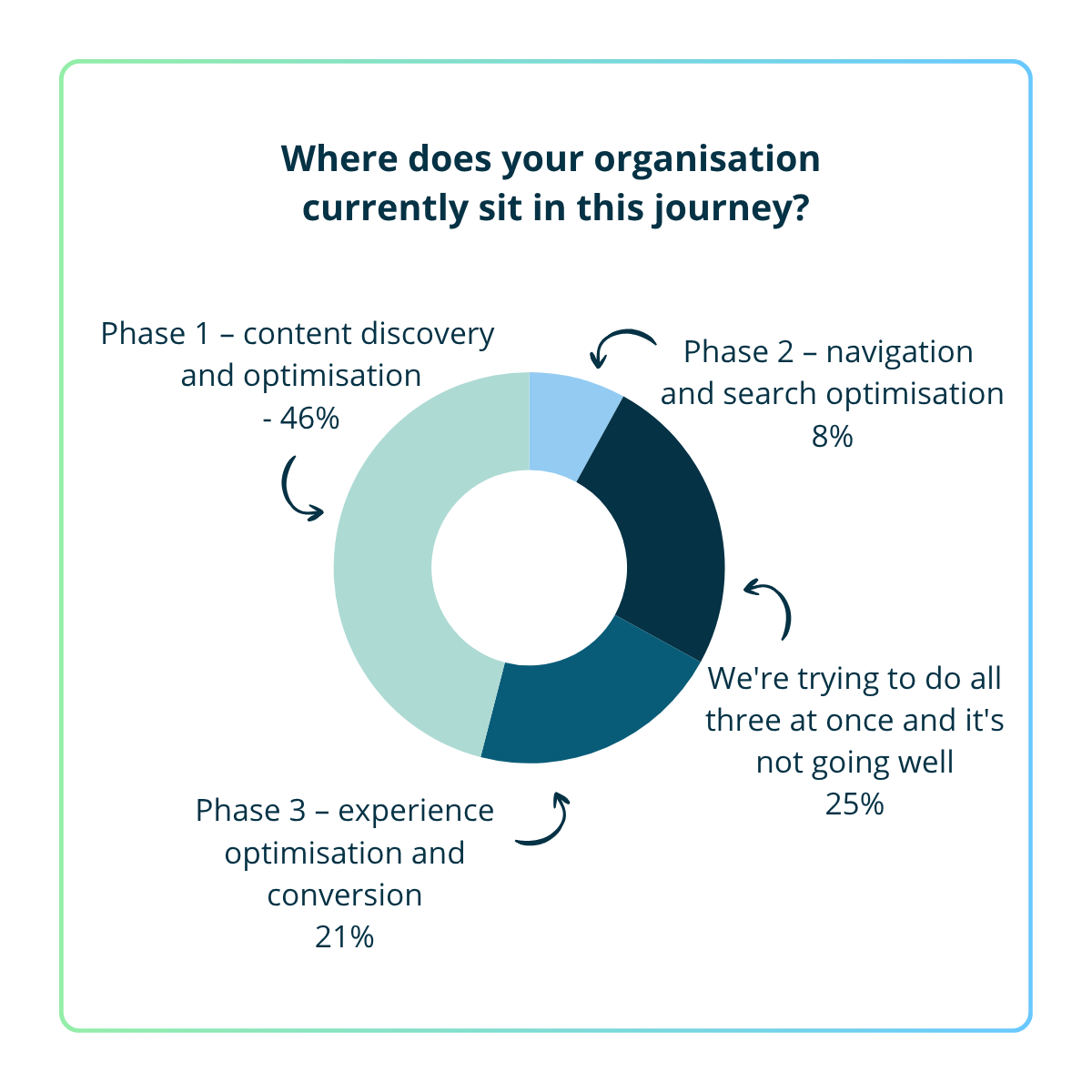
- We're still working on Phase 1: content discovery and optimisation - 46%
- We're into Phase 2: navigation and search optimisation - 8%
- We're working on Phase 3: experience optimisation and conversion - 21%
- We're trying to do all three at once and it's not going well - 25%
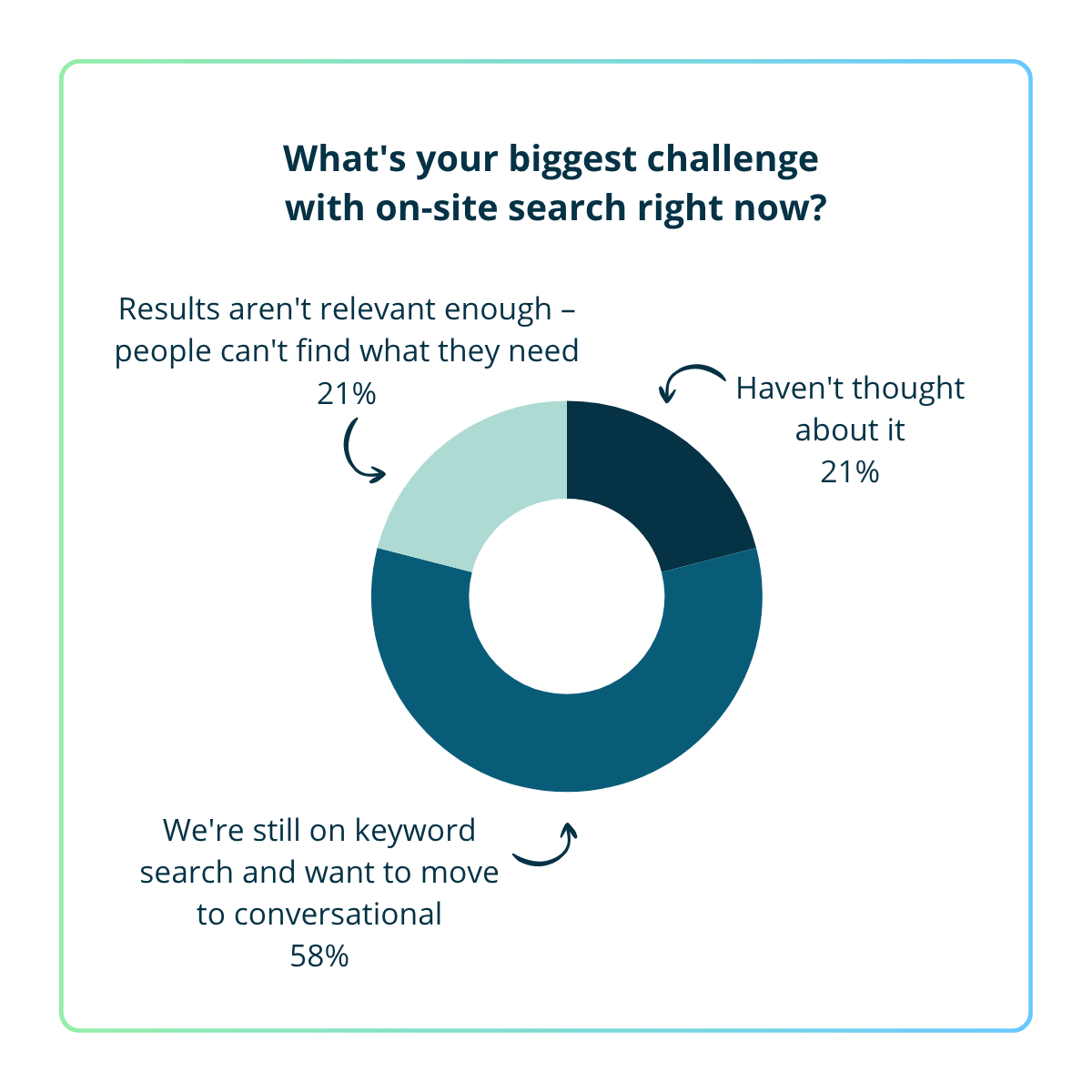
- Results aren't relevant enough, people can't find what they need - 21%
- We don't have visibility of what people are actually searching for - 0%
- We're still on keyword search and want to move to conversational - 58%
- Haven't thought about it - 21%
AI visibility report
Is your content invisible in AI search platforms?
Get a free AI visibility report of your content. See where you stand today and get clear recommendations on next steps.
Webinar Q&A
Phase 1: Content discovery & optimisation
It overlaps, but it’s not strictly the same thing.
Accessibility audits focus on whether people (and assistive tech) can use your site: heading structure, alt text, form labels, keyboard navigation, contrast, and so on. That’s essential — and it’s the “A” in what we covered.
Phase 1 is broader: it’s about making sure your content is findable and citable in both traditional search and AI search (and then improving it continuously, not as a one-off audit).
In the session, Pez framed Phase 1 using the “SAD” foundations:
- Structure — one topic per page, clear headings, answer-first writing, consistent terminology, and (where appropriate) structured data.
- Accessibility — semantic HTML, correct heading structure, alt text, and removing barriers that stop content being parsed.
- Discovery — explicitly answering the questions your audience asks (with complete answers and clear language).
So if you’re already doing accessibility well, great — Phase 1 builds on it to cover structure + discovery, and to turn audits into an ongoing programme.
Both, but a content team can absolutely lead it.
In practice, most Phase 1 wins are content-led:
- clearer, more explicit headings and titles
- answer-first writing (don’t bury the point)
- one primary topic per page (avoid “kitchen sink” pages)
- consistent terminology across the site
- filling the gaps where questions aren’t properly answered
Developer support matters when the platform/template is the blocker (for example: heading hierarchy baked into templates, shared components causing accessibility issues, or content hidden behind JavaScript rendering). The most effective model is: content team leads the programme, developers fix the foundations once, then content teams scale improvements across priority pages.
Phase 2: Navigation optimisation (conversational search)
The most common mistake is one Will called out live: skipping Phase 1.
If you roll out conversational search on top of outdated, inconsistent, or incomplete content, you’ll get:
- incorrect answers (because the source content is wrong)
- uneven answer quality (because pages don’t follow the same structure)
- a lot of “hallucination-looking” responses (because the system is trying to stitch together thin content)
A couple of practical pitfalls we also mentioned:
- deploying a “chatbot layer” without first auditing what content exists (and what’s out of date)
- pulling in uncontrolled sources (e.g. competitor content) without governance or guardrails
Conversational search works best when the content is already structured, explicit, and up to date — garbage in, garbage out.
The argument is outcomes, not novelty:
- Faster task completion: people get the answer without trawling “10 blue links”.
- Better experience for high-intent visitors: as we discussed, the traffic that does reach your site is often further down the consideration journey — and they have more specific questions.
- Lower cost-to-serve: fewer “I can’t find X” escalations to support/contact centres.
- Better insight: longer, question-style queries are rich intent signals — they tell you what people are actually trying to do.
Phase 1 helps people find you; Phase 2 helps them get answers fast once they arrive.
Your own signals will usually tell you:
- on-site search logs (longer queries, full questions, “how do I…”, “can I…”)
- search refinements and pogo-sticking (people repeatedly adjusting queries or bouncing)
- support/contact drivers (recurring questions are “search failures” in disguise)
And there’s a broader behaviour shift too: we mentioned that Google has reported a significant increase in long-form, question-style searches — people have been trained by ChatGPT/Perplexity-style interfaces, so expectations have changed.
Phase 3: Experience optimisation (connected data + personalisation)
In most cases it works alongside what you already have, and makes it more valuable.
The point of the connected layer (DXP) is to reduce the fragmentation we described: tools not talking, and insight “dying” in dashboards. A connected DXP helps you join up:
- content improvements (Phase 1)
- search intent (Phase 2)
- behavioural signals + activation (Phase 3)
Your CRM can remain the system of record — the DXP helps you use the signals from the web journey to make the experience smarter and more actionable.
We answered this live with a practical example (if you missed it, we recommend you watch the recording above if you’d like more details):
- first, the platform tracks an anonymous visitor ID (typically via cookies / an anonymous identifier) and builds an anonymous view of behaviour: pages visited, searches, downloads, repeat visits.
- later, when the visitor completes an identifying action (e.g. a form submission), the platform can connect that known identity to the earlier anonymous behaviour using that identifier.
So the “stitching” happens at the moment identity is captured, but the behavioural history is already there.
Public sector ROI is usually about service outcomes and efficiency:
- better task completion (citizens get what they need without drop-off)
- reduced cost-to-serve (fewer calls/escalations caused by unclear content)
- accessibility and compliance (lower risk, better equity of access)
- faster processing (better-quality submissions, less rework)
- trust and satisfaction (less frustration, fewer complaints)
It’s the same connected-journey logic — just measured in service outcomes rather than revenue.
Governance at scale
Yes, and it’s a strong use case.
In multi-site / multi-agency environments, the hardest part is maintaining consistent standards and governance across a large estate:
- preventing accessibility regressions over time
- enforcing structural/content standards (headings, clarity, “answer-first” writing)
- aligning terminology and patterns across services
- seeing issues and progress across the whole estate (not site-by-site)
A content intelligence layer helps you scan consistently, prioritise fixes by impact, and track progress over time — turning quality into a programme rather than periodic audits.