





Why accessible content is AI-ready content
In this webinar
Everyone's talking about AI search platform visibility – but most teams are fixing the wrong things. They're chasing prompts and platform tricks when the real problem is much simpler: if AI can't read your content, it can't cite it. And the rules for what AI can read are the same rules that have governed accessibility for years.
In this practical session, we'll show you how accessibility and AI search platform visibility are the same challenge – and how fixing one fixes the other.
Video: Why accessible content is AI-ready content. Captions and transcript available on playback.
Why accessible content is AI-ready content
Press play to watch the webinar on demand.
Transcript: Why accessible content is AI-ready content
Poll results
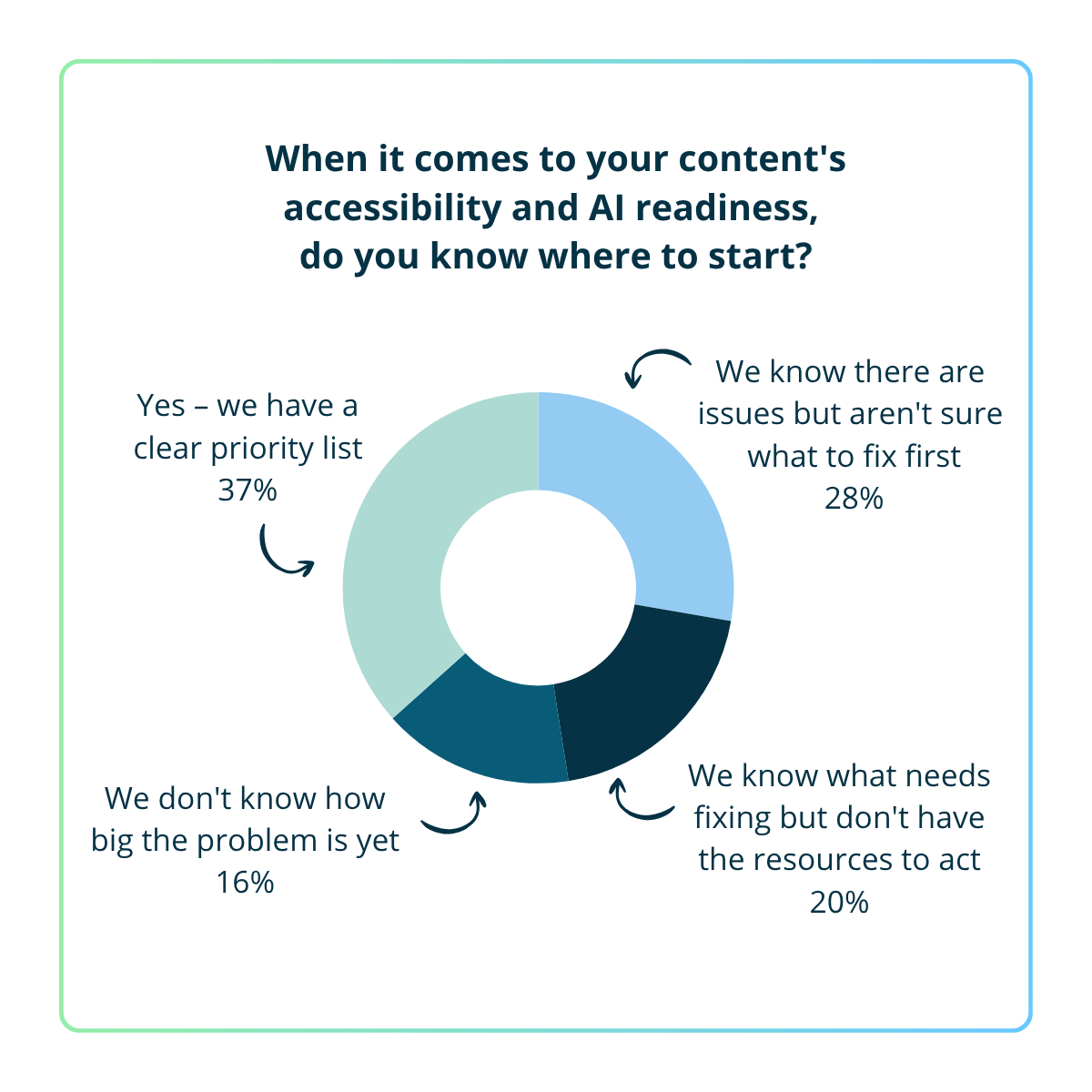
A) Yes – we have a clear priority list – 37%
B) We know there are issues but aren't sure what to fix first – 28%
C) We don't know how big the problem is yet – 16%
D) We know what needs fixing but don't have the resources to act – 20%
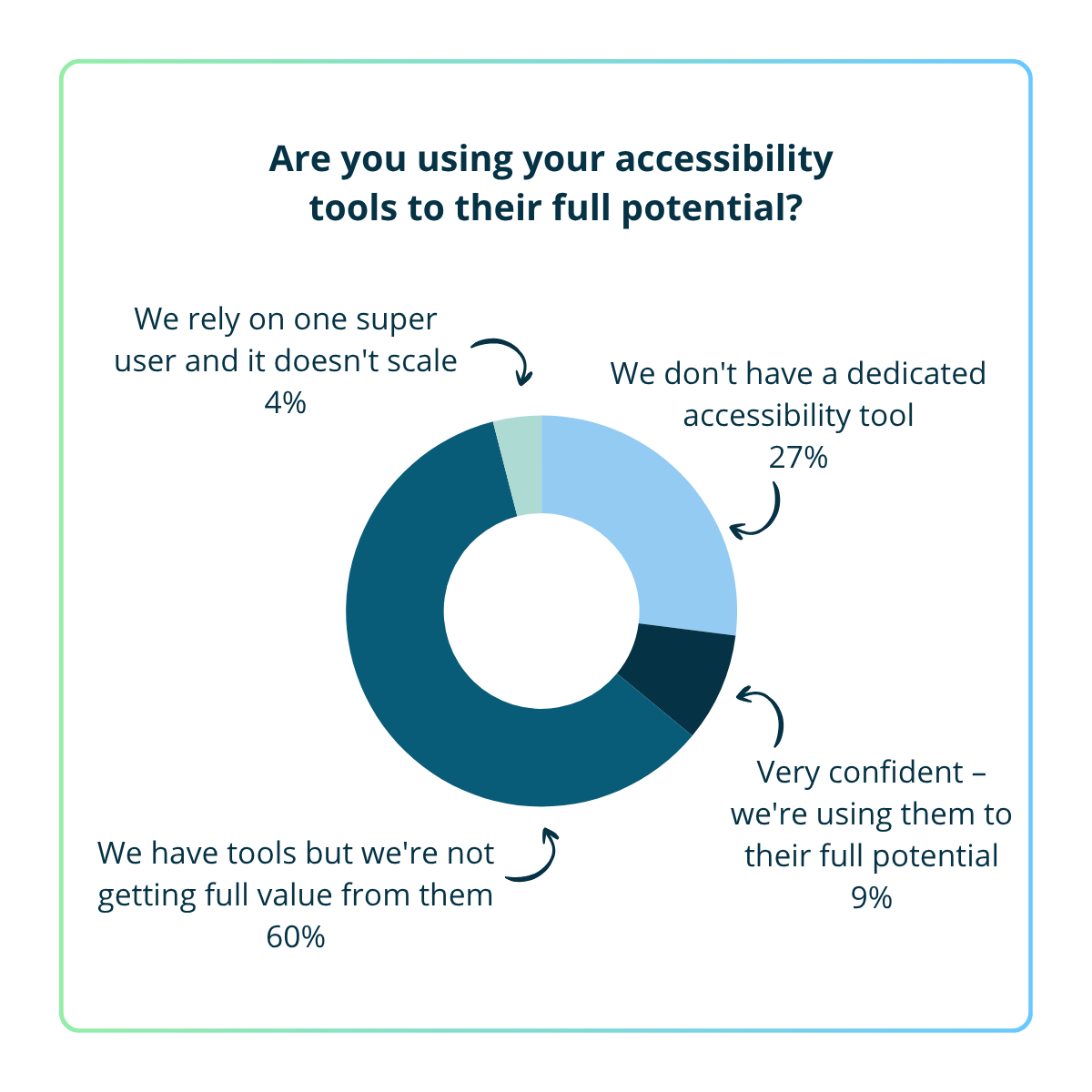
A) Very confident – we're using them to their full potential – 9%
B) We have tools but we're not getting full value from them – 60%
C) We rely on one super user and it doesn't scale – 4%
D) We don't have a dedicated accessibility tool – 27%
AI visibility report
Is your content invisible in AI search platforms?
Get a free AI visibility report of your content. See where you stand today and get clear recommendations on next steps.
Webinar Q&A
A few common ones stand out:
Content locked in PDFs - AI can’t reliably read PDFs. Important content should live on well-structured HTML web pages, with PDFs as supplements if needed.
Vague or marketing-heavy language - content that sounds good but doesn't actually say anything specific. AI search platforms are looking for clear, direct answers to questions. If your content doesn't provide them, a competitor's will.
Inconsistent information across pages - if multiple pages on your site say slightly different things about the same topic, AI doesn't know which version to trust. Consistency reinforces authority.
Information spread too thin - if content about a single topic is scattered across many pages, AI struggles to piece it together. Consolidate so each key topic has a clear, comprehensive home.
Yes - there are certain types of content that are harder for AI search platforms to interpret reliably, particularly when meaning is not expressed in structured, text-based formats.
- PDFs - AI can't reliably read PDFs. The lack of consistent structure makes it harder to interpret and chunk the information correctly. Design-heavy brochures and form-style PDFs are common problem cases.
- Images and infographics - AI is not always reliable at extracting structured meaning from images, compared to text. If the information only exists visually, it may not be consistently interpreted. Alt text helps, but complex diagrams, flowcharts, or data visualisations should also have a text or HTML equivalent.
- Video and audio - AI search platforms typically rely on transcripts or written summaries to accurately interpret the content. Without them, the information is effectively much harder to access and use.
- Content loaded dynamically via JavaScript - Content that only appears after user interaction (such as tabs or accordions) may not always be reliably discovered or indexed, depending on how it is rendered.
The common thread is that AI search platforms are most effective when information is presented in clear, structured text. Anything that relies solely on visual, audio, or interaction-based delivery should have a text-based equivalent to ensure it can be reliably understood.
Start with the pages that matter most to your audience and your business goals. Look at which pages get the most traffic and which ones support your most important user journeys - if you're in higher education, that might be program pages, financial aid, or tuition. If you're a business, it might be your core service or product pages.
Your SEO data can help here - it'll show you which pages get the most traffic, and also where people are dropping off, which can be a sign the content isn't working well enough.
Beyond that, look for where the biggest problems are concentrated. Sometimes making a few high-impact fixes across your worst-performing pages will move the needle more than incremental improvements to pages that are already in reasonable shape.
There's no single right answer - it depends on how much content you're publishing and how quickly things change in your organisation.
As a general guide, audit regularly and make it part of your ongoing workflow rather than a one-off project. For teams publishing a lot of new content, monthly or even weekly makes sense. For organisations with mostly evergreen content, quarterly is a reasonable starting point.
The key is that it's recurring. Even if your site isn't changing frequently, what makes good accessible and AI-ready content does shift over time. Match your audit cadence to your content output, and build a repeatable process around it - audit, prioritise, fix, track, repeat.
They're not in conflict - but tone of voice shouldn't come at the expense of clarity.
Plain language doesn't mean stripping your content of personality. It means making sure your message is specific and easy to understand. You can still sound like your organisation while being direct. What you want to avoid is letting brand voice become a substitute for actual information - flowery or aspirational copy that doesn't clearly answer the question a visitor (or an AI) is looking to answer.
The practical balance: start with your own people creating content in your voice, then check it against what AI search platforms can actually extract. If an AI can't give a clear, accurate summary of what your page says, the language probably needs to be more specific - regardless of how on-brand it sounds.
Tone of voice matters - especially if you want to stand out from competitors. Don't lose that in the push toward AI readiness. But make sure the substance is there alongside it.
Some AI search platforms can process Word documents, but HTML web pages are generally the stronger choice for content you want to be easily discovered and understood.
The same principle applies as with PDFs - Word documents lack the structural control that HTML provides. On the web, HTML enables semantic markup, heading hierarchy, internal linking, schema data, and accessibility features, which help search engines and AI search platforms more reliably interpret and organize content.
An accessible Word document is better than an inaccessible one, but if the content is important for visibility in search and AI-driven experiences, it should live on a well-structured web page. Word documents are best used as downloadable supplements rather than the primary source of truth.
Schema markup is helpful, but it's not as important as the quality of your content itself - being clear, specific, and directly answering the questions your audience is asking.
What schema does well is help search engines and AI search platforms understand the structure and meaning of your content. For example, marking up an FAQ section as FAQPage or a step-by-step guide as HowTo can make it easier for these platforms to interpret and extract information consistently.
That added layer of structure can improve how reliably your content is processed and how it may appear in search features or AI-generated responses.
That said, schema works best as an enhancement to content that's already well-written and well-structured. If your content quality isn't in good shape, adding schema on top won't fix the underlying issues. Get the content right first, then layer schema on to reinforce what's already there.
The same optimization principles apply to personalized or A/B tested content as to any other content on your site. The key thing to understand is that AI crawlers typically only see a single, default rendered version of your page.
That means if important information only appears for certain audience segments or in one variant of an A/B test, it may not be consistently discovered or interpreted by search engines and AI search platforms. You can and should tailor the experience for different audiences - including messaging, framing, and emphasis - but your core factual content should always be available in the default version of the page.
You don't need to tailor content specifically for AI crawlers. What works for AI is what works for any visitor arriving without prior context: clear, specific content that answers their question without relying on segmentation or conditional rendering to fill in the gaps. If your default page experience provides a complete, useful answer, AI search platforms will be able to work with it.
This is a real challenge, and there's a trade-off involved. Restricting AI crawlers may reduce your visibility in AI search platforms. If crawlers associated with the major players can't access your site, it may limit how often your content is discovered or retrieved in those environments. However, this isn't always a direct one-to-one relationship, as different systems use different methods for indexing and retrieval.
A few practical approaches:
- Don't block major AI-related crawlers unless costs are genuinely unsustainable. Some are used for training, others for retrieval or indexing in search-backed systems.
- Use rate limiting or bot management tools rather than outright blocking where possible. Many CDNs allow you to control traffic from automated agents without fully cutting off access.
- Review server logs to understand which crawlers are generating the most traffic and whether the load is justified by the value they bring.
- Be cautious with unknown or low-quality bots. Not every crawler identifying as "AI-related" is part of a major or useful ecosystem.
This is where Squiz Content Intelligence comes in. It's designed to audit your site for accessibility and AI readiness issues, highlighting which pages need attention and helping you prioritize where to focus. For AI readiness specifically, it includes page-level views so you can see which individual pages need work.
If you're interested in exploring what this looks like for your site, reach out to your Squiz account team and they can walk you through it.