





Why accessible content is AI-ready content
In this webinar
Everyone's talking about AI search platform visibility – but most teams are fixing the wrong things. They're chasing prompts and platform tricks when the real problem is much simpler: if AI can't read your content, it can't cite it. And the rules for what AI can read are the same rules that have governed accessibility for years.
In this practical session, we'll show you how accessibility and AI search platform visibility are the same challenge – and how fixing one fixes the other.
Video: Watch the webinar. Captions and transcript available on playback.
Watch the webinar
Press play to watch the webinar on demand.
Transcript: Watch the webinar
Poll results
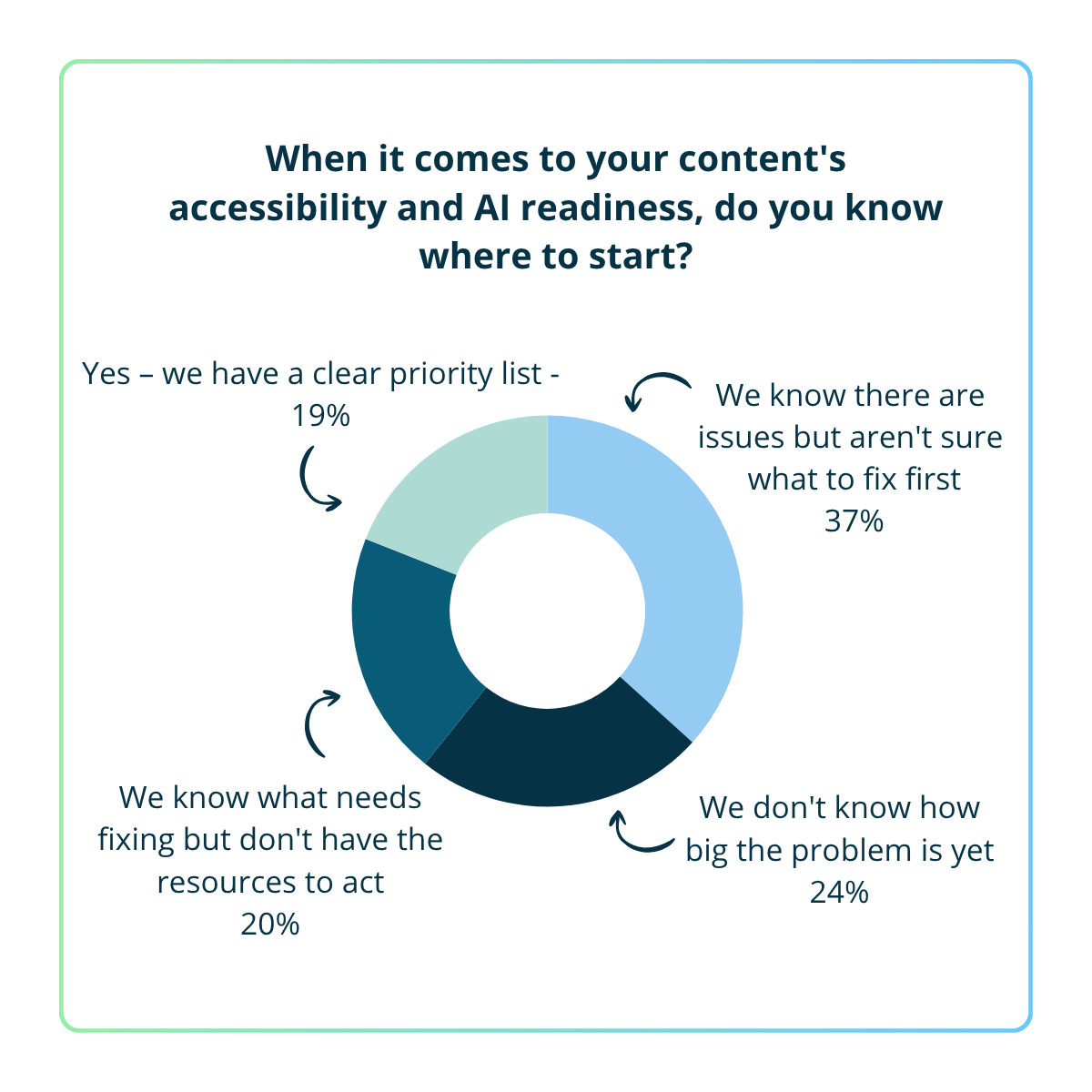
A) Yes – we have a clear priority list – 19%
B) We know there are issues but aren't sure what to fix first – 37%
C) We don't know how big the problem is yet – 24%
D) We know what needs fixing but don't have the resources to act – 20%
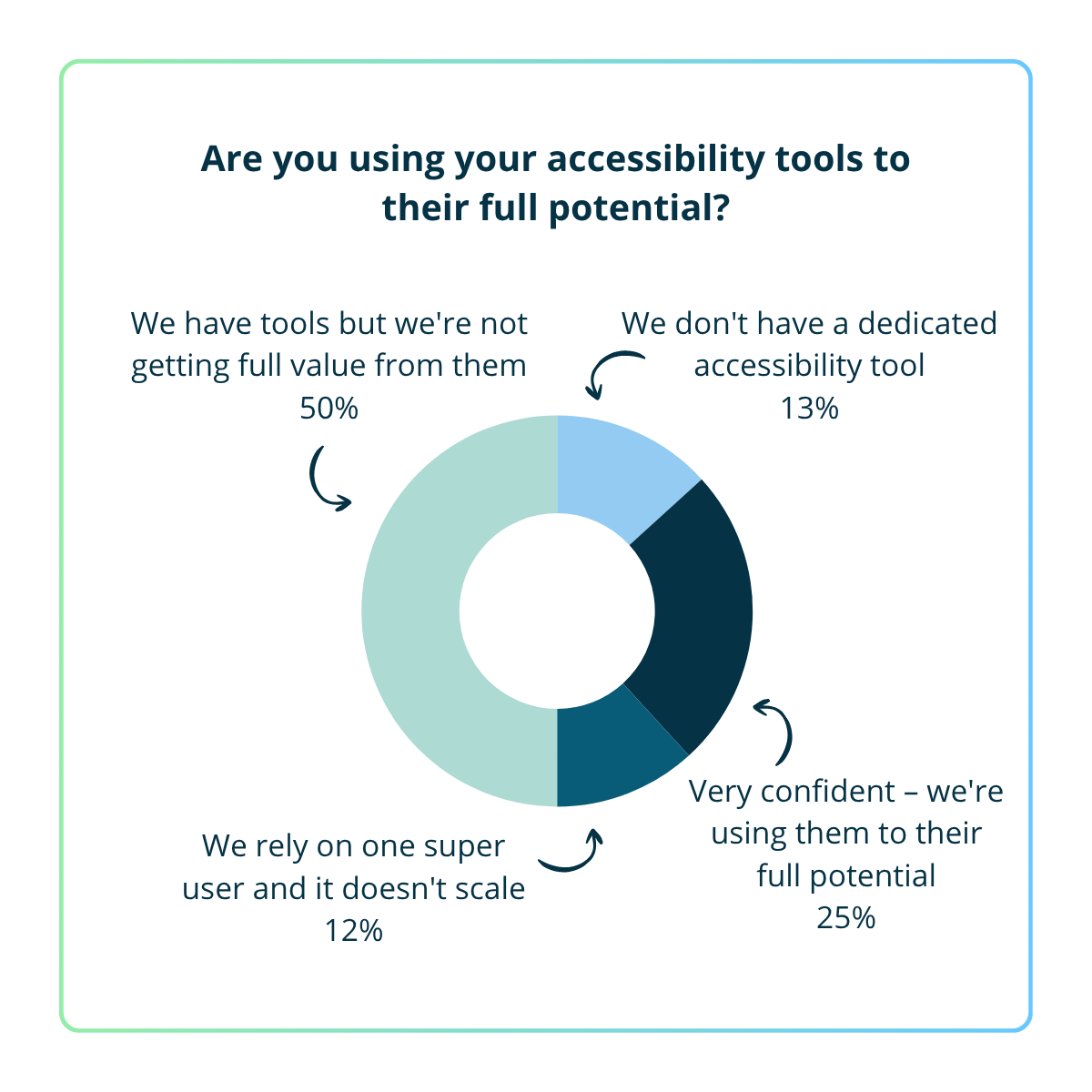
A) Very confident – we're using them to their full potential – 25%
B) We have tools but we're not getting full value from them – 50%
C) We rely on one super user and it doesn't scale – 12%
D) We don't have a dedicated accessibility tool – 13%
AI visibility report
Is your content invisible in AI search platforms?
Get a free AI visibility report of your content. See where you stand today and get clear recommendations on next steps.
Webinar Q&A
Content strategy and structure
A few common ones stand out:
Content locked in PDFs - AI can’t reliably read PDFs. Important content should live on well-structured HTML web pages, with PDFs as supplements if needed.
Vague or marketing-heavy language - content that sounds good but doesn't actually say anything specific. AI search platforms are looking for clear, direct answers to questions. If your content doesn't provide them, a competitor's will.
Inconsistent information across pages - if multiple pages on your site say slightly different things about the same topic, AI doesn't know which version to trust. Consistency reinforces authority.
Information spread too thin - if content about a single topic is scattered across many pages, AI struggles to piece it together. Consolidate so each key topic has a clear, comprehensive home.
Full question:
Should web content be formatted in a way that mimics answer engine output – Q&A format and lists? When reading the content on a web page it can feel like you are reading notes rather than a fully formed web page. Will this be less of an issue as familiarity with answer engine formatting/presentation becomes the norm?
Answer:
There's a balance to strike.
Structuring content around clear questions and direct answers does help with AI visibility. AI search platforms retrieve content in short chunks, and a question-style heading followed by a concise answer maps naturally to how they work.
That said, you don't need to force your entire site into a rigid Q&A format. The pattern works best when it's woven into your content pages - question-style headings with direct answers underneath - rather than dumped into a standalone FAQ section as an afterthought. For pages where ideas are closely related, a clear heading structure with each section standing on its own as a complete answer achieves the same thing without feeling like notes.
Start with the pages that matter most to your audience and your business goals. Look at which pages get the most traffic and which ones support your most important user journeys - if you're in higher education, that might be program pages, financial aid, or tuition. If you're a business, it might be your core service or product pages.
Your SEO data can help here - it'll show you which pages get the most traffic, and also where people are dropping off, which can be a sign the content isn't working well enough.
Beyond that, look for where the biggest problems are concentrated. Sometimes making a few high-impact fixes across your worst-performing pages will move the needle more than incremental improvements to pages that are already in reasonable shape.
There's no single right answer - it depends on how much content you're publishing and how quickly things change in your organisation.
As a general guide, audit regularly and make it part of your ongoing workflow rather than a one-off project. For teams publishing a lot of new content, monthly or even weekly makes sense. For organisations with mostly evergreen content, quarterly is a reasonable starting point.
The key is that it's recurring. Even if your site isn't changing frequently, what makes good accessible and AI-ready content does shift over time. Match your audit cadence to your content output, and build a repeatable process around it - audit, prioritise, fix, track, repeat.
Technical implementation
Full question:
We're in the process of implementing Conversational Search, it’s been very interesting so far and a huge learning curve. I have heard a lot about schema markup, is this a priority if our accessibility and content is in a good place?
Answer:
Schema markup is helpful, but it's secondary to the content quality and accessibility work you're already doing. What it does well is help AI search platforms understand the structure and meaning of your content - for example, marking up an FAQ section as FAQPage or a guide as HowTo makes it easier for these platforms to interpret and extract your content consistently. There's anecdotal evidence it can enhance visibility, and if your foundations are already solid, it's a worthwhile next layer to add.
As of 7 May 2026, FAQ rich results are no longer appearing in Google Search for any site. This completes a process that started in August 2023, when Google first restricted FAQ rich results to a limited set of authoritative government and health websites, removing them for most of the web. The May 2026 update removes them for everyone, including those government and health sites that had retained them.
Google will drop the FAQ search appearance and rich result report from Search Console in June 2026, with Search Console API support removed in August 2026. The official notice is in Google's FAQ structured data documentation.
You don't need to rush to strip FAQPage markup from your pages. Google has said it won't cause problems to leave it in place – but it will no longer produce any visual enhancement in search results.
Schema types that continue to produce rich results include Article, Organisation, Product, Review/AggregateRating, LocalBusiness, and BreadcrumbList. Google's structured data documentation is the authoritative reference for what's currently supported.
One thing that hasn't changed is that clear, well-structured content organised around genuine questions and direct answers remains valuable for AI search platforms - not because of the schema markup itself, but because of how that content format maps to the way AI retrieves and chunks information. Get the content right first, then use schema to reinforce what's already there.
Full question:
My phase one GEO advice to colleagues is: comply with WCAG2.2 as your baseline; add ld-json to your page layouts; add llms.txt and llms-full.txt to your site root; link robots.txt to the llms.txt file; update Google Search Console. I'm interested in Phase 2, reviewing and refining the structure of the ld-json components so they're using the most appropriate schema. Does the tool offer a feature similar to validator.schema.org so checking 1) the ld-json structure is correct and 2) the schema tags are the most appropriate for the content?
Answer:
Squiz Content Intelligence focuses on accessibility and AI readiness rather than schema validation specifically, so it doesn’t focus on JSON-LD validation directly.
Your Phase 1 foundations are strong - WCAG 2.2 compliance and well-implemented JSON-LD are the right place to start. On llms.txt, though, it’s worth tempering expectations. Current evidence suggests very limited practical impact: a tracked experiment across 10 sites found 8 saw no measurable change after implementing it, and no major AI company has publicly committed to reading it in production. It won’t hurt to leave what you’ve already implemented in place, but it’s not where your effort will pay off. Your Phase 2 focus on content structure and schema quality is where the real value is.
For validating your implementation, Schema Markup Validator (validator.schema.org) is the primary tool for checking JSON-LD structure and ensuring it aligns with schema.org standards. It’s also worth using Google Rich Results Test alongside it, as this validates eligibility for Google Search rich results and highlights issues specific to how Google processes structured data.
Neither tool will definitively tell you if you've chosen the most appropriate schema type - that's more of a content modelling decision - but they're useful for confirming your implementation is technically sound.
Accordions aren't inherently a problem - it depends on how they're built. If the content inside your accordions is present in the page's HTML when the page first loads and is just visually collapsed, AI crawlers can read it fine. Most major AI search platforms don't look at what's visible on screen - they read the code, the same way a screen reader does.
The problem arises when accordion content is only injected by JavaScript after a user clicks to expand it. Most AI crawlers don't execute JavaScript, so if the content isn't in the page source on initial load, it's effectively invisible to them.
Tooling and measurement
Squiz Content Intelligence covers both accessibility and AI readiness in one tool. On the accessibility side, it scans for WCAG conformance issues and prioritises them by severity, so you know where to focus. It also provides remediation advice - not just flagging problems, but suggesting fixes for both developers and content editors. On the AI readiness side, it goes beyond traditional accessibility auditing to surface issues like vague language and conflicting information that affect how AI search platforms interpret your content.
You can see a short case study of how we used it on our own website here. To learn more or request a free AI visibility report, visit insights.squiz.net/content-intelligence.
Yes, absolutely. Squiz Content Intelligence works on any website, regardless of the CMS or platform. Whether you're on WordPress or anything else, it can still audit your content.
Not in the same way as traditional SEO. Referral traffic from AI platforms like ChatGPT, Perplexity, and Claude does show up in tools like Google Analytics - so you can start tracking that today. It won't capture everything, since AI-generated answers often satisfy the user without generating a click, but it gives you a baseline. Early data also suggests that traffic referred from AI search platforms converts at a higher rate than traditional organic search - so even small volumes can be meaningful.
Beyond that, there are GEO tools and brand monitoring platforms emerging that claim to track AI citations more directly, but this category is still maturing and it's too early to say how reliable they'll be. The best thing you can do right now is focus on what you can control - making your content clear, specific, and well-structured. That's what determines whether AI search platforms pick up and use your content in the first place.